Use the Database dialog to configure the database connection of Lobster Data Platform.
The platform applies your changes during runtime. The platform also writes the values to the corresponding XML configuration. Your settings persist after a system restart.
NOTE When you save changes, the platform reconnects to the database server in the background. During this step, the platform may create the required table definitions.
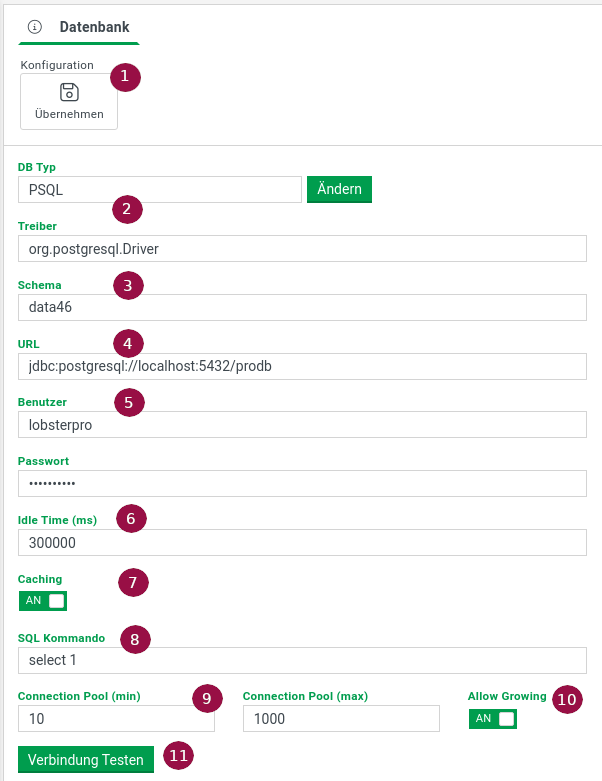
Action
Button | Description |
|---|---|
Apply | Applies the configuration change for Lobster Data Platform/Orchestration. In a cluster, the platform applies the change on all nodes. The platform then persists the values to the corresponding XML configuration. |
Test connection | Tests the connection with the entered credentials. In a cluster, the platform tests the connection on all nodes. |
Fields
Field | Description |
|---|---|
Database type and driver | Selected database type and the matching driver. Through the Change button you can select a profile. The profile fills the required fields with correctly formatted values. |
Catalog (schema) | Name of the catalog (schema) inside the database. Depending on the database type, this value also represents an alias name. |
JDBC URL | JDBC URL that represents the connection to the database. The URL is database-specific, for example |
Credentials | Username and password for the authentication at the database. |
Idle time (ms) | Time in milliseconds that a connection may stay idle in the pool. After this time, the DatabaseService checks the further validity of the connection. |
SQL statement cache | Enables the caching of SQL statements from applications. The DatabaseService checks and adjusts each statement when required. With sufficient resources, caching these results for later reuse is worthwhile. For mainly dynamic statements, turn the caching off. Otherwise the service stores statements that you never use again. |
Validation SQL | SQL command for checking the validity of a database connection. Without an explicit command, the platform retrieves the list of available tables. Some JDBC drivers cache this information. As a result, invalid connections may still appear as valid. |
Pool size | Initial size and maximum size of the connection pool. |
Pool can grow | Allows the pool to grow beyond the initial size. The platform requests new connections once all initial connections are in use. |
Related articles
Web settings: Sister dialog for the web server of the platform.
Storage settings: Sister dialog for the directories of the StorageManager.
File manager settings: Sister dialog for the home directory of the file manager.