Go to Administration > Base settings > Web.
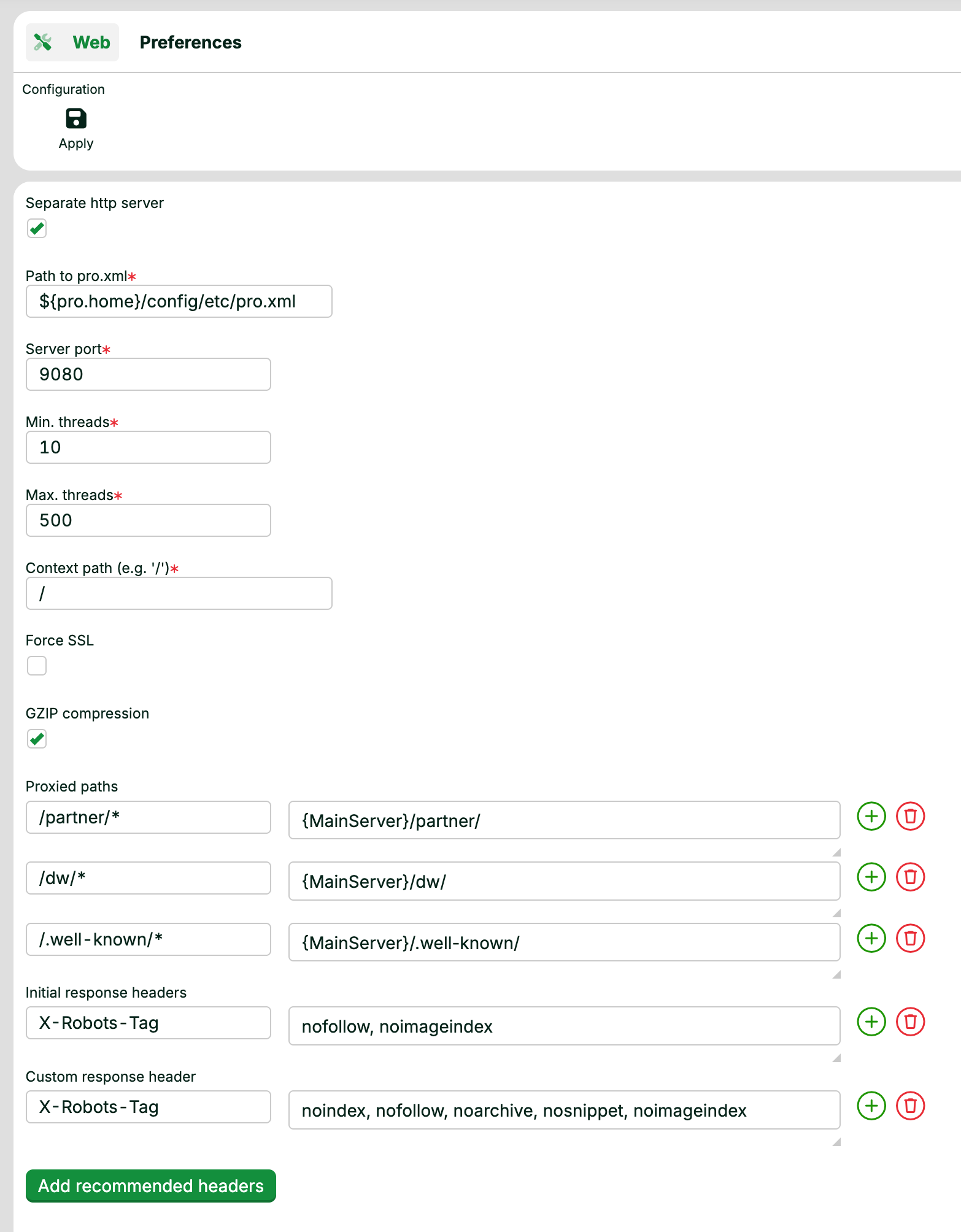
The Web view configures the web server of the Lobster Data Platform. The web server exposes the HTTP interfaces of the platform.
Click Apply to save your changes:
Immediate: changes take effect right away.
Cluster-wide: in a cluster, Apply propagates the changes to all nodes.
Persistent: the platform writes your values to the corresponding XML configuration. The settings persist after a system restart.
NOTE When you save changes, the web server restarts in the background. The current connection drops, and the platform reconnects automatically. After a change to Server port or Context path, you may need to enter the URL again.
Fields
Field | Description |
|---|---|
Separate http server | Runs |
Path to pro.xml1 | Path to the configuration file You can specify the path relative to the The file must exist on the host and must be readable. In a cluster, this applies to all nodes. Default: |
Server port1 | Port for the separate web server. The value must differ from the port of Default: |
Min. threads1 | Minimum number of server threads. Default: |
Max. threads1 | Maximum number of server threads. Default: |
Context path1 | URL path under which the application is reachable. On a separate web server, you can use the root context Default: |
Force SSL | When enabled, the web server requires HTTPS for all incoming requests. Plain HTTP requests are rejected. Default: disabled. |
GZIP compression | Turns GZIP compression for HTTP responses on or off. Default: enabled. |
Proxied paths | List of path mappings that the separate web server forwards to the main server. Use this to expose selected paths of Each entry has two parts:
Click + to add a mapping. Click the trash can to remove one. Replaces the legacy fields Profile path (request) and Profile path (trigger). |
Initial response headers | HTTP response headers that the web server sets on every response. Define each header as a name/value pair. Click + to add a header. Click the trash can to remove one. See Add recommended headers below to populate this list with a recommended security baseline. |
Custom response header | Additional HTTP response headers, added on top of Initial response headers. Define each header as a name/value pair. Click + to add a header. Click the trash can to remove one. See Add recommended headers below to populate this list with a recommended security baseline. |
1 Required only when Separate http server is enabled.
Add recommended headers
The Add recommended headers button sits at the bottom of the view. Click it to populate Initial response headers and Custom response header with a recommended HTTP security baseline. These headers typically lead to a Grade A rating in common security scanners.
The button appends the following entries to Initial response headers:
Content-Security-Policy: baseline policy starting withdefault-src 'none';Permissions-Policy:fullscreen=(), geolocation=(), camera=()X-Frame-Options:sameorigin
The button appends the following entries to Custom response header:
Access-Control-Allow-Origin:noneReferrer-Policy:strict-originStrict-Transport-Security:max-age=63072000X-Content-Type-Options:nosniffX-XSS-Protection:1; mode=block
NOTE The button appends to the existing lists. After clicking, review both lists. Remove duplicates and any entries that conflict with your configuration.
Related articles
Database settings: configures the database connection.
Storage settings: configures the directories of the StorageManager.
File manager settings: configures the home directory of the file manager.
Authentication: configures the login and session settings.