See also: Check JSONPath (Plugin)
Projection – Abstract
Purpose: Used to retrieve values with a specific Result type from a data object defined in JSON format via a JSON path defined statically within the Projection using JSONPath syntax.
Tooltip
Usage: A JSON path (JSONPath expression) is applied on JSON data (or a JSON-string) provided by a Projection to extract a return value of the Result type.
Parameter:
Name optionally defines the title of an output column (if applicable). By default, the column name is the name of the configured Projection, prefixed with
json value of.A Projection is expected to be a projection that returns JSON data (e.g., from an Any field) or text with the appropriate syntax.
The JSON path, defined by a static JSONPath expression, specifies how a return value should be derived from the data provided by the Projection. In the expression,
$represents the return value as a whole.The Result type (default:
String) must be selected in accordance with the JSON path, taking into account the SQL/JSON syntax of the database system being used, in order to resolve the desired value.Note: The value resolver is primarily designed to retrieve a single value, which, depending on the database system, may also be "extracted" from an array. An array present as a value in the data source can generally also be returned using the Result type "Object". Attempting to retrieve an array of individual values as a return value via the JSON path, however, is only successful in exceptional cases.
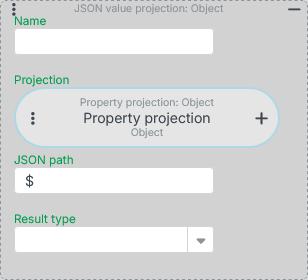
A JSON value projection is used to resolve values with a specific Result type from a data object defined in JSON format, using a JSON path defined statically within the Projection using JSONPath syntax.
IMPORTANT The specific functionality that JSON value projection can provide in any given case ultimately depends on the capabilities of the database system used for Lobster Data Platform and how the generic configuration is internally mapped to it. Primarily, JSON value projection is intended to enable access to a single value from the JSON data source. Whether, and under what conditions, the JSONPath expression can return an array of multiple values depends on the database system (and, if applicable, its version).
Configuration
Parameter | Type | Description |
|---|---|---|
Name |
| The optional Name parameter can be used to assign an (alias) name to the projection.
|
Projection | Entity | The Projection parameter defines the data source to which the JSON path should be applied to extract a value. The data source is supposed to be JSON data of varying complexity, which can be provided either as text ( NOTE Typically, a Property projection is used to incorporate source data from the data structure of an entity persisted in the Lobster Data Platform into a query. However, a Literal projection can also be useful for defining a static sample text as a data source when testing for the "appropriate" JSON path, or for supplying data via Resolvers from (e.g. Session based (Resolvers)) that is intended to be evaluated through the JSON path. |
JSON path |
| The JSON Path parameter contains static text defined in JSONPath syntax that specifies which information should be extracted from the return value of the Projection. The IMPORTANT Whether a particular expression works ultimately depends on the database system on which the Lobster Data Platform server is running. In some cases, the full JSONPath syntax may not be available, or specific adjustments to the notation may be required. Whether a JSON path returns the expected value may also depend on the selected Result type, as this may determine the choice of JSON function used in the syntax for the database system in question. |
Result type | Class | In the Combobox element for the Result type, you should select one of the following options based on the expected result of the JSONPath expression:
|
Example
Simple use case: Determining the class of an embedded object
Some entity types that are predefined by the Lobster Data Platform system have properties to which embedded objects of different classes can be assigned:
The "API" entity type (RestApiDefinition), managed via the menu item API Manager, contains an "API" (api) property that can hold either a configuration of the REST API or MCP Server type.
Since the system provides only a single consolidated overview for the "API" (RestApiDefinition) entity type, the MCP Server configurations should be highlighted in this list using line formatting.
The following screenshot shows the desired result in the API Manager:
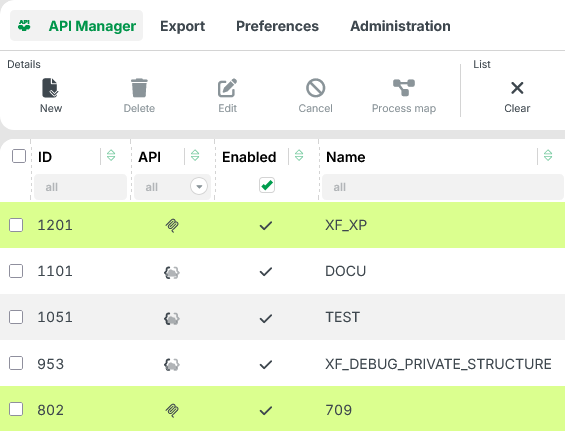
In addition to being distinguished by an icon (see the API column), the MCP Server configurations are displayed with a neon green background.
Configuration:
Specific row formatting can be defined in the client settings for a list (Ribbon: Settings/List/Edit) (for details, see Row formatting in datagrids).
Whether or not a specific row format should be assigned to a list row is determined by the "condition", which must be defined as a restriction (see Restrictions).
The return value from a Property projection for the "API" (API) property cannot therefore simply be subjected to a Check type which would be intuitive and convenient in the context of a rule (see Rules and values).
Since all specific details about the selected API class are stored as JSON data in the "API" property, you can – just as conveniently – evaluate the class field of the API object instead.
{
	"class": "de.lobster.scm.api.mcp.McpRestApi",
	"baseUri": "myFancyMcp",
	...
	"tools": [ ... ]
}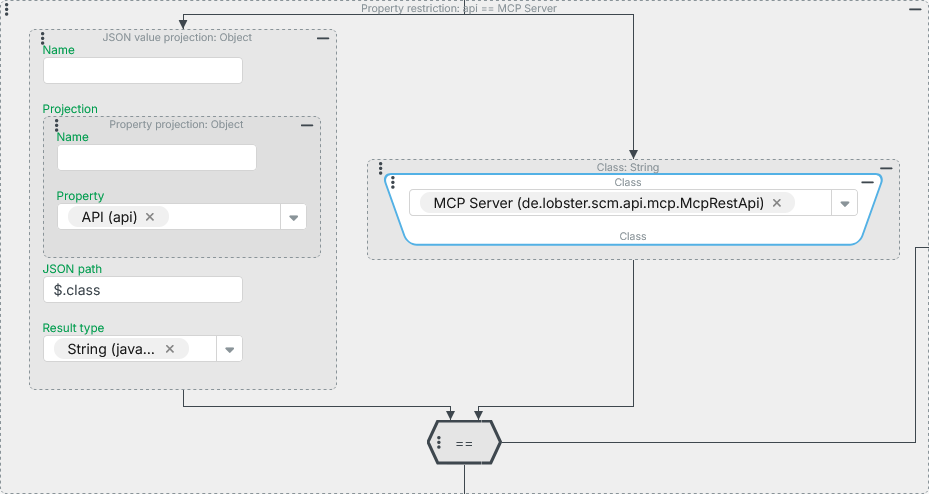
On the left side of the Field restriction shown above, the JSON value projection is used:
A Property projection on the Property "API" (
api) serves as the Projection.The JSON path
$.classdirectly accesses the value of theclassproperty of the data object in the return value of the Projection ($).The Result type
Stringis suitable here for the fully qualified class name as the test value.
On the right-hand side, the Class value resolver is used to set the class "MCP-Server" (
McpRestApi) as a static compare value.
NOTE From the object of "Class" (class) type, the fully qualified class name is automatically used as a string representation for the comparison, which appears in parentheses in the label of the Combobox element.
NOTE The JSON value projection is also used by the system as the basis for the "API" column (api) of the "API" class (RestApiDefinition). This becomes clear, for example, when you set a filter for this column and then, while holding down the Shift key, click the Ribbon button "List/Search" to copy the Tuple search behind the current overview to the clipboard:
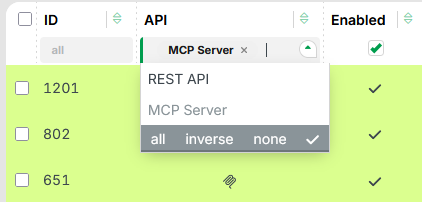
If the Tuple search is then pasted from the clipboard into the Search builder a corresponding JSON value projection named api→class appears in the condition there (as it does under Projections).