Background: 'REST API definition' vs. 'REST API'
The following information relates to the 'REST API' (
RestApi) class, which is integrated via the 'API' (api) field in the 'REST API definition' entity type (RestApiDefinition) in order to provide endpoints (Endpoints) for a user-defined REST API via the Lobster Data Platform server. The same entity type 'REST API definition' (RestApiDefinition) can alternatively also be used to define MCP Tools if the 'MCP Server' (McpRestApi) class is used instead.
The common starting point for managing all instances of the entity type 'REST API definition' (
RestApiDefinition) is the menu item API Manager (see there for further details).The following documentation covers specific details for the 'REST API' (
RestApi) class.
The user interface allows access to these details in the context of the input form for the 'REST API definition' (
RestApiDefinition) entity type, which can be opened from the API Manager.Within the common input form (
de.lobster.scm.api::RestApiDefinition|detailsWindow), the following tabs contain specific content for the 'REST API' (RestApi) class:
'API' tab (available for 'REST API' and 'MCP Server').
'Meta information' tab (exclusively available for 'REST API').
'API' tab

Header area
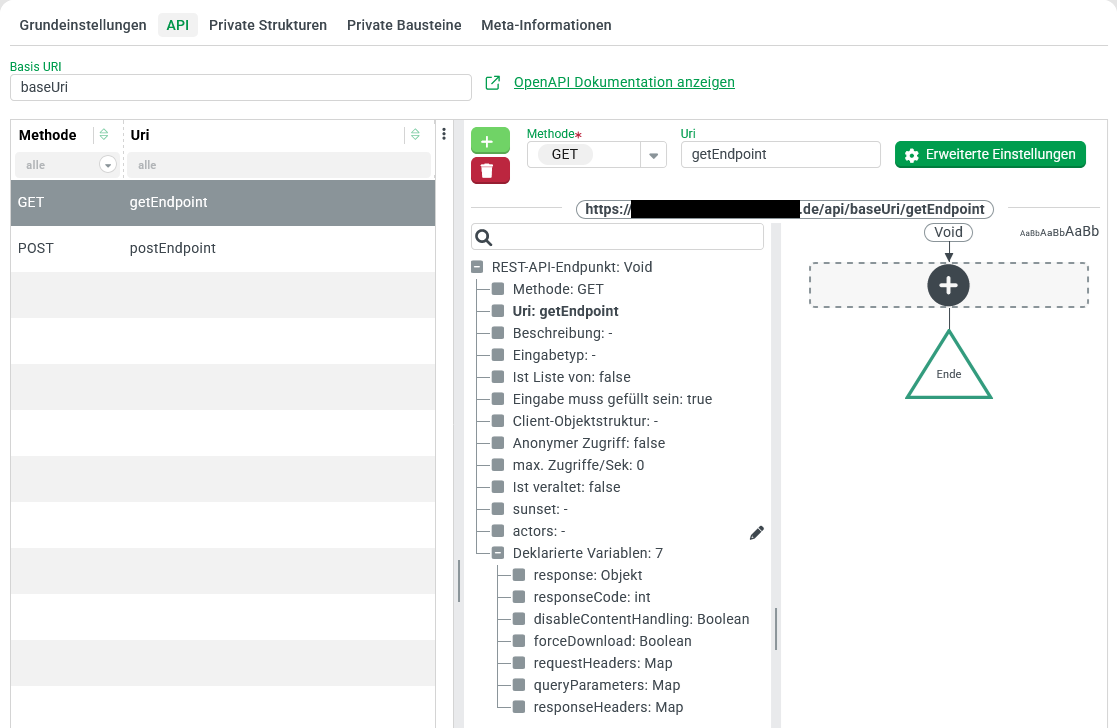
The header area contains elements that are not bound to a specific endpoint definition:
In the Text field for the Base URI (
baseUri) property, the common 'base address' for the endpoints defined in the context of the 'REST API' instance must be specified.The Show OpenAPI documentation link opens a new browser tab with automatically generated Swagger documentation for all effective endpoint configurations for the API identified by the Base URI.
The decisive factor for the OpenAPI documentation is the status of all active 'REST API definitions' that refer to the same Base URI, as persisted (saved) at that point in time.
Endpoint definitions from inactive 'REST API definitions' are not taken into account.
If several active 'REST API definitions' provide endpoint definitions for the same endpoint 'URI' (
uri), their priority value (see API Manager) determines which one takes precedence. The documentation only describes an endpoint that is actually effective. There is no immediate reference in the documentation to the 'REST API definition' that defines the effective endpoint.
List of endpoints
Below the header area, a Data grid element lists all endpoints created within the 'REST API definition' in the left half of the details area.
This list is empty for a newly created 'REST API'. Using the two buttons at the top left of the details area to the right of the list, an entry (endpoint) can be added () or the entry displayed in the details area can be removed ().
If list entries for endpoints already exist, a single list entry can be selected by clicking on the list line to display the associated data in the details area.
When the tab is first opened, no entry is initially selected. The details area then does not display any detailed data.
Clicking on the row of an already selected entry deselects it, so that the details area no longer displays any specific data.
The selection of the list entry to be displayed can also be controlled using the cursor keys (↑↓) as long as the list has focus. This can be recognized by the fact that the selected list entry is highlighted in the primary color (see Styles).
The list can be filtered and sorted. However, any settings made will only be valid until the input form is closed. They will not be saved as user preferences.
The context menu (at the top right of the list) supports the following functions for data grids (see Data grid):
Change column visibility (settings are not saved).
Reset list settings (ineffective because settings are not saved).
Export list.
Endpoint details area
The details area for endpoints (on the right side of the endpoint list) provides access to detailed data for the endpoint selected in the list:
The header of the details area contains the buttons mentioned above for adding () or removing () endpoints, as well as Form elements for direct (method, uri, etc.) or indirect (Advanced settings Button) access to endpoint properties.
NOTE Depending on the selection already made, Form elements may appear or be hidden in this area. If hidden, any data entered will be lost.The Combobox element for the Input type only appears depending on the selected Method. No input value is expected for the HTTP methods
GETandDELETE. In this case, a selection for the Input type is not relevant.For the input type 'Client object' (
ASObject), the Button Client object structure also appears, which can be used to reference a Custom client object structure or a 'Private structure' created in the context of the 'REST API definition' (RestApiDefinition) (see API Manager) or a 'New client object structure' can be created locally for the Input type.
The main window of the details area is divided vertically into two sections:
On the left, a tree view visualizes the data structure for the selected 'REST API endpoint' (
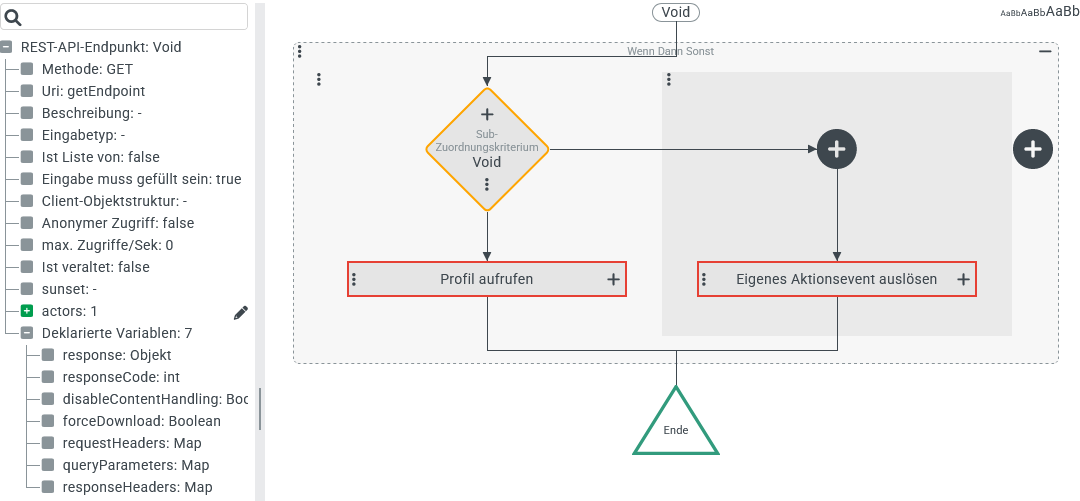
RestApiEndpoint) data object. In addition, a node appears for Declared variables (see below for details), which can be used in the context of the action block.To the right of this, an action block for event handling for the endpoint can be configured by adding Event actions (see Configuration of events).

NOTE At the border between the header and main window, the URL for the endpoint is displayed according to the following scheme: <platform-url>/api/<baseUri>/<uri> 
<platform-url>is the URL under which the current client session was established.<baseUri>is a substring of the total URL that can be defined uniformly for all associated endpoints by the 'Base URI' (baseUri) property of the 'REST API' (RestApi) class.<uri>is a substring of the full URL that can be defined specifically for the endpoint via the 'URI' (uri) property within the 'REST API endpoint' (RestApiEndpoint) class.
CAUTION When assigning values for <baseUri> (and sometimes also <uri>), make sure that the predefined literal /api/ is not immediately followed by mcp/ in order to prevent address conflicts between definitions for MCP Server and REST API.
Method (method)
The following HTTP methods are available:
Method | Uses input value (requestBody)? | Typical REST action |
|---|---|---|
| No | Read |
| Yes | Create |
| Yes | Modify |
| Yes | Modify (partially) |
| No | Check existence (without reading details) |
| No | Delete |
URI (uri)
In the simplest case, the 'URI' property only identifies the endpoint by means of a static string value, which can optionally be a path structured by slashes (/).
However, variable components – represented as URI parameters – can also be defined to map sections of the URI addressed at runtime to variables for the action block.
Example:
Deleting an entity of a specific type should be possible via an endpoint (./demo/deleteItem/{id}) using the DELETE method, whereby a URI parameter ({id} – see below for details) should identify the entity to be deleted via its internal 'ID' (id).
NOTE A URI parameter always primarily returns a text value (String). Explicit type conversions may therefore be necessary in the action block, as illustrated in the following example.
The screenshot on the right shows the action block for an endpoint ( The Execute with event action defines the entity to be deleted via the Object resolver as a temporary reference object for the Delete later event action in the inner action block. Using the
|
|
URI parameter
In addition to plain text characters, the text value specified for the 'URI' (
uri) property can also contain URI parameters in the{<variable>}format. At runtime, the corresponding sub-strings from the specified call address are then mapped as text values to variables (see Variable) that can be accessed in the action block.
IMPORTANT The string assigned at runtime should use URL encoding to mask HTTP relevant special characters, e.g.,%20for the space,%2For a slash (/) or%3Ffor the question mark (?).The character string for the 'URI' (
uri) property can contain multiple URI parameters, between whose definitions an appropriate separator must be inserted. The separator must not be included (unmasked) in the strings provided at runtime.IMPORTANT All URI parameters are treated as mandatory by definition. An empty string (
"") cannot be assigned as%00. This limits the possible uses for the Default value resolver.NOTE If an HTTP relevant special character is used as a separator, it must also be masked at runtime using URL encoding e.g.,
%23instead of the hash symbol (#).Example:
The text
demois specified as the base URI for an API definition (baseUri).The API definition provides an endpoint that uses the
GETmethod to return output text displaying the system time with a time zone and formatting selectable via URI.
For the 'URI' (
uri) string, the following text is specified:getTime/{zone}|{format}.At runtime, the endpoint can be addressed as follows:
https://████████████/api/demo/getTime/Europe%2FAthens|EEEE%20HH:mm%20z
The text between
getTime/and the pipe symbol (|) used as a separator appears decoded as the text valueEurope/Athensfor the Variablezone.The text after the pipe symbol (
|) appears as text valueEEEE HH:mm zfor the Variableformat.In the action block, these text parameters can be used to generate the desired output text (e.g.,
Wednesday 19:40 Europe/Athens).NOTE As the example shows, the date format can contain components that require localization (here: the full text for the day of the week with the pattern
EEEE). To make the output language optionally selectable in this case, an additional query parameterlocalecould be included, which could be used to formulate the call as follows, for example:https://████████████/api/demo/getTime/Europe%2FAthens|EEEE%20HH:mm%20z?locale=frThe
localeparameter in the action block is then accessed via the system-populated VariablequeryParametersusing the Map item resolver with the keylocale.
The desired output text for the requested language 'French' (
fr) would then be, for example:mercredi 19:40 Europe/Athens.At the end of the character string defined by the 'URI' (
uri) property, a dynamic path can be specified using a URI parameter with the following schema:{<variable>: <regExp>}
If the corresponding section of the URI addressed at runtime matches the specified regular expression (
<regExp>) completely, it is transferred to the Variable (<variable>).If, on the other hand, the corresponding section of the URI addressed at runtime does not match the specified regular expression (
<regExp>), the request fails with an error (404 - NOT FOUND).Example:
The text
demois specified as the base URI for an API definition (baseUri).The API definition provides an endpoint that is supposed to output data about a specific 'artist' in a media database using the
GETmethod.
The string for the 'URI' (
uri) is initially specified as follows:getArtist/{name: .+}
The regular expression
.+accepts any characters (e.g.,U2,UB40,AC/DC,Van%20Halen,Primus,MEGADETH) as long as at least one character is provided.If, instead, the regular expression
[A-Z]+[0-9]*were predefined, then only the 'artists'U2,UB40andMEGADETHwould be able to be addressed from the above examples.With the regular expression
[a-zA-Z/]|%20|%2F)+[0-9]*all of the 'artists' mentioned would be compatible again. ForAC/DCthe preferred spelling with URL encoding (AC%2FDC) would also be supported.
Input type (inputValueType, isCollectionOf, clientStructure)
The Combobox element for the 'input type' (inputValueType) only appears if a 'method' (method) is selected that uses an input value. This applies to the methods POST, PUT and PATCH, which typically aim to create or update resources (see the table in the 'Method' (method) section above).
The dropdown menu contains data types from different categories (simple values such as Boolean, complex data objects such as DateRange, and specific entity types, parent classes, interfaces, etc.).
The selection for the 'Input type' is optional. If no selection is made, the completely unspecific data type 'Object' (Object) is formally used.
The Check box 'Is collection of' (
isCollectionOf) can be set if a 'collection' ([]) of entries with an additionally selected 'input type' is to be permitted as an input value.A collection of entries with any input type can be defined as an input value by selecting the 'Object' (
Object) type in conjunction with 'Is collection of' (isCollectionOf).Alternatively, the 'List' (
java.util.List) or 'Unique list' (java.util.Set) type can be specified without selecting the 'Is collection of' (isCollectionOf) option.In the second case (
Set), the entries provided do not have to be unique. However, duplicates are omitted in the action block and the order of the values may differ from the input value.
If the 'input type' is not a specific type, but rather an interface such as 'Interface > User' (
IUser), the system checks whether a compatible class is present in the response body.If the class (
class) declared in the response body is not compatible with the type selected as the 'input type', an error (404 Error: Not Found) is returned.
Special input type 'Content' (Content)
If the 'input type' is declared as 'content' (Content), there will be no automatic deserialization of the input value provided during the request. Instead, a data object of the 'content' (Content) type is created, to which the 'payload' from the request is assigned in the body field. The mediaType field is set in the same way as the Content-Type header. The name field remains empty.
For example, a binary file can be processed or user-defined XML can be parsed in the action block (see Parse XML).
Special input type: 'Client object' (ASObject)
If the 'Input type' is set to 'Client object' (ASObject) a Button labeled 'Client object structure' appears to the right of the Combobox element. This button can be used to define a Client object structure reference (in the clientStructure field). Clicking the button opens a Popover element that can be used to select an existing definition for a private or public client object structure or to create a local one (directly in the Popover):
When 'New client object structure' is selected, an element appears in a Popover for defining the new client object structure, for which (in another Popover for the header data) an optional Alias can be specified, which must meet the requirements for class names. The Ignore additional properties option determines whether the data structure provided at runtime may contain Fields that are not explicitly defined in the structure (see Client Objekt-Struktur (Definition)). |
|
Example: An Aerodrome should optionally be identifiable by its ICAO code (4-letter identifier such as | |
The local 'Client object structure' definition shown on the right with the Alias At runtime, an error ( |
|
If the Ignore additional properties option is selected, the symbol NOTE Instead, the corresponding OpenAPI sample structure contains a field whose name corresponds to the schema At runtime, the endpoint now also accepts a data object with a JSON structure such as |
|
NOTE Ignore additional properties only refers to the acceptance of a client object as an input type for the endpoint. Additional fields and their values are not removed from the data object. These fields can therefore still be accessed in the action block. However, to access the Object property resolver, a specific field name (here: designation) must be specified as free text. If necessary, different field names could be 'tried out' by concatenating several Default value resolvers until one of several field names returns a value. Alternatively, the 'Client object' type can also be treated as a map. The All map keys resolver enables the systematic evaluation of all existing field names.
Input type: 'Client object' (ASObject) for HTML form data
A request that uses the Content-Type header format application/x-www-form-urlencoded typically delivers data from an HTTP form as a concatenation of key-value pairs in a URL-encoded String.
This data can be processed with the Client-Objekt input type. The following table illustrates the interpretation of the syntax using examples:
HTTP form data | Client object (JSON) |
|---|---|
| |
| |
| |
Endpoint – Advanced settings
General advanced settings (upper section of the dialog box)
Clicking on the Button 'Advanced Settings' opens a modal dialog that provides access to additional settings for the endpoint:
The Check box 'Input mandatory' (
inputMandatory) determines whether a suitable input value must be provided or is treated as optional (default).The Check box 'Allow anonymous access' (
allowAnonymousAccess) determines whether or not the endpoint should be enabled for 'Anonymous access' (default).
CAUTION The release of an endpoint for anonymous access should only be permitted in absolutely exceptional cases, especially in a publicly accessible production system. The careless or inappropriate triggering of operations in the action block by 'anonymous callers' can have far-reaching consequences, depending on the configured workflow, and jeopardize both data security and the overall availability of the Lobster Data Platform (see the 'Anonymous vs. authorized access' section below).The Check box 'Is Deprecated' (
isDeprecated) can be set to declare an endpoint as deprecated in order to be able to take it out of service in a controlled manner after a grace period.Once the option is set, a Date/Time element appears, in which the sunset – i.e., the point in time until which the obsolete endpoint should still be available – can be specified down to the minute.
The endpoint will remain in operation until the sunset date. However, it is already marked as 'obsolete' in the OpenAPI documentation.
A request after the sunset time generates a specific error message (
410 Error: Gone).
The Text field 'Description' (
description) can optionally be filled with informative plain text, which typically documents the endpoint configuration.
Policy settings (policySettings)
The 'Policy Settings' tab at the bottom of the 'Advanced settings' dialog box provides access to policies for accessing the endpoint, which are contained in the policySettings list field of the endpoint definition.
What are policy settings used for?
The purpose of policy settings is to define upper limits for the access frequency for a specific endpoint at runtime.
The same endpoint can use different 'policy settings' in parallel in order to model a suitable characteristic for the frequency of accesses as flexibly as possible.
Each individual policy refers to a specific time window for which a maximum number of accesses to the endpoint is specified.
By combining two such policies, the following characteristic could be formulated for an access restriction, for example:
An API endpoint should not be addressed more than 500 times within 24 hours.
The time interval between two requests should be at least 30 seconds.
As soon as one of these two guidelines is violated, the 'excessive' number of attempts returns a specific error (
429 Error: Too Many Requests) in the response body.NOTE Details regarding the violated policy can be found in the response headers in this case.
Configured 'policy settings' appear in a Data grid in the dialog. Above this is a detail area that allows access to details of a selected instance via Form elements.
By default, no 'policy settings' are defined.
The Button 'New' (with the symbol) adds a list entry.
The Button 'Remove' (with the symbol) removes the list entry displayed in the details area.
Each policy is represented by a list entry of the 'Policy Settings' (PolicySettings) type with the following properties:
The Combobox 'Policy' (
policy) allows a single selection from a list (Policyclass) for classifying the policy.The 'Max. requests' (
maxRequests) defines an upper limit for the permissible number of requests to the endpoint in a time window that can be set in milliseconds (see next property).The 'Timeframe in ms' (
timeFrameMs) field defines the reference period for the upper limit on request frequency defined by the 'Max. requests' (maxRequests) property.
NOTE All information is treated as mandatory fields. Each added policy must therefore be fully parameterized.
OpenAPI status codes
The 'OpenAPI status codes' tab at the bottom of the 'Advanced Settings' dialog box provides access to 'OpenAPI status codes', which are managed in the statusCodes list box of the endpoint definition.
This list of errors enriches the 'OpenAPI documentation' (see above) with alternative return values in addition to the regular response (see below) via status code 200 for the relevant endpoint.
IMPORTANT Changes in the 'OpenAPI status codes' tab must be saved in order to appear in the 'OpenAPI documentation'.
The entries in this list can be created and managed completely manually via the user interface.
Clicking on the Button Scan profile(s) for thrown error codes (at the top of the tab) will scan all profiles addressed in the action block for instances of the throw http exception() function which is used to 'throw' — i.e., deliberately trigger — errors. If the search finds status codes in function calls that are not yet included in the statusCodes list of the endpoint, these are added to the existing list.
NOTE Searching the profiles for thrown HTTP errors does not trigger an update if a list entry with the relevant status code already exists.
If, after a change in the profile, modified content is expected for an already listed error code, this information will only be added to the list by clicking on the Button Scan profiles for thrown error codes if the outdated entry is manually removed beforehand.
Error codes that are no longer found during a search are not automatically removed from the list. They are also not marked as orphaned.
IMPORTANT Values for status codes (in the HTTP response status codes column) should be assigned strictly uniquely within the list to avoid 'confusion' (with regard to OpenAPI).
By definition, HTTP response status codes are expected to be positive integers between
100and599.Positive integers between
400and499are reserved for client errors.Integers outside this range can also be assigned interactively via the user interface.
The throw http exception() function allows strings for positive integers in the range
0to999for the corresponding parameter (A).Leading zeros can be entered and saved for values <100. However, they are ignored when transferred to the
statusCodelist.
WARNING If the status code 200 is included in the statusCodes list, the corresponding definition overrides the value returned in OpenAPI, which normally refers to the type hint for the response variable in the action block.
Example:
NOTE The status codes have been deliberately chosen outside the official range of values for HTTP response status codes.
Endpoint configuration:

Excerpt from the OpenAPI documentation for the endpoint:

Declared variables (tree view)
The tree view to the left of the action block reflects selected features of the data structure for the endpoint definition in the upper area.
The last element of the top hierarchical level in the 'tree' is the 'Declared variables' node, which lists all variables declared for the action block (including type information) for informational purposes.
The variables in the following table are defined by the system. They can be defined in the action block using the Variable resolver.
NOTE If the node contains further 'Declared variables' as entries, these either originate from configurations in the action block or from the definition of the 'URI' (see above: URI parameters) for the endpoint.
NOTE During configuration, the tree view is only updated when the tree 'is touched' (after changes in the action block). Changed 'URI parameters', on the other hand, appear immediately after leaving the field in the tree view.
Variable name | Type | Description | Direction |
|---|---|---|---|
|
| All request headers as a map that assigns | Incoming |
|
| All query parameters from the URL as a map that assigns | Incoming |
|
| The data object for the return value. | Outgoing |
|
| The HTTP response status code for the response (default for 'success': | Outgoing |
|
| Custom | Outgoing |
|
| This flag controls the handling of a
| Outgoing |
|
| This indicator is only relevant if the value
| Outgoing |
Return value and response type
The regular return value for an endpoint is defined as an action block by assigning it to the response variable in terms of content.
The formal representation (serialization) of this data object — i.e., the desired 'response type' — is generally determined by the Accept header defined for the request.
EXCEPTION If an object of the 'Content' type is assigned to the response variable, no automatic serialization takes place for the return value. Instead, the 'payload' of the 'Content' object is provided as the return value. For example, a File reference can be returned with any amount of data. The content type for the response header is taken from the mediaType field of the 'Content' object.
NOTE This special treatment for the 'Content' (Content) type as a return value can be overridden by assigning the value true to the system-provided Boolean Variable with the name disableContentHandling in the action block (see table above).
Anonymous vs. authorized access
For each endpoint, the 'Anonymous Access' (allowAnonymousAccess ) option can be used to decide individually whether it should be available for access without authorization—i.e., for 'anonymous access'.
Before an endpoint is enabled for 'anonymous access', security aspects regarding the functionality provided by the action block should be carefully reviewed.
The missing 'session context' (Role of session, Company of session, User of session) can be compensated for if necessary by using the Run as event action.
To execute a Search (Event action), for example, a Role of session must be available that has read rights for the entity types being searched for.
CAUTION If a Search (Event action) is configured in the context of the Search (Event action) event action that claims a Role of session that has no ownership restrictions (typically 'Super user'), the anonymous endpoint could allow read access to sensitive data without access control.
IMPORTANT If access to an endpoint takes place via the same browser in which a Lobster Data Platform session is already logged in, the session cookie for this login automatically takes effect, i.e., the existing 'session context' (Role of session, Company of session, User of session). In this case, a 'private browser window' (or a REST client detached from the 'logged-in' browser) can or must be used in order to be able to execute truly anonymous calls to an endpoint – e.g., for simple tests – without first logging out of the Lobster Data Platform session.
Otherwise, authentication should be performed via OAuth2 for API access.
'Meta information' tab

In the 'Meta information' tab, you can store informative details about the REST API, which will appear in the OpenAPI documentation depending on the call context.