See also: Styles, Style templates, Companies/Clients
If the Multisite module is licensed, Site configurations can be defined, with the help of which a Lobster Data Platform system can be presented to different user groups with a specific appearance depending on the URL used for the call.
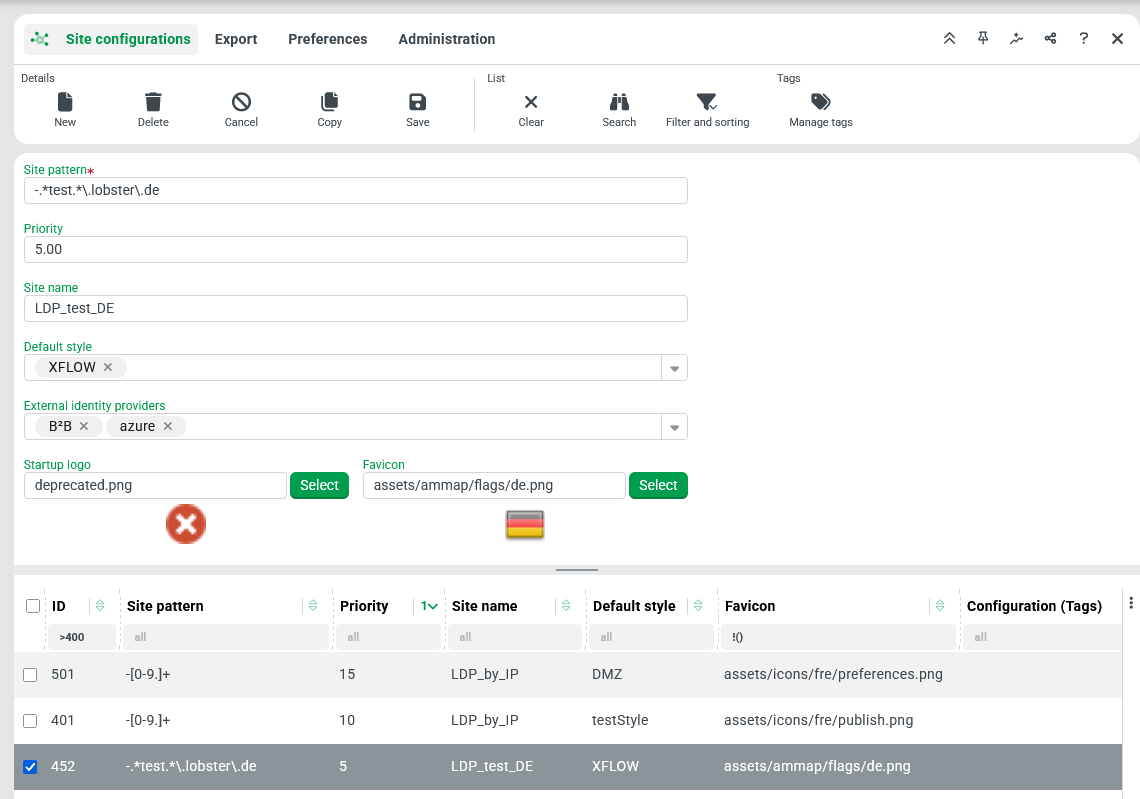
The Site configurations menu item (administration/designer/siteConfig) opens a view that combines an overview for entities of the "Site configuration" type (core:SiteConfig) with the associated default input form for accessing a selected site configuration:
What is the purpose of site configurations?
Styles and Style templates offer extensive possibilities for defining the appearance of Lobster Data Platform.
Each Lobster Data Platform login refers to a specific company account, which can optionally refer to a specific "style" for display within a session (see Input forms for company accounts).
Site configurations also offer the possibility to assign a specific "style" (and some other features) before the actual login takes place, i.e. when the Company of session is not yet defined.
The assignment is always based on an evaluation of the URL used to access Lobster Data Platform. Specifically, the domain name or an alternatively used IP address is evaluated.
Examples: The section of the URL relevant for the assignment of site configurations is highlighted by
monospacedfont in each case.
https://
www.domain.net/portalhttps://
portal.doma.in:9443/testhttps://
32.168.123.45:443
Operating principle
Although Site configurations are not assigned via Association criteria, a kind of "assignment" according to the all-matching principle (see Association criteria) is relevant when the URL is evaluated:
The Site pattern to be specified for each site configuration defines a regular expression that is applied to the domain name (or IP address) from the URL to decide whether this configuration is potentially relevant for the given context.
The relevant section from the URL (domain name or IP address) must be completely characterized by the Site pattern:
Therefore, a Site pattern like
portaldoes not address all domain names that contain the stringportal.For this purpose, the Site pattern
.*portal.*would be more appropriate instead. Each.*string in the pattern defines an indefinite number (≥0) of arbitrary characters.
Without specification for the Site pattern, a site configuration is always considered potentially relevant without any check.
Based on the properties of the potentially relevant Site configurations, the characteristics for all features of a session that can be directly influenced via Site configurations (see second section in the following table) are determined according to the following rules:
Among all potentially relevant Site configurations that specify a specific value for a given feature at all, the one with the highest value for Priority is considered.
If several Site configurations with the same Priority provide conflicting specifications for the same feature, the last configuration created (with the highest ID value) determines the specification for the feature in question.
If none of the potentially relevant Site configurations defines a specific characteristic, the Lobster Data Platform default applies.
NOTE The characteristics of a session can therefore be determined by overlaying specifications in different Site configurations (and default values, if applicable). As the example (below) demonstrates, different configurations can result in the same "experience" for users.
Properties
Each "Site configuration" (SiteConfig) uses the following properties:
Properties | Field | Contents | Description | Example |
|---|---|---|---|---|
... to control the relevance of a site configuration depending on the URL used for access | ||||
Site pattern |
| Regular expression | A regular expression that decides whether the site configuration is considered potentially relevant when Lobster Data Platform is accessed via a given URL. This is exactly the case if the domain name (possibly also an IP address) specified in the URL corresponds completely to this regular expression. |
for a URL like
|
Priority |
| Integer | If the Site pattern qualifies multiple site configurations as potentially relevant to the URL in use, Priority determines their precedence with respect to the expression of the following characteristics. |
|
... to control the appearance of the session | ||||
Default style |
| Style ( | The Default style defines the default "style" (see Styles), which determines the appearance of /var until the successful login of a session, for which after the login, depending on the Company of session, a style different from the Default style may take effect. | |
Site name |
| Text | The Site name defines the text for the HTML tag |
|
Favicon |
| Text | The Favicon property optionally defines a relative path to an image file for the icon that appears, for example, in the browser tab of the Lobster Data Platform session in conjunction with the Site name. |
|
IMPORTANT The string entered for Favicon must reference a public image resource. It does not work with Font awesome icon, although the "Asset Manager", which can be opened via the "Select" button in the user interface, my suggest this. Font awesome icons even show in the preview below the Text field, but they cannot appear as a Favicon in the browser tab of the Lobster Data Platform client. As shown in the example above, real images available under It is also possible to upload own images (see File manager) into a public folder (below | ||||
Startup logo |
| Text | This is a legacy property with no immediate effect in current versions. | |
... to control availability of SSO providers in login dialog | ||||
External |
| Multiple choice of "Alias" | The Multiselect combobox for External identity providers can be used to optionally select "Alias" names for "SSO System preferences" configured for the Lobster Data Platform (see SSO (Single Sign-On) for details).
NOTE Since it is not possible to specify that a site configuration should not feature any SSO options in the login dialog by not defining any External identity providers at all, the only way to achieve this is to provide a whitelist with an invalid "Alias" name. A name like "none" may be entered into the Multiselect combobox and is accepted if the [+] symbol is clicked or Enter is pressed afterwards. | |


IMPORTANT The Site pattern often targets (sub-)strings for domain names that contain the period (.) as a separator character. Since the string specified as the Site pattern is interpreted as a regular expression, the period is by default a placeholder for any character. For a period character to be "interpreted" as literal text in a regular expression, either (see "Example" below) a backslash must precede it (\.) or the dot must be enclosed in square brackets ([.]).
A Site pattern like
loc.lh.stis therefore not only effective for the domain nameloc.lh.stbut also, for example, when the Lobster Data Platform server is accessed "locally" via the domain name localhost. The Site patternsloc[.]lh[.]storloc\.lh\.ston the other hand, strictly and precisely address only the domain name (loc.lh.st).A Site pattern like
.*.etis valid for all domain names that refer to the Top Level Domain (TLD) et (for Ethiopia). Since in this Site pattern not only the first but also the second dot is interpreted as a wildcard, this site configuration is also potentially relevant for all domain names with the TLDnet. The Site pattern.*\.et, on the other hand, applies exclusively to Ethiopian domain names.
Examples
For a Lobster Data Platform implementation, the following Site configurations are defined: | ||||||
Priority | Site pattern | ... URL condition | Favicon | Site name | Default style | External identity providers |
10 |
| Domain name ends with ".de" | empty | Mein Portal | DE | none |
5 |
| Domain name ends with ".eu" |
| empty | EUROPE | ["azure"] |
0 |
| Domain name starts with "myportal.company." |
| My Portal | GLOBAL | ["none"] (see Note above) |
For accesses with the specified URLs, this effectively results in the following feature combinations: | ||||||
URL used for access | potentially relevant (with descending priority) | Effective characteristic (per URL) | ||||
Favicon | Site name | Default style | External identity providers | |||
| "green" |
| My Portal | GLOBAL | none | |
| "blue" > "green" |
| My Portal | EUROPE |
| |
| "red" > "green" |
| Mein Portal | DE | none | |
Alternative Configuration:The same effective expressions can also be achieved (for the mentioned URLs) with the following Site configurations: | ||||||
Priority | Site pattern | ...URL condition | Favicon | Site name | Default style | |
0 |
| Domain name is exactly "myportal.company.de" |
| Mein Portal | DE | ["none"] (s. note above) |
0 |
| Domain name is exactly "myportal.company.eu" |
| My Portal | EUROPE | ["azure"] |
-1 | empty | Any domain name |
| My Portal | GLOBAL | ["none"] (see note above) |


With the "alternative configuration", all Site configurations define all properties explicitly, but partly in agreement. This creates transparency, because exactly one configuration is always used completely.
The regular expressions for the Site pattern of the configurations "red" and "blue" are mutually exclusive. Therefore, the matching priority (0) is not a problem.
The omission of a Site pattern for the "green" configuration makes it the "default configuration", which is always potentially relevant, but with a priority value of -1 becomes effective exactly when no Site pattern for one of the higher-priority Site configurations takes effect.