With the source type File folder, you generate a list from the files in a directory. Each file name becomes one data row. You then process these data rows in the target data or one file at a time in a child task.
Typical use cases:
Batch processing of all files in an incoming directory.
Iterating over a set of files with one child task per file.
Taking inventory of a directory without processing the file contents.
Settings
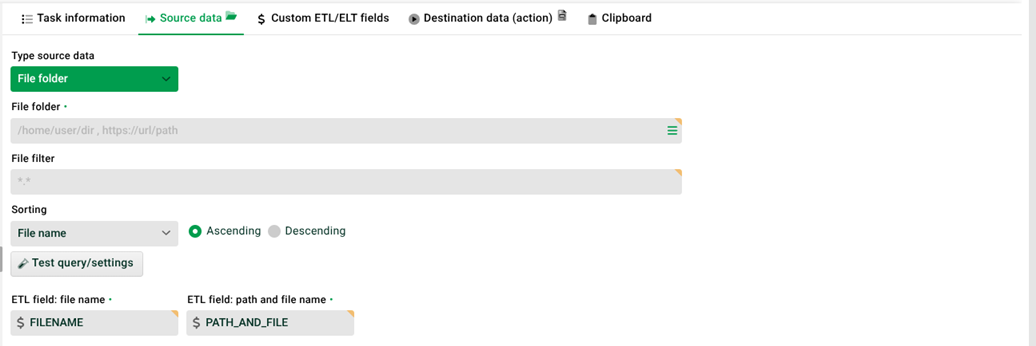
No. | Field | Description |
|---|---|---|
(1) | File folder | Lobster searches this directory for files. The search is not recursive. You can also specify a URL. Example: |
(2) | Icon to the right of (1) | Opens the selection of ETL/ELT variables. |
(3) | File filter | Filters files by name. By default, Lobster expects a glob pattern. Use the prefix
|
(4) | Sorting | Sorts the files by file name or modification date, ascending or descending. |
(5) | Test query/settings | Runs a test query and returns a list of the matching files. |
(6) | ETL/ELT field file name | Defines the names of the ETL/ELT fields that you use to read the file name or full path in target data or child tasks. Examples: |
How it works
Lobster builds a list of the files in the specified folder. The filter and sorting options shape the result. Each file name becomes one data row.
You have two options for processing the data rows:
Processing in the target data: You access the file name and path through the ETL/ELT fields defined in (6).
Processing in a child task: The parent task reads the file names. The child task processes one file at a time. Specify the file name in the child task using one of the ETL/ELT fields from (6).
Example path in the child task:
./webapps/root/upload/myfiles/$FILENAME