Simplified context
Basically we want to receive data (resources) from an HTTP(S) server (resource server) with our channel (client).
Therefore, we need an "access token", which we receive from an authorization server in advance. The access token is stored internally in the "HTTP" channel.
The following screen explains how to obtain this access token. For this purpose, you first need an authorization grant.
NOTE See also https://tools.ietf.org/html/rfc6749#section-1.1.
Settings
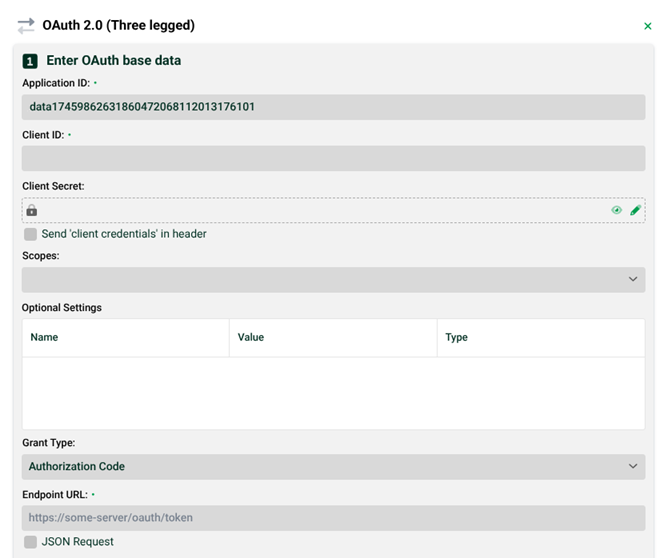
(1) Application ID: This will be entered automatically. Example: "data1606366806421015".
(2) Scope: OAuth 2.0 scopes provide a way to limit the amount of access that is granted to an access token. For example, an access token issued to a client application may be granted read and write access to protected resources, or just read access.
NOTE The input of individual values can be completed with the "Enter" key. However, you can also enter several values at once, each separated by a space.
(3) Optional settings: Additional parameters (query or body) and headers can be specified here.
(4) Grant type: There are several methods (Authorization Code, client credentials, password credentials) with which you can get an "Authorization Grant". See the corresponding subsections. See also: https://tools.ietf.org/html/rfc6749#section-1.2.
(5) Endpoint URL: The endpoint URL. After a successful authorization grant (4), the channel receives the access token from this URL of the authorization server. Example: "https://some-server/oauth/token".
(6) JSON request: If the checkbox is set, the body of all requests is sent in JSON format with content type application/json, otherwise with content type application/x-www-form-urlencoded.
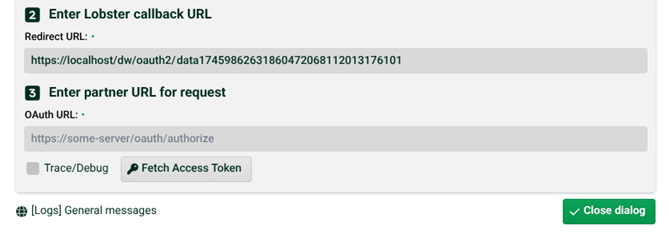
(7) Redirect URL: Is automatically entered and only active for the Authorization Code value in (4), see corresponding section below. NOTE The IP may have to be adjusted if your authorization server is not in your internal network, i.e. you must then enter the IP with which your Lobster Integration (Integration Server) can be reached from outside the internal network. Your network administrator will be able to help you with this. Example: "https://192.168.132.193/dw/oauth2/_data1606366806421015". Example: For "OAuth URL": "https://some-server/oauth/authorize".
(8) Trace/Debug: If this checkbox is set, you will find additional trace messages in (10).
(9) Fetch access token: Click here to fetch the access token via the token Endpoint URL (5) of the authorization server. NOTE You will find an entry with the name SYS_HTTP_OAUTH2 in the "Additional IDs (in channel)" section in Channels, for the access token and an entry with the name SYS_HTTP_OAUTH2_REFRESH for a refresh token.
(10) Logs general messages: Jumps to page "General messages" of the Control Center.
Authorization grants
Grant type "Authorization code"
(11) Client ID, Client secret: The Client ID is a public identifier for applications (here our channel). The client secret is only known to the client and the authorization server. NOTE Both are generated and provided by the authorization server in advance.
(12) Send client credentials in header: If this checkbox is set, the credentials (“Client ID", "Client Secret") are specified in the header instead of the body of the request to the authorization server.
(13) OAuth URL: The authorization Endpoint URL. This URL of the authorization server will take you to a page where you can manually enter access data (for the resource server, which is finally validated by the authorization server). Via (7) you can get back to Lobster Integration. By doing so, you will (simplified described) receive the authorization grant from the authorization server and then the access token (and possibly a refresh token). See also: https://tools.ietf.org/html/rfc6749#section-4.1.
Grant type "Client credentials"
(14) Client ID, Client Secret: The "Client ID" is a public identifier for applications (here our channel). The "Client Secret" is only known to the client and the authorization server. NOTE Both are generated and provided by the authorization server in advance.
Both are sent to the authorization server. This will get you the authorization grant and then the access token. See also: https://tools.ietf.org/html/rfc6749#section-4.4.
(15) Send client credentials in header: If this checkbox is set, the credentials (Client ID, Client Secret) are specified in the header instead of the body of the request to the authorization server.
Grant type "Password Credentials"
(16) Client ID, Client secret: The Client ID is a public identifier for applications (here our channel). The Client Secret is only known to the client and the authorization server. NOTE Both are generated and provided by the authorization server in advance.
IMPORTANT Both fields are not mandatory in this case, but some authorization servers require them!
(17) Send client credentials in header: If this checkbox is set, the credentials (Client ID, Client Secret) are specified in the header instead of the body of the request to the authorization server.
(18) Own ID, Own password: If you got access data from the resource server in advance, you can use it to obtain the authorization grant from the authorization server (which validates the access data for the resource Server) and then the access token (and possibly a refresh token). See also (16). See also: https://tools.ietf.org/html/rfc6749#section-4.3.
DATEV OAuth2 hybrid flow
See also: DATEV OAuth2 hybrid flow for a special OAuth2 variant of DATEV.