Lobster Cloud Hosting Standard Editions run on a unified base architecture designed for an availability of 99.0%.
If your operations require fast response times and proactive monitoring, refer to the Premium Monitoring page for details. The architecture for high-availability systems is described on the High Availability architecture page.
Core principles
Every Lobster Cloud system is built on the same standardized architecture. The key principles are:
Principle | Description |
|---|---|
Dedicated resources | Your system runs on dedicated virtual machines and a dedicated database. No resources are shared with other customers. |
Network isolation | Each system is deployed in its AWS Virtual Private Cloud (VPC) with a private network range selected during the pre call. |
Database protection | The database runs in a protected private subnet. No external access is possible, not via VPN and not via the internet. Only the corresponding Lobster web server has access. |
Standardized design | The architecture cannot be customized on a per-customer basis. This ensures consistent security, reliability, and operational quality. |
Architecture variants
The standard architecture is available in three configurations, depending on your requirements. See architecture diagrams below.
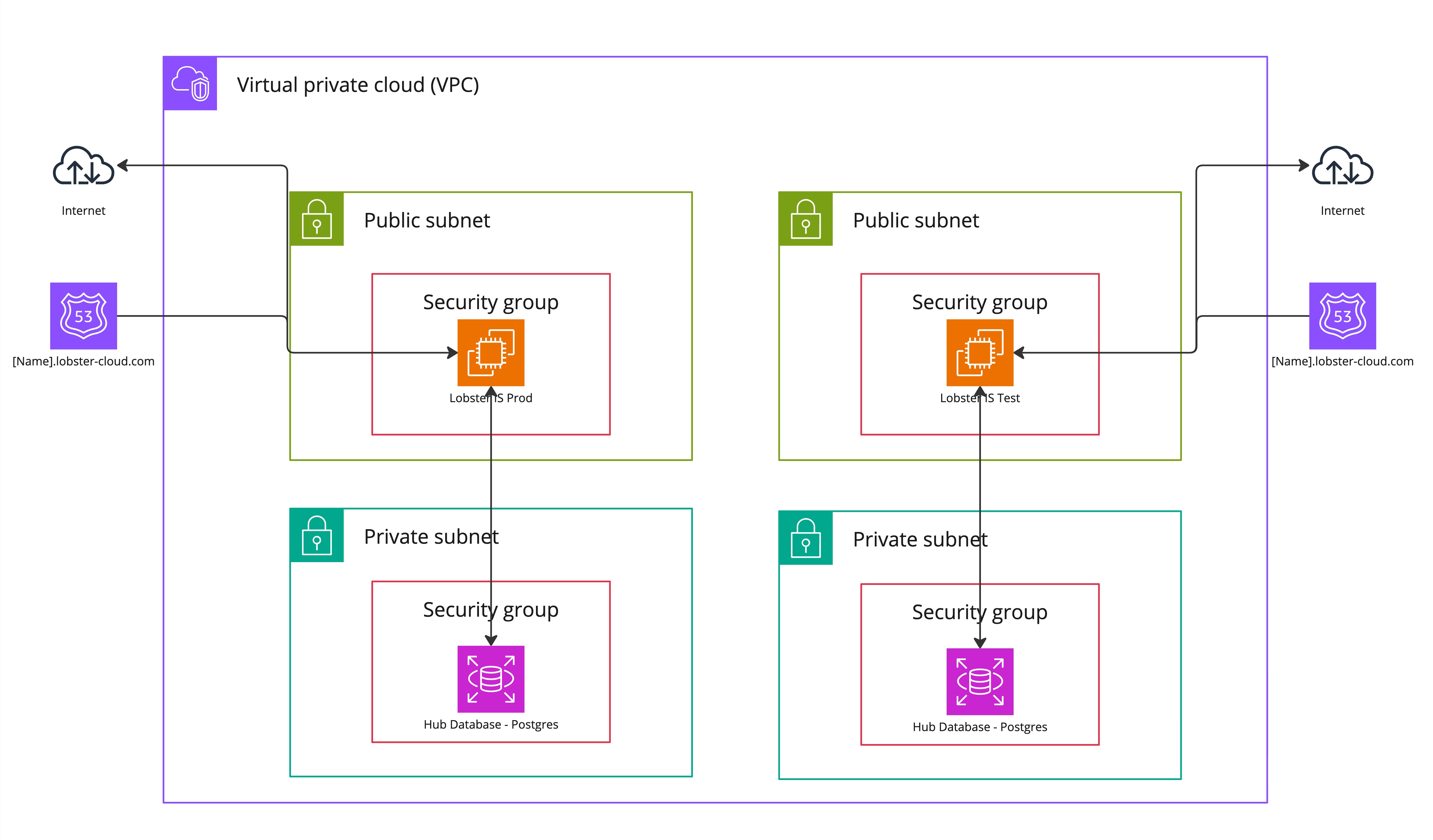
Base system (without DMZ)
This is the simplest configuration. It consists of a single Lobster Data Platform server and a dedicated database, both running within the same VPC. All information on size selection can be found under Editions and Sizing.
Component | Description |
|---|---|
Lobster Data Platform Server | Processes all jobs, profiles, and data integrations. Accessible via Port 443 (HTTPS) for the web interface and Port 9000 for the admin console. |
Database (RDS) | PostgreSQL database running in a private subnet. Stores all configuration data, job history, and platform metadata. |
Security Group | Acts as a virtual firewall controlling all incoming and outgoing traffic. Only IP-based rules are supported (no DNS names). |
Static IP | Provides a static public IP address for your system, ensuring it remains reachable even if underlying infrastructure changes. |
Traffic from the internet enters the VPC through the AWS Internet Gateway, passes through the security group, and reaches the Lobster server. Port 80 is used exclusively for Let's Encrypt certificate automation and redirects all other traffic to Port 443 (HTTPS).
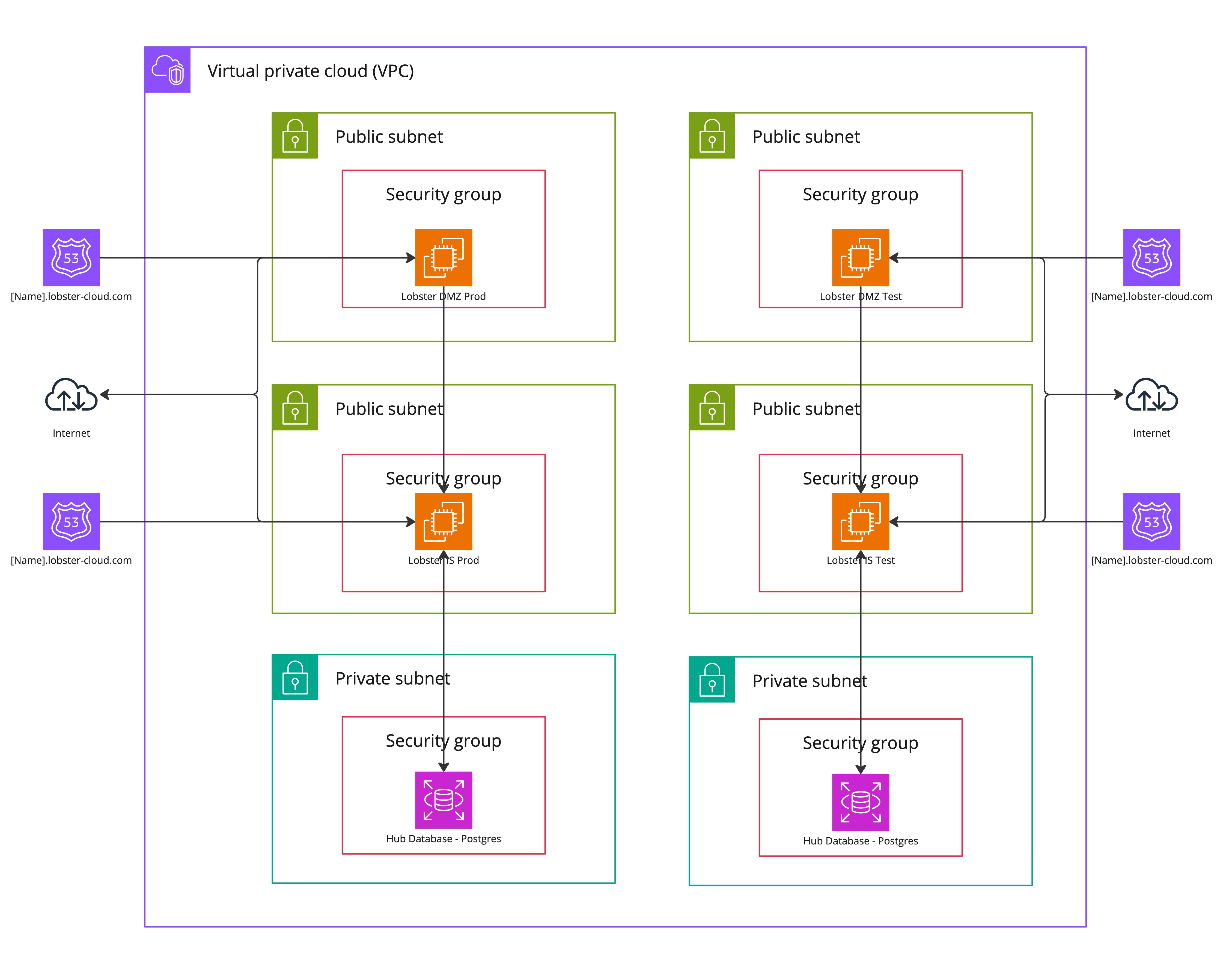
Base system with DMZ
Adding a DMZ server places a security layer between the public internet and your internal Lobster system. This is the recommended configuration for customers who exchange data with external partners. All information on size selection can be found under Editions and Sizing.
Component | Description |
|---|---|
DMZ Server | Publicly accessible endpoint that receives all incoming traffic. Functions as a reverse proxy. |
Lobster Data Platform Server | Located behind the DMZ in a protected network segment. Not directly accessible from the internet. |
Database (RDS) | PostgreSQL database in a private subnet, accessible only by the OIS server. |
Security Groups | Separate security groups for the DMZ and the OIS server, each with individual firewall rules. |
For a detailed description of the DMZ server and its functions, see the DMZ Architecture page.
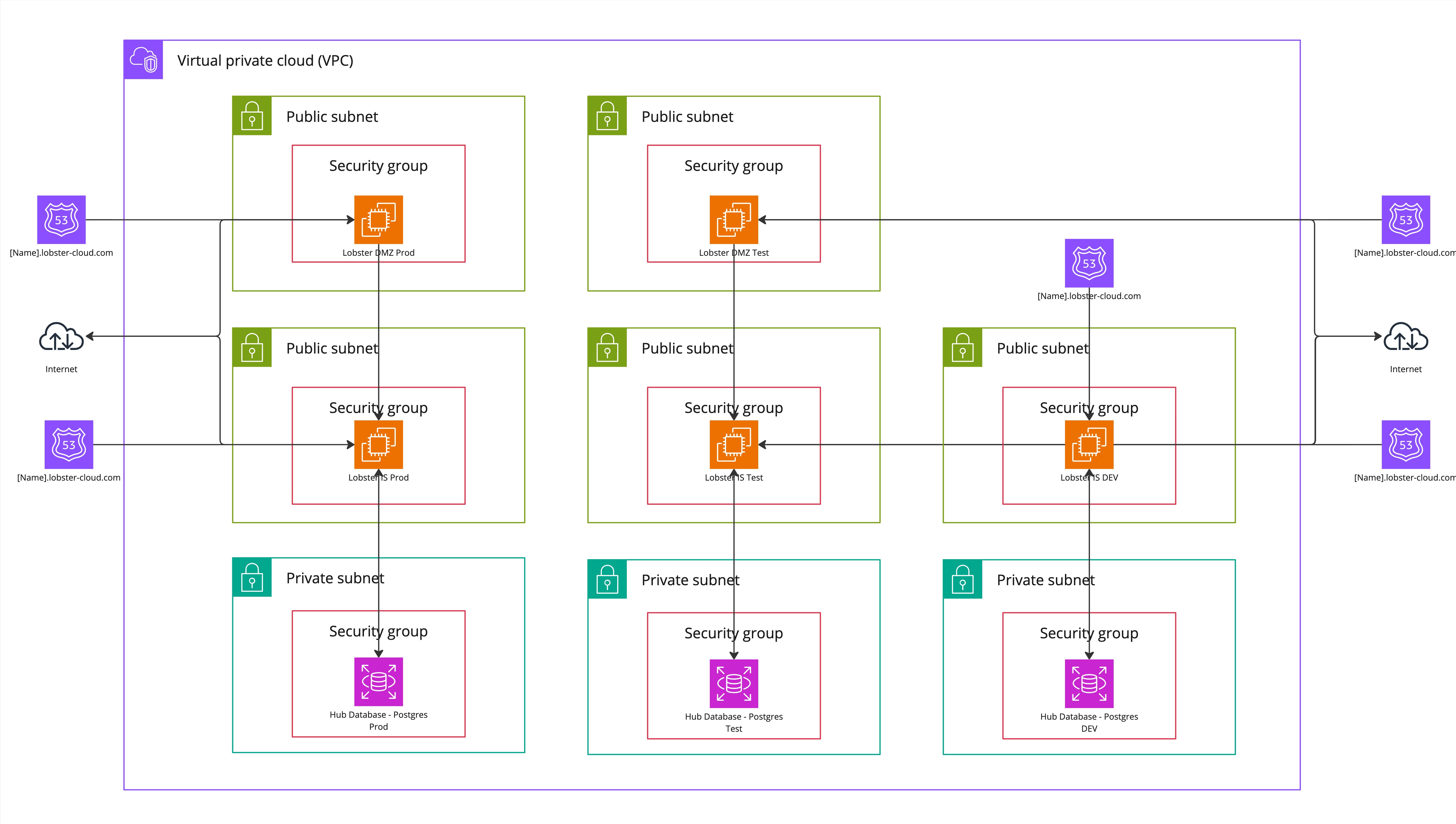
Base system with DMZ and DEV environment
This configuration adds a development environment alongside your production system. The DEV system is a separate, independent installation with its server and database. All information on size selection can be found under Editions and Sizing
Component | Description |
|---|---|
Production DMZ | Publicly accessible endpoint for your production system. |
Production Lobster Data Platform Server | Your production Lobster Data Platform, located behind the DMZ. |
Production Database | Dedicated production database in a private subnet. |
DEV Server | Separate Lobster Data Platform instance for development and testing. |
DEV Database | Dedicated database for the DEV environment. |
The DEV environment has its security group and can be configured with different firewall rules than your production system.
Network configuration
VPC and subnets
Each system is deployed in its AWS VPC. During the pre call, you select one of three private network ranges for your environment. You can find all the information you need at VPN Connections.
Important
The network range cannot be changed after your system has been provisioned. This is especially important if you require a VPN connection, as the selected range must not overlap with your on-premise network.
Internet connectivity
Your Lobster system communicates with the internet via a public subnet with a static Elastic IP address. The architecture uses the following flow:
Direction | Description |
|---|---|
Incoming traffic | Internet traffic enters through the AWS Internet Gateway, passes through the Security Group, and reaches your DMZ (if configured) or Lobster DATA Platform Server. |
Outgoing traffic | Outgoing connections from your system are open by default, allowing communication with external partner systems, APIs, and services. |
Standard port configuration
You can find all the information you need at Ports and Protocols
Security groups (firewall)
Security groups function as virtual firewalls for your system. Each system component (LDP, DMZ, DEV) has its own dedicated security group. You can find all further information on this topic here: Firewall Rules.
SSL/TLS certificates
You can find all further information on this topic here: SSL/TLS Certificates.
DNS configuration
All information on this topic can be found here: DNS Configuration.
Architecture diagrams
Base system
The following diagram illustrates a standard Lobster Cloud LDP environment setup without a DMZ server.
Base System with DMZ
The following diagram illustrates a standard Lobster Cloud LDP environment setup with a DMZ server.
Base system with DMZ and DEV environment
The following diagram illustrates a standard Lobster Cloud LDP environment setup with a DMZ server and DEV environment.