Overview: Peppol Access Point 1.0.0
Reference documentation for the Lobster Peppol Access Point service. This service enables bidirectional e-invoice exchange through our certified Peppol Access Point.
Supported formats and standards
All processing is based on the UBL (Universal Business Language) framework. Peppol BIS Billing 3.0 is the default document standard.
In addition to BIS Billing, the following domestic Peppol formats are supported:
NLCIUS (Netherlands)
Additional country-specific CIUS implementations
Domestic format support
Contact the Lobster Sales team or your Customer Success Manager to discuss available domestic formats for your target countries.
Outbound: sending invoices to Peppol
Submit e-invoices for validation and transmission through the Peppol network. Invoices can be submitted in Peppol BIS Billing 3.0 (default) or in a domestic format required by specific countries or trading partners.
Authentication
The service uses HTTP Basic Authentication. Request credentials from your designated technical contact or the Lobster Customer Success team.
Validation versus processing
Validation only (
validateonly=true) — The invoice is validated against the applicable schema but not transmitted to the Peppol network.Full processing (
validateonly=false, default) — The invoice is validated and, if valid, forwarded to the Peppol network.
Delivery acknowledgements and notifications
After an e-invoice is submitted, a Message Delivery Notification (MDN) confirms successful delivery to the receiving Access Point.
If the recipient cannot be reached via Peppol, the system triggers an automatic fallback e-mail delivery to the address specified in the UBL document.
The invoice sender can receive these notifications: delivery confirmation, fallback delivery, or error through either of the following channels:
One or more configured e-mail addresses
An HTTP callback endpoint
Callback payloads include the following details:
Transaction ID
Delivery status (
delivered,fallback_email_sent,failed)Error messages (if applicable)
If an HTTP endpoint is already configured for receiving inbound invoices, it can be reused for status callbacks.
NOTE
Callback configuration is performed by the Lobster Onboarding team. Coordinate all technical details with your Customer Success Manager or designated technical contact.
Inbound: receiving invoices from Peppol
To receive inbound invoices, configure an HTTP endpoint (for example, https://yourdomain.com/invoice/receive). Invoices are pushed to this endpoint in the original format as received from the Peppol network — no format conversion is applied.
Delivered content:
UBL XML documents with
Content-Type: application/xmlPeppol BIS Billing 3.0 (most common)
Domestic formats when sent by trading partners (for example, NLCIUS from Dutch suppliers)
Unmodified — Invoices are delivered as received to preserve the original structure and regulatory compliance
Respond with 200 OK to confirm successful receipt.
Endpoint and authentication configuration
Your endpoint URL and authentication credentials must be registered in the Lobster E-Invoicing Portal. Provide these details to your designated technical contact or the Lobster Customer Success team.
Installation
A package with preconfigured template profiles and partner channels is available for Lobster Data Platform customers to accelerate integration with the Peppol Access Point service.
Click Home → Start from template.
Click Install on the Peppol Access Point API template tile.
You are automatically redirected to Integration → DataFlow → Designer.
The Import package dialog opens. It is organized into four tabs:
Contents — Lists all included profiles and DataFlows with type, name, status, and version.
Constants — Displays constants included in the package (in this package: 0).
Partners/Channels — Displays partners and partner channels included in the package with import options.
Information — Contains supplementary information about the package.
Contents
The Contents tab displays all components included in the package:
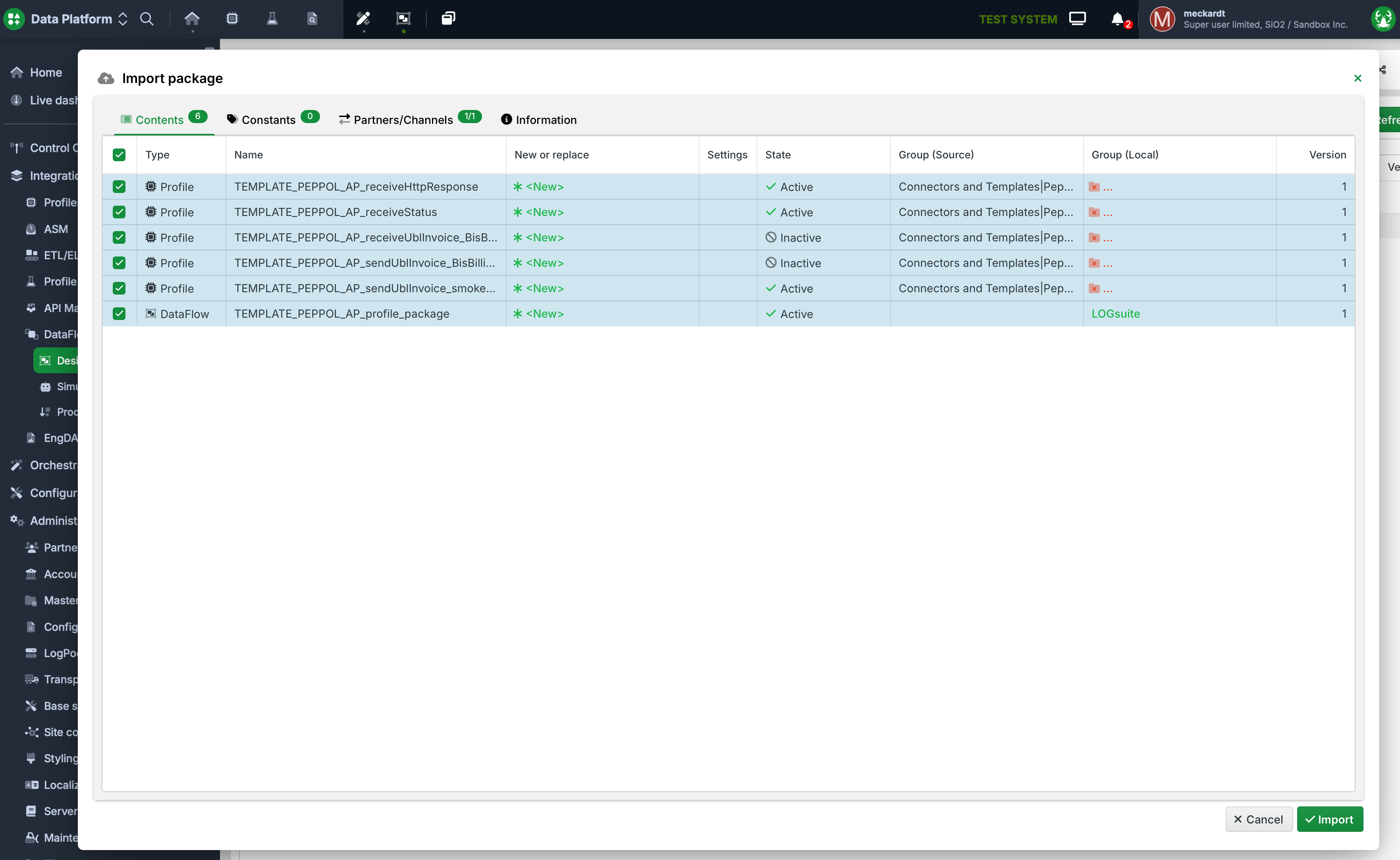
Import package dialog, default Contents tab: overview of all profiles and DataFlows.
The package contains the following components:
Type | Name | Status |
|---|---|---|
Profile |
| Active |
Profile |
| Active |
Profile |
| Inactive |
Profile |
| Inactive |
Profile |
| Active |
DataFlow |
| Active |
NOTE
Profiles with the status Inactive are templates that must be customized for your individual mappings and activated after import. Profiles with the status Active are ready to use immediately.
Group selection
Select the appropriate local groups for the profiles.
.png)
Import package contents with active and inactive profiles.
Partners/Channels
The Partners/Channels tab displays the partners and partner channels included in the package. This package contains one partner with one partner channel. If overwrite is not toggled, an update will not change the partner channel, so you can safely update the connector.
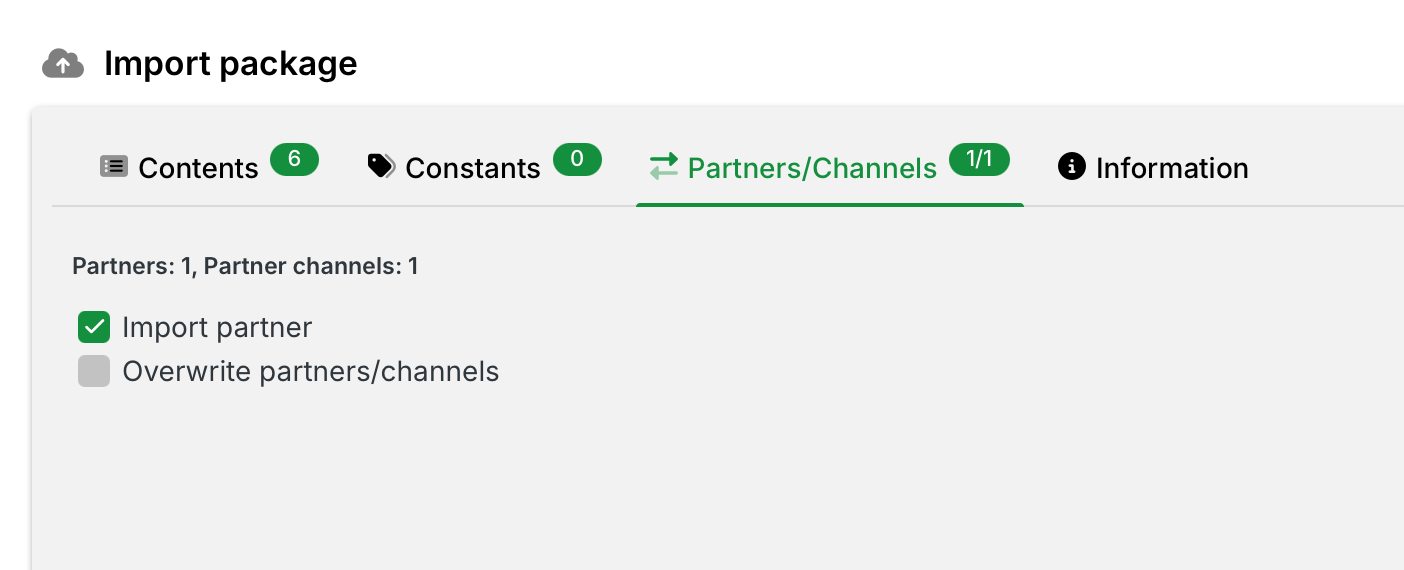
Import package dialog, Partners/Channels tab: import options for partners and partner channels.
The following options are available:
Import partners — Imports the partner included in the package (Lobster Peppol Access Point) along with the associated HTTPS channel. This option is enabled by default.
Overwrite partners/channels — Overwrites existing partners and channels with the same name. Enable this option only if you intentionally want to replace an existing configuration.
IMPORTANT
If the partner Lobster Peppol Access Point already exists in your environment and you have made custom modifications, leave the Overwrite partners/channels option disabled to preserve your configuration.
Complete the import
Review the displayed components across all tabs, click Import, and confirm to start the import.
2. Configure credentials
Credentials for sending invoices
Username and password for the Lobster E-Invoicing HTTPS endpoints.
Request credentials from the Lobster Customer Success team.
Credentials for receiving invoices
Provide your endpoint URL.
Define a username and password for authentication.
Partner channel configuration
The DataFlow package includes the following pre-configured components:
Partner: Lobster Peppol Access Point
HTTPS channel: peppol_ap
Navigation:Administration → Partner → Partners/Channels → Lobster Peppol Access Point → peppol_ap
Configure outbound credentials
Section: Own ID
Enter the username and password provided by the Customer Success team.
.png)
Own ID section: username, password, and partner address fields.
IMPORTANT
The partner address in the package points to the test environment by default. Before deploying to production, update this URL to the production endpoint.
Configure inbound credentials
Section: Partner ID (Partner towards me)
Create a username and password.
Provide these credentials to the Lobster Customer Success team.
.png)
Partner ID section: username and password fields.
Share endpoint URL
URL format:<your-server-name>/dw/request/<endpoint-uri>
Locate the endpoint URI:
Profile:
TEMPLATE_PEPPOL_AP_receiveUblInvoice_BisBilling3.0Phase 1 → URL Address
.png)
Phase 1 HTTP settings: URL address suffix and allowed HTTP methods.
3. Use profile templates for custom mappings
The package contains profile templates for both directions: sending and receiving UBL invoices.
Sending invoices
Smoke test and mapping example: TEMPLATE_PEPPOL_AP_sendUblInvoice_smoketestExample
Uses your credentials to connect to the Peppol Access Point service.
Includes an example 1:1 mapping of Peppol BIS Billing 3.0.
To run a smoke test, right-click the profile and select Restart → Start Cron.
Customizable template:TEMPLATE_PEPPOL_AP_sendUblInvoice_BisBilling3.0
Use this template to send UBL invoices through the Peppol Access Point service.
Replace the source structure with your custom invoice format.
Map your format to the pre-filled UBL target structure.
Synchronous HTTP response handling: TEMPLATE_PEPPOL_AP_receiveHttpResponse
Processes the synchronous HTTP response returned by the sending profile.
Replace the target structure with your custom format.
Process the response according to your requirements.
Asynchronous status notifications: TEMPLATE_PEPPOL_AP_receiveStatus
Provides a callback endpoint for asynchronous status notifications from the Peppol Access Point (for example, delivery acknowledgements or error messages).
Replace the target structure with your custom format.
Process the received status notifications according to your requirements.
Receiving invoices
Template: TEMPLATE_PEPPOL_AP_receiveUblInvoice_BisBilling3.0
Use this template to receive UBL invoices from the Peppol Access Point service.
Replace the target structure with your custom invoice format.
Process the received invoices according to your requirements.
Support
For questions about DataFlow configuration, contact the Lobster Customer Success team. Verify that all credentials are correctly configured before deploying to production.
Contact
Lobster DATA GmbH
https://www.lobster-world.com/
support@lobster.cloud
Servers
Production
Live environment for sending invoices through the Peppol network.
https://connect-data-network.lobster-cloud.com
Staging
Test environment for sending invoices through the Peppol network.
https://connect-test-data-network.lobster-cloud.com
Customer webhook endpoint
Your endpoint for receiving invoices from the Peppol network.
Server variables
customer-domain — Your webhook endpoint domain, as configured in the Lobster E-Invoicing Portal.