See also: Base64 encoding
Value resolver – Abstract
Purpose: "Decodes" a Base64-encoded
Stringas an input value either as aString(default) or as a "ByteArray" (byte[]).Tooltip
Usage: The input value must be a text value (
String) that corresponds to the Base64 format (including the "=" filler character at the end if required). Then – depending on the return as ByteArray option – the "decoded" value is returned as a string or "ByteArray" (byte[]). Otherwise: "no value" ($null)Parameter: The return as ByteArray option is unchecked by default. The decrypted value is then returned as a
String. Otherwise: as "ByteArray" (byte[]).
The Base64 decoding resolver "decodes" a Base64-encoded string as an input value either as a String (default) or as a "ByteArray" (byte[]).
The input value must correspond to the Base64 format and therefore fulfill the following requirements:
This is a text value (
String).The text value may only contain characters from the Base64 character set (
[A-Z][a-z][0-9]+/) and can contain up to two instances of the fill character (=) at the end.The length of the text value (including any filler characters at the end) must be an integer multiple of 4.
If the input value violates at least one of these requirements, the return value is "no value" ($null).
Background: Base64 coding
The Base64 code is not encoding in the cryptographic sense. It is merely a mapping rule for converting binary data by which a sequence of bytes (groups of 8 bits) is transferred into a character set with 64 "readable" and common characters (
[A-Z][a-z][0-9]+/).As 6 bits are required to distinguish 64 characters, a group of 4 Base64 codes (4 x 6bit = 24bit) each represents 3 unencrypted bytes or letters of an ACSII text.
Example: Text:
ABC→ ASCII byte sequence:{65, 66, 67}
→ Bits grouped 8 at a time:{01000001, 01000010, 01000011}
→ Bits grouped 6 at a time:{010000, 010100, 001001, 000011}
→ Base64 value/code:{16/Q, 20/U, 9/J, 3/D}→ Base64 code:QUJDNOTE At the end of the return value, up to two actual-equal characters (=) can appear, which are not contained in the Base64 character set and are only used as fill characters if the 3 : 4 substitution scheme is not completely utilized due to the length of the input value.
Example: TextAB→{01000001, 01000010} → {010000, 010100, 001000, } → {16/Q, 20/U, 8/I, } → QUI=
Configuration
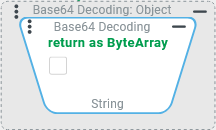
The return as ByteArray option is unchecked by default. With this setting, the result of the decoding is returned as a text value ( |
|
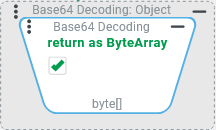
If the return as ByteArray option is checked, the result of the decoding is returned as a ByteArray ( |
|
Example
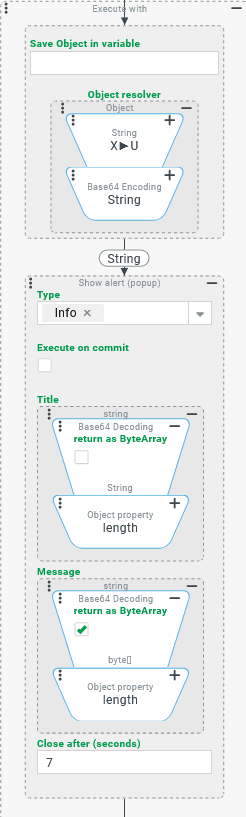
The following example is only intended to illustrate the effect of the return as ByteArray option. It has no immediate practical use.
The screenshot on the right shows an Execute with value resolver whose Object resolver is used here to generate a Base64 string that "encodes" the character string "X►U" (with a special Unicode character in the second position). The generated Base64 string, which is the temporary reference object for the action block, is The action block contains a Show alert event action that uses one instance each of the Base64 decoding resolver in the Title and Message to decode the generated base string. In the Title, the return as ByteArray option is unchecked (default), so that the original In the Message, the return as ByteArray option is checked so that not the original In both cases, an Object property value resolver is linked that accesses the length property, which specifies the Since the unencoded text contains a special character "►", for which the UTF-8 encoding – unlike for characters from the ASCII character set – requires several bytes, the length of the character string (3 characters) differs from the length of the byte array (5 bytes). |
|
Runtime example:
| |