See also: Base64 decoding
Value resolver – Abstract
Purpose: Returns the base64-encoded
Stringfor a suitable input value ("Content", "Document", "File information", "File reference",String).Tooltip
Usage: The content to be returned as a Base64 string must be provided as the input value. The following data types can be used for this:
String"Content" (
Content)"Document" (
Document)"File information" (
FileInfo)"File reference" (
FileReference)NOTE Internally, the input value is always converted into a "Content" (
Content) object. If none of the data types mentioned here is available as an input value, the return value is "no value" ($null).
The Base64 encoding resolver returns the Base64-encoded String for a suitable input value.
A "Content” (
Content) data object is expected as an input value, whereby an automatic type conversion is performed based on the following data types:Text value (
String)"Document" (
Document), see Documents"File information" (
FileInfo), see File"File reference" (
FileReferenz), see File reference, File manager
For all other data types as input value, the return value is always "no value" (
$null).
Background: Base64 coding
The Base64 code is not encoding in the cryptographic sense. It is merely a mapping rule for converting binary data by which a sequence of bytes (groups of 8 bits) is transferred into a character set with 64 "readable" and common characters (
[A-Z][a-z][0-9]+/).As 6 bits are required to distinguish 64 characters, a group of 4 Base64 codes (4 x 6bit = 24bit) each represents 3 unencrypted bytes or letters of an ACSII text.
Example: Text:
ABC→ ASCII byte sequence:{65, 66, 67}→ Bits grouped 8 at a time:
{01000001, 01000010, 01000011}
→ Bits grouped 6 at a time:{010000, 010100, 001001, 000011}
→ Base64 value/code:{16/Q, 20/U, 9/J, 3/D}→ Base64 code:QUJDNOTE At the end of the return value, up to two actual-equal characters (=) can appear, which are not contained in the Base64 character set and are only used as fill characters if the 3 : 4 substitution scheme is not completely utilized due to the length of the input value.
Example: Text
AB→{01000001, 01000010} → {010000, 010100, 001000, } → {16/Q, 20/U, 8/I, } → QUI=
Example
A logo image file stored in the server file system via the Lobster Data Platform/Orchestration File manager is integrated into the body of an e-mail message in HTML format.
The content of the small image file for the "logo" should not be referenced but provided directly as a payload for the src attribute of an img element via the Base64 format.
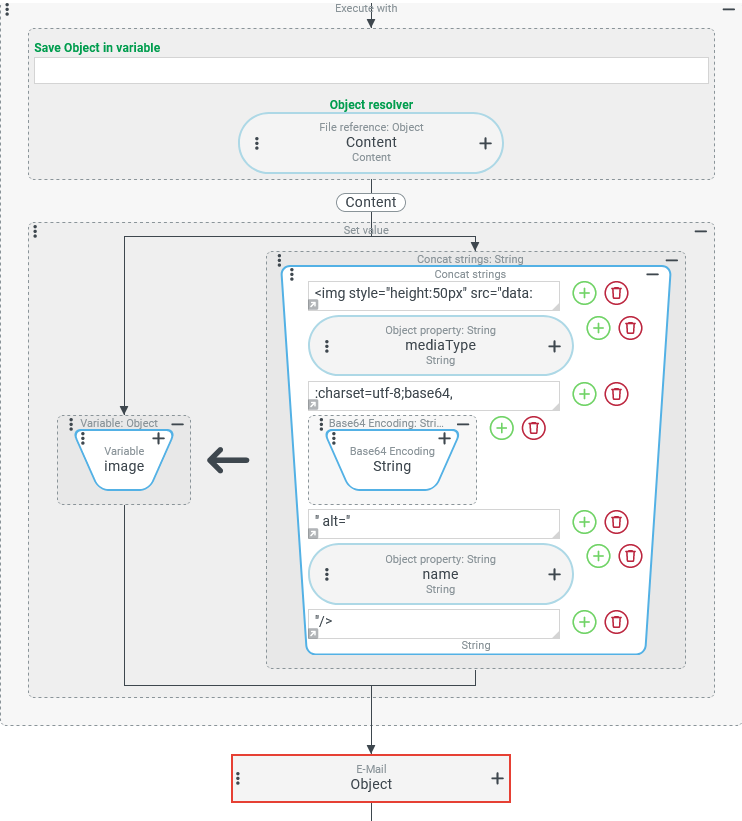
The HTML code for the imgelement should be provided in advance in a variable with the name image, which can be accessed (several times if necessary) when compiling the e-mail body:
<img style="height:50px" src="data:<type>;charste:utf-8;base64,<base64data>" alt="<fileName>" />
<type>represents the content type of the file (as a string, e.g.image/png).<base64data>defines the Base64-encoded file content.<fileName>defines the file name that appears as a placeholder if the file cannot be displayed.
Configuration:
The screenshot on the right shows an Execute with event action that defines the file to be included in the Object resolver as a temporary reference object via a File reference value resolver. This means that the "Content" (
|
|