See also: Call profile (Event action)
Value resolver – Abstract
Purpose: This converts the data of the input value into a "server XML", which is passed in a synchronous profile call to the profile identified by Profile name.
Tooltip
Usage: A "Server XML" is created from the input value and passed to the profile identified by the profile name, which is called synchronously. Additional Variables can optionally be passed to the profile. Further parameters concern the handling of the return value or errors during profile execution.
Parameter:
Profile name: Name of the profile to be called synchronously.
Fail on profile error?: This option determines whether an error within the processing of the profile should be treated as an error in the context of Lobster Data Platform/Orchestration.
Parse result: This option determines whether a text in XML format is expected as return value of the profile, which is interpreted in Lobster Data Platform/Orchestration as the "Server XML" of an object. When the input data for the profile relates to an entity defined in Lobster Data Platform/Orchestration, the target structure of the profile may be interpreted as an update for the volatile data of this entity (similar to an Import).
Use as string: This option determines whether the value resolver should convert the return value of the profile into text or return it directly (e.g. as an object or binary data).
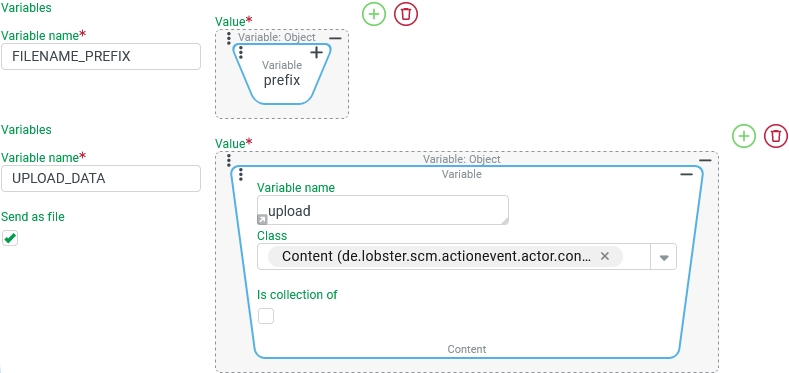
Variables: Value assignments for profile variables can be added or removed via the symbols
and
. In the profile, the specified Variable name receives the prefix
MSG_CALL_.NOTE Together with the profile call parameters, the values for the
VAR_PROCESS_XMLandVAR_APPLY_TO_INPUTprofile variables may also be decisive for the effect of a profile call. As only a few of the many possible combinations are considered to be "suitable" for the specific application, we recommend reading the manual entry and intensive tests.
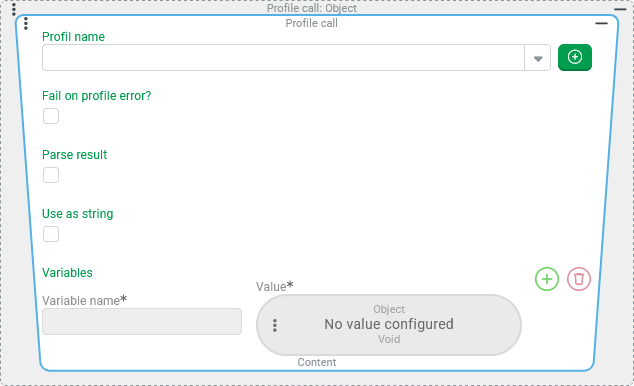
The Profile call value resolver converts the data of its input value into a "server XML" (see Object to server xml) to pass it to the profile identified by Profile name.
Optionally, the values of the Variables
MSG_CALLcan be specified via value resolvers during the Profile call (see "Configuration" for details).
The profile is always called synchronously. The processing context of the value resolver is therefore interrupted until the called profile has been processed.
The processing context is canceled with an error message (
"Failed to call profile...") if the called profile does not exist, which causes a rollback for the surrounding transaction.If the called profile exists but is not "unlocked (active)", the processing context is immediately continued. The value resolver then returns "No value".
If an error occurs during the execution of the called profile or is specifically triggered, the processing context is canceled or continued (with "No value" as the return value of the resolver) depending on the selection for the Fail on profile error? option.
A return value from the profile can optionally be considered, provided the profile serves an active response path for Lobster Data Platform/Orchestration – e.g. via CronPassBackDataResponse (Responder).
Depending on its parameters, the value resolver returns one of the following data types as a return value via the options Parse result and Use as string – possibly in interaction with further details within the profile configuration:
Action event content, e.g. with the binary data of a graphic or file supplied as the target file of the profile (in the
bodyfield).A data object created by "parsing" a "server XML" target file of the profile (see Server xml to object).
Text (string) obtained either directly from the target file returned by the profile or from the data object parsed from it.
CAUTION From a strictly technical point of view, the Profile call value resolver can be used like any other value resolver at all positions in configurations where a "value" is supposed to be resolved. However, with respect to performance, caution should be exercised when used in contexts where the value in question must be "resolved" particularly frequently. This applies especially to the definition of Association criteria, which are not configured as logic components (see Association criteria of type 'Logical component' type) and are therefore typically evaluated by the system with a very high frequency..
Special use case: update an entity passed as input value
If the input value for the value resolver is an "entity" as a data object, a suitable XML target structure can be interpreted as an update for this entity, in the same way as the logic applicable for an Import. Whether this mechanism takes effect or not depends on the selection for the option Parse result – possibly in interaction with the profile variables VAR_PROCESS_XML und VAR_APPLY_TO_INPUT – with the following case distinction:
Option "Parse result" | VAR_PROCESS_XML | VAR_APPLY_TO_INPUT | Impact on input value (entity) | Return value (note below!) |
|---|---|---|---|---|
|
empty or not used |
| Update based on the target structure. | Updated entity (parsed). |
| Input value unchanged. | Target structure (parsed as entity). | ||
| irrelevant | Input value unchanged. | ||
Do not parse result |
|
| Update based on the target structure. | Target structure as text(file) in the |
All alternative combinations | Input value unchanged. | |||
.svg) Parse result
Parse result.svg)
NOTE If the Use as string option is set, then the return value specified in the table is subsequently converted to a string:
Then its string conversion appears instead of an entity, e.g.
5751:en.lobster.scm.order.bto.Order@658e4a20for the data object of an "order" with the ID5751(and the Java Object Id654e4a20).The string conversion for a "Content" object that contains the base64-encoded text of a target structure in the
bodyprovides the "server XML" for the target structure (and not for the updated entity, for example).
IMPORTANT While an Import implicitly saves the updated entity, an update via the Profile call value resolver only affects the volatile data object of the entity in question. If a Profile call value resolver is used within the "Validating rule" of an event handling, the updated state is crucial for all subsequent rules, if any, and also for event actions executed when the validation is passed. Whether the update is saved, and therefore permanently effective, depends on the further context of the call. Within an event handling, the entity in question can be marked to be saved upon successful completion of the transaction via the Save changes later event action, if required.
Assignments to MSG_CALL variables in the profile:
Information about the applicable login context (company, role, user) is automatically assigned to the MSG_CALL variables predefined in profiles – as usual for profile calls from Lobster Data Platform/Orchestration. These are automatically filled with values at runtime depending on the session"s login data as well as, if necessary, taking into account any adjustments made by the Run as event action:
Data object | Value | Variable name (Lobster Data Platform/Integration | Data type (Lobster Data Platform/Integration) |
|---|---|---|---|
ID ( | MSG_CALL_SCM_Company_id |
| |
Company account data object as XML (text) | MSG_CALL_SCM_Company_xml |
| |
ID ( | MSG_CALL_SCM_Role_id |
| |
ID ( | MSG_CALL_SCM_User_id |
| |
User name ( | MSG_CALL_SCM_User_username |
| |
Data object of the user account as XML (text) | MSG_CALL_SCM_User_xml |
|
Optionally, value assignments can be configured for further Variables to provide additional data to the called profile.
Configuration
In the Profile name parameter, the profile to be called must be identified by a static direct entry or by selecting an entry from the drop-down list activated via "Auto-complete". NOTE In contrast to calling profiles in the context of forms, access control for profiles based on Profile securities is not guaranteed. All available profiles can be selected and executed. |
|
The Fail on profile error? option decides how event processing reacts to an error while executing the profile:
|
Notes on error handling:
Notes on error handling:
|
The option Parse result specifies that a text in XML format is expected as the return value of the profile, which can be interpreted in Lobster Data Platform/Orchestration as the "server XML" of an object.
|
|
The Use as string option determines whether the return value of the value resolver should return the data obtained from the profile call directly or formatted as text.
|
|
In the Variables area, the symbols
|
|