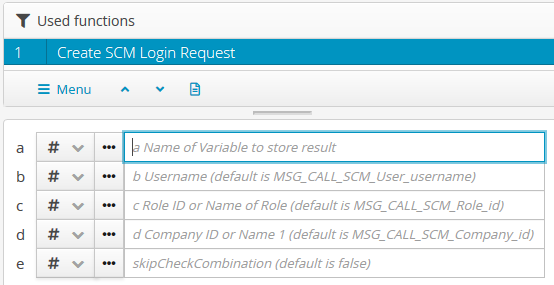
The Create Login Request (Integration function) function creates the XML structure for a Integration login object (LobsterDataLoginRequest) based on the specifications for parameters (b to e) and saves it in the variable with the name defined in parameter a.
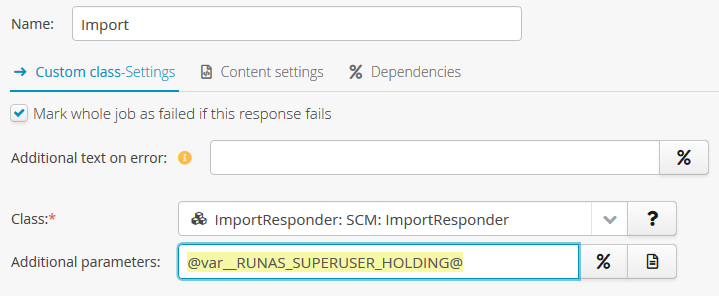
For example, an ImportResponder (Responder) (in the field "Additional parameters") can refer to this variable to define the login context for an Import.
The Import (Integration function) function also provides a separate parameter for a Integration login object to which this variable can be assigned as a source.
Parameters
Parameter | Description | Example | Note |
|---|---|---|---|
a | Name of the variable in which the Integration login XML is to be saved. |
| This parameter must be assigned the name of the variable as a text value (typically a static assignment with parameter type "#"). CAUTION In conjunction with parameter type "%", the specified variable name would be defined as the source of the text value defining the name of the target variable. This is usually not effective. However, a temporary change to the parameter type "%" can be helpful if an existing variable is to be selected by dropdown. Afterwards, the parameter type must be set to "#" again so that the selected variable name is assigned as a static text value at runtime. |
b | User name ( (see Users) Standard: |
| As in the login dialog, the identification of the user account is case-sensitive. Without an assignment for this parameter, the value of the metadata variable |
c | ID ( (see Roles) Standard: |
| The identification of a role by name is case sensitive. Without an assignment for this parameter, the value of the metadata variable |
d | ID ( Standard: |
| Either the ID of a company or the exact name of the field "Name 1" in the company account can be entered. Without an assignment for this parameter, the value of the metadata variable |
e | Determines whether the check of the selection of company and role (via parameter c and d) against the Standard: |
| With the value Otherwise, (e.g. with the value |
Example
A profile call from Lobster Data Platform/Orchestration should, among other things, cause the deletion of certain entities via Batch import, which should be executed with a login in the role "Super User" (with ID 1), so that the deletion can be executed reliably regardless of ownership and role permissions.
Under certain circumstances, the same Batch import may also create new entities for which a specific company from the existing hierarchy ("ACME Holding Ltd.") must be assigned as ownerId.
At the same time, the user in whose context the profile was called up should be traceable, e.g. as "creator" (creatorId) of the added entities.
Configuration:
In the target structure of the profile the function Create Login Request (Integration function) is parameterized in a calculation field as follows:
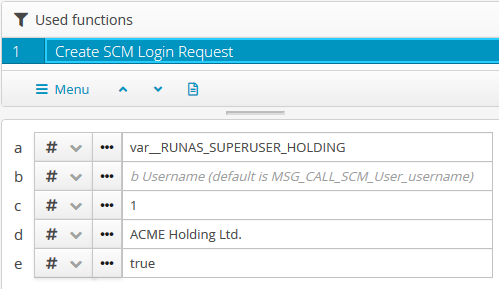
The parameter a identifies the name of a variable in which the Integration login is to be stored as
var__RUNAS_SUPERUSER_HOLDING.The parameter b is not assigned, so that the logged-in user is taken from the variable
MSG_CALL_SCM_User_username, which was initialized with the profile call.The parameter c identifies the role "Super User" via the internal ID 1.
The parameter d references the exact name (
address.name1) of an existing company account.The parameter e with the value
trueensures that there is no check as to whether or not the same user could interactively log in as "Super User" in the context of "ACME Holding Ltd".
In the response path set up for the Import, the ImportResponder (Responder) refers to the variable set in the mapping: