Event action – Abstract
Purpose: This event action executes an HTTP request with a supported method (
GET,POST,PUT,PATCH,DELETE) and grants access to the response.Tooltip
Usage: The event action notes content to create a log entry when the current transaction is completed.
Parameter:
The Method to be executed must be supported (
GET,POST,PUT,PATCH,DELETE) and specified in capital letters, otherwiseGETis used.URL and, if applicable, Query define the relevant components of the 'call address'.
The Request Header and Payload define data that is included in the request.
Response Header and Response Content define targets for assigning details from the response.
Further parameters are 'hidden' in an Expandable:
References to a server-side HTTP Channel ID or a Certificate ID can be used to authenticate the request.
The Enable streaming option enables the response to 'push' server-sent events via
text/event-streamresponse type.With the Via DMZ option, the request is executed via the DMZ.
The Timeout determines (except by Enable streaming) the maximum waiting time in seconds after which the request should be canceled in a controlled manner.
The Retries setting is added to the request so that repeat runs are triggered if necessary.
NOTE The ‘Storage’ object assigned to the Response Header indicates the progress status of the request via the
RESPONSE_CODEkey. The optionalERROR_INFOkey may contain further error information.
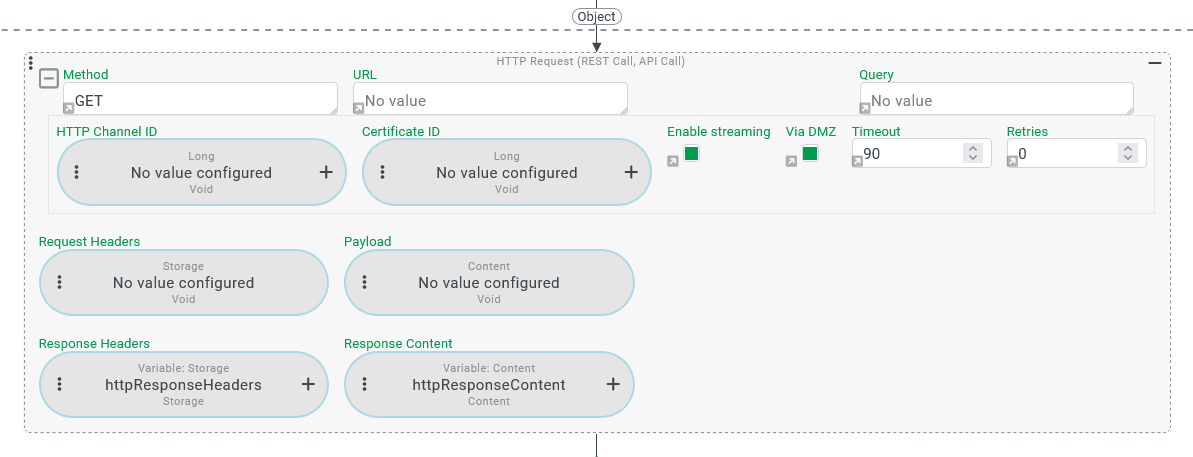
The HTTP Request (Action) event action executes an HTTP request for a supported Method (GET , POST , PUT,PATCH, DELETE), taking into account the other configured parameters (see 'Configuration' for more details).
The URL must contain a protocol (e.g.
https) and a web address that can be resolved by the Lobster Data Platform server.The URL and Query parameters are located in the header area of an Expandable element, whose detail area (shown expanded in the screenshot above) contains further parameters (see ‘Configuration’ for more details).
From a technical point of view, specifying a string for the Query parameter is optional. It enables value assignments to URL parameters that are taken into account according to the syntax of the Method.
The Request Header and Payload parameters define the header and any ‘payload’ to be transmitted for the request (see ‘Configuration’ for more details).
If the URL can be resolved and the addressed server responds, the response is prepared as follows:
A data object of the ‘Storage’ (
Storage) type is generated from header information, which is stored in thehttpResponseHeadersVariable by default (see Response Headers parameter of the response).A data object of the ‘Content’ (
Content) type is generated from the body that may be provided depending on the selected Method, which is saved in thehttpResponseContentVariable by default (see Response Content parameter).
Configuration
The HTTP Request (Action) event action does not expect a specific reference object. However, value configurations for parameters can access the applicable reference object.
All parameters can be defined by value configurations if required. If a static value is configured (see Static values) and the relevant form element is displayed in conjunction with a small grey arrow (bottom left), this must be clicked on to switch to the value configuration.
Parameter | Data type | Default value | Usage |
|---|---|---|---|
Method | Text ( |
| The text value for the Method, which can either be entered directly or determined dynamically via a value configuration at runtime, must correspond exactly to the name of one of the supported HTTP Methods. The event action only supports the HTTP methods in the following whitelist:
This positive list could be expanded in future versions. IMPORTANT In many cases, an unsuitable input/configuration for the ‘Method’ parameter does not generate an error message because The following rules apply to the interpretation of text values for the Method parameter:
The following examples illustrate the potential effects:
|
URL | Text ( | No value | The text value for the URL, which can be entered directly or determined dynamically via a value configuration at runtime, must specify the protocol to be used (e.g. NOTE If the HTTP request uses URL parameters, the complete HTTP query string must be defined via the Query parameter. If the string for the URL contains an HTTP query string, this is ignored. |
Query | Text ( | No value | A text value can optionally be provided in the Query parameter, either by direct input or dynamically determined at runtime via a value configuration, which is attached as an HTTP query string to the string defined as the URL. The separator (?) provided in the URL syntax is inserted automatically. It should therefore not be included in either the URL string or the Query string. The Query string can concatenate several value assignments with the Example: The following Query string contains assignments for three parameters: token=DEMO®ion=APAC&fromDate=2025-01-01 |
Request Headers | Storage ( | No value | The optional value configuration for the Request Headers parameter should return a ‘Storage’ data object at runtime that contains the information for the HTTP Request Header. NOTE Instead of a ‘Storage’ ( |
Payload | Content ( | No value | The value configuration for the Payload parameter should return a ‘content’ ( NOTE The value configuration for the Payload is technically optional. However, the Payload may be required depending on the Method (see above).
IMPORTANT If the value configuration for the Payload parameter returns a type other than ‘Content’ ( |
Response Headers | Storage ( |
| The optional value configuration for the Response Headers parameter defines the target of a value assignment for the ‘Storage’ ( IMPORTANT The ‘Storage’ (
|
Response Content | Content ( | No value | The optional value configuration for the Response Content parameter defines the target of a value assignment for the ‘Content’ (
NOTE If the Show content event action is used to display the ‘Content’ object from the return value, the value in the |
The following parameters are contained in the detail area of an Expandable that is collapsed by default. | |||
HTTP Channel ID | Integer ( | No value | The HTTP Channel ID parameter can be used to reference a channel created in (see [Lobster_data, Channels). If a value configuration exists that refers to a valid HTTP Channel ID (
|
Certificate ID | Integer ( | No value | If the authentication of the HTTP requests requires your own certificate stored on the server side (see Lobster Data Platform/Integration, 'Local Certificates'), this can be referenced via the Certificate ID parameter by setting up a value configuration that returns a |
Enable streaming | Boolean value ( | No value | The Enable streaming option must be selected so that server-sent events (SSE) provided in response to a request can be processed individually (s. Server-sent Events (SSE) verarbeiten). The media type ( The stream of SSEs (server-sent events) can be processed after the HTTP Request (Action) has been executed by reading the
|
Via DMZ | Boolean value ( | No value | If the Via DMZ option is selected, the HTTP request is executed via the DMZ. The selection of the option can either be defined statically via the Check box element in the configuration or bound to a value configuration that returns a Boolean value ( |
Timeout | Integer ( | 90 | The Timeout parameter defines an upper limit for the runtime of the HTTP requests in seconds. A value of 90 (seconds) is assigned by default. If the runtime of HTTP requests exceeds the limit defined by the Timeout, the execution is cancelled. The event handling is not cancelled, however, so that the ‘Storage’ (
|
Retries | Integer ( | 0 | The Retries parameter defines the number of attempts to be made if the HTTP request does not return a response with a
|