The HTTP Request (Action) event action can be used in conjunction with the GET method to establish a connection to a server/endpoint, which can then use this connection to transmit an unspecified number of Server-Sent Events (SSE).
In this particular application scenario for the HTTP Request (Action) event action, the request does not result in a single response, but potentially a series of responses that arrive as a stream of events without a predefined 'schedule' and are to be processed in real time.
The cyclical processing of the 'event stream' requires special measures in the call context, i.e. the event handling in which the connection was established via HTTP Request (Action) event action:
The 'Enable streaming' option for the HTTP Request (Action) event action must be selected.
The targeted server/endpoint must provide a response with the
text/event-streammedia type.The 'Response content' parameter defines a suitable target for the assignment of the 'Contents' (
Contents) object to which the 'Event stream' is mapped.The default assignment to the Variable
httpResponseContentfulfills this requirement, as does an assignment to a suitable data object via an Object property value resolver.However, an assignment to a File reference is not suitable for processing server-sent events individually and in real time.
For streaming in the context of event handling, an HTTP Request (Action) event action must be combined with a For each loop event action according to the following diagram:
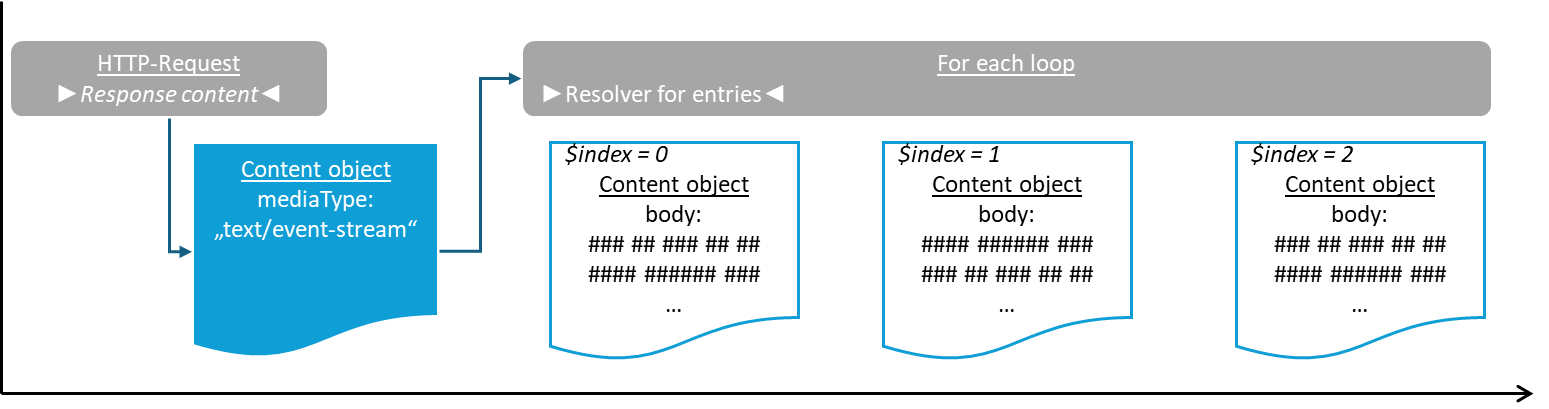
The HTTP Request (Action) event action establishes the connection for streaming and receives a 'Content' (
Content) object with the media type (mediaType)text/event-streamin response.The following For each loop event action accesses the 'Content' (
Content) object in the 'Resolver for entities' parameter.Each time a specific server-sent event is transmitted, an iteration of the loop is triggered, for which a 'Content' (
Content) object is generated as the reference object, whosebodyfield contains the data of the event.
The following configuration examples illustrate the handling of the various 'Content' (Content) objects in different contexts:
|
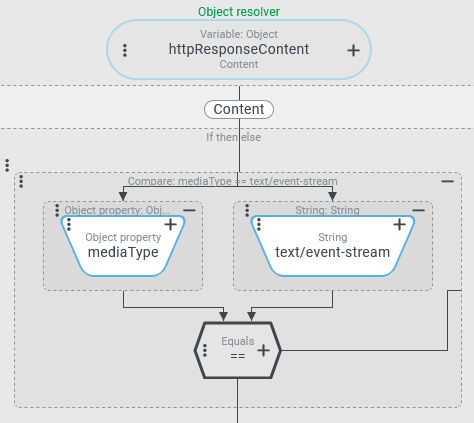
| The screenshot on the left shows an excerpt from an Execute with event action that defines the NOTE In the schema (above), the relevant 'Content' ( In the use case on the left, an Entity property rule within an If then else event action compares the value of the This response is available immediately after the connection has been successfully established, regardless of whether the source has already sent a server-sent event or not. |
| The | |
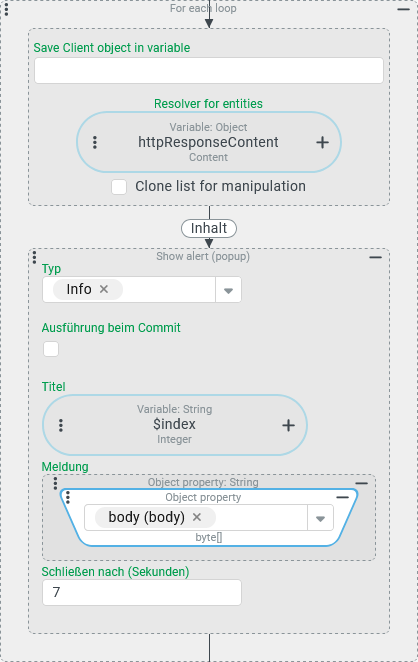
| The 'Content' ( In this particular configuration, the loop immediately executes an iteration for each event arriving via stream, for which another 'Content' ( In the example on the left, a notification is issued immediately each time an event occurs, with the string image of the var/ The loop waits for further events (iterations) until the addressed server/endpoint terminates the connection. Until then, a thread of the Lobster Data Platform/Orchestration server remains occupied in order to 'listen' for the arrival of further events. Within the action block for the iteration, a cancellation criterion for 'listening' for further events can be formulated using If then else and Break loop. However, this is only ever checked if an event has occurred. No maximum waiting time can be defined for 'listening' without an event. The 'Timeout' parameter in the configuration for the HTTP Request (Action) event action only applies to the initial connection setup and does not limit the waiting time until the next event arrives. | |
NOTE If the For each loop event action is used as a 'recipient' for an 'event stream' as described here, in contrast to all other use cases, the maximum number of iterations executed is not predetermined by the return value for the Resolver for entities parameter. In the action block for the iteration, the | ||