Resolver – Abstract
Purpose: Defines a static numerical value that is output either as an
Integeror aDoublevalue.Tooltip
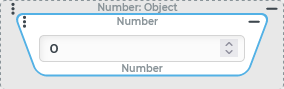
Usage: The resolver supplies the parameterised numerical value as an
IntegerorDoublevalue. The input value is ignored.Parameter: The only parameter is an input field that accepts numeric input with or without decimals. The integrated stepper generates integers with an offset of ±1 to the output value. Decimals are lost in the process.
NOTE Integers outside the
Integervalue range (approx.±2e9) generateDoublevalues as return value.
IMPORTANT All resolvers for Static values ignore the input value. Within a resolver chain (see Chained resolver) this prevents the processing of all preceding resolvers (if any).
The Floating number resolver returns a statically defined value that is treated either as an Integer value or as a Double value, depending on the numerical value entered.
Integers in the value range
-2147483648to2147483647are returned asIntegervalues.Non-integer values and integers outside the
Integervalue range are returned as aDouble.
For the context of the configuration, the parent data type "Number" (Number) is defined for the return value.
NOTE Specific return values are nevertheless always either Double or Integer, but also pass a Check type against the Number class.
IMPORTANT Applicable decimal separator depends on browser settings
Unlike what is usual in Lobster Data Platform/Orchestration, the applicable decimal separator for the Floating number resolver is not determined as localization for the Current locale (
[lobsterui,decimalSeparator]) via the Localization or applicable Company specific localization. Instead, the decimal separator applicable on the browser side (possibly with reference to the client operating system) is decisive for the input of decimal numbers in the Floating number resolver.
Configuration
The value in the input field can be changed either by direct input, pasting from the clipboard or via the stepper functionality.
The direct input accepts only digits, the applicable decimal separator (see above) and optionally a preceding minus sign as input.
Since validation takes place after each keystroke, previous entries may be lost if an unwanted character is entered at the position in question.
As long as the text field contains an invalid entry, which is marked by a red frame, further entries or adjustments to the previously entered string are possible.
If the input is still invalid when the configuration is saved, the
Doubleerror valueNaN(Not a Number) is persisted instead of the input.
When pasting from the clipboard, the string contained in the input field after pasting is validated as a whole.
Both the period (.) and the comma (,) are evaluated as decimal separators if exactly one of these characters occurs exactly once.
IMPORTANT Thousands separators should therefore never be included in text pasted from the clipboard. They are either misinterpreted as decimal separators or completely prevent validation as a number.
In contrast to the character-by-character direct input, the exponential notation (e.g.
-2.5e-3for-0.0025) is also supported during insertion, if necessary.If the updated string cannot be validated, a red frame around the input field indicates this.
The stepper functionality allows incremental changes of an existing value in steps of ±1.
CAUTION The stepper processes only the integer component of the output value. If the output value contains decimals, these are ignored. Decimals are "lost" without any rounding. The result is always an integer.The existing value can be increased/decreased step by step by clicking the up/down buttons on the right side of the text field.
Alternatively, the cursor keys (up/down) or, if necessary, the mouse wheel can be used for the same effect as long as the input field has the focus.
Example
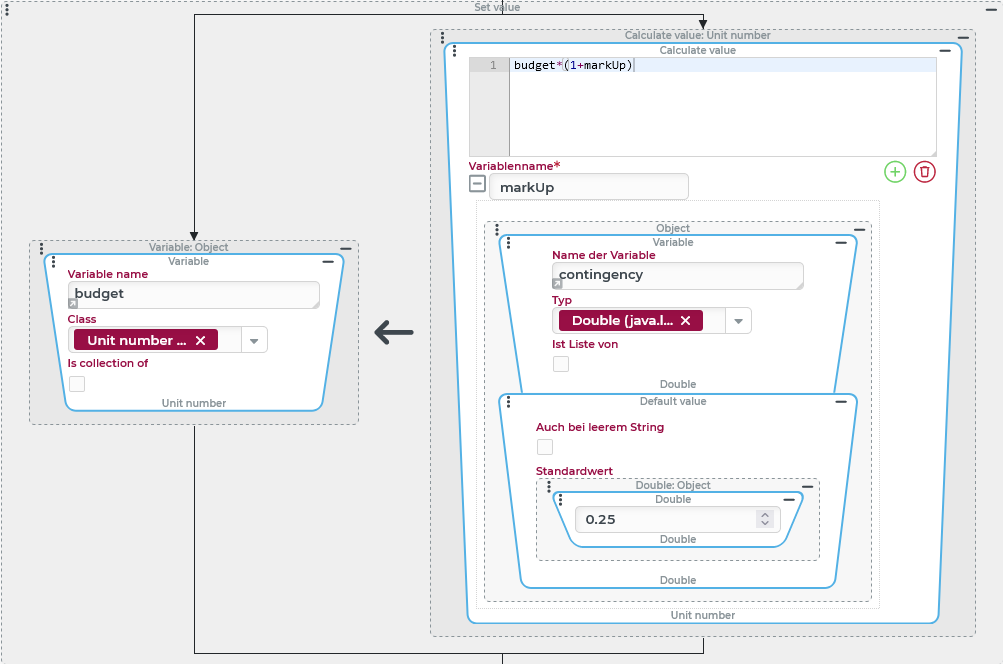
In the context of an event handling, a percentage markup is added to an entry in a budget variable as a "Unit number".
As a rule, a specific "safety margin" is defined as a Double value via a further variable (contingency). In case this variable does not contain a value, a default surcharge of 25% (as decimal number: 0,25) applies.
Configuration:
The Set value event action shown on the right scales the value of the
It is assumed that the A Calculate value resolver is used on the right side of the assignment, which defines the right side of this formula:
|
|