This topic describes the Advanced settings dialog of a REST API endpoint: general options, policy settings, and OpenAPI error codes. For an overview of the REST API configuration, see REST API.
General advanced settings
A click on the Button Advanced settings opens a modal dialog with additional endpoint settings.
The Check box Input must be filled (inputMandatory) determines whether an input value is mandatory. Default: optional.
The Check box Anonymous access (allowAnonymousAccess) determines whether the endpoint allows anonymous access. Default: not allowed. For details on behavior and risks, see Access control for APIs.
CAUTION
Only release an endpoint for anonymous access in rare exceptional cases. This applies in particular to publicly reachable production systems. Inadvertent or abusive calls can have far-reaching consequences for data security and availability, depending on the workflow.
Is deprecated (Sunset)
The Check box Is deprecated (isDeprecated) marks an endpoint as deprecated. This lets you decommission it in a controlled manner after a grace period.
Once the option is active, a Date/Time element appears. There, you specify the Sunset time to the minute. Until then, the deprecated endpoint remains available.
Until the Sunset time, the endpoint stays in operation. The OpenAPI documentation already marks it as "deprecated".
A call after the Sunset time responds with HTTP error
410 Error: Gone.A Text field for multiline text also appears. There, you enter a Sunset warning.
The text of the Sunset warning appears in the response headers under the key
warningwith the code299, as long as the Sunset time is in the future.During this period, the endpoint shows the visual marker for deprecated endpoints in the GUI and the OpenAPI documentation (for example, strikethrough text).
The platform maps the information about the upcoming shutdown to variables. You access these in the action block via the Variable value resolver:
Property (data type) | Data field | HTTP response header | Variable (data type) |
|---|---|---|---|
Is deprecated ( |
|
|
|
Sunset ( |
|
|
|
Sunset warning ( |
|
|
|
The Text field Description (description) you optionally fill with informative plain text. This documents the endpoint configuration.
Policy settings (policySettings)
The Policy settings tab in the lower part of the Advanced settings dialog manages the policies for accessing the endpoint. The entries reside in the policySettings list field of the endpoint definition.
What are policy settings for?
Policy settings define upper limits for the access frequency of an endpoint at runtime.
An endpoint can use multiple policy settings in parallel. This way, you flexibly model a permitted characteristic for access frequency.
Each individual policy refers to a specific time window. For this time window, it defines a maximum number of accesses to the endpoint.
With two policies, you formulate the following characteristic, for example:
An API endpoint may be called at most 500 times within 24 hours.
The time interval between two calls is at least 30 seconds.
If a call attempt violates one of these two policies, the platform responds with HTTP error
429 Error: Too Many Requestsin the response body. Details on the violated policy are in the response headers.
In the dialog, the configured policy settings appear in a Data grid. Above the list, a detail area shows the properties of the selected entry via Form elements.
By default, there are no policy settings.
The Button New () adds a list entry.
The Button Remove () removes the displayed entry.
Each policy is a list entry of type Policy settings (PolicySettings) with the following properties:
The Combobox Policy (
policy) allows a single selection from the enumeration (classPolicy) to classify the policy.The Max. requests field (
maxRequests) sets the upper limit for the permitted number of accesses within the configured time window.The Time frame in ms field (
timeFrameMs) defines the time window for the upper limit.
NOTE All fields are mandatory. You must fully parameterize each new policy.
OpenAPI error codes
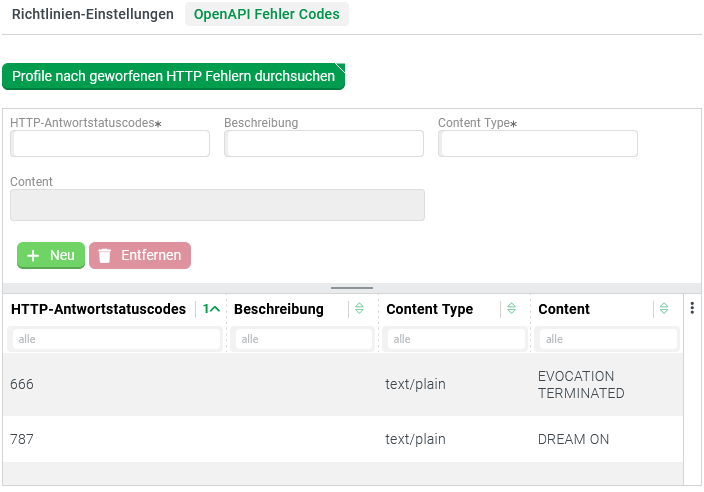
The OpenAPI error codes tab in the lower part of the Advanced settings dialog manages error codes for the OpenAPI documentation. The entries reside in the statusCodes list field of the endpoint definition.
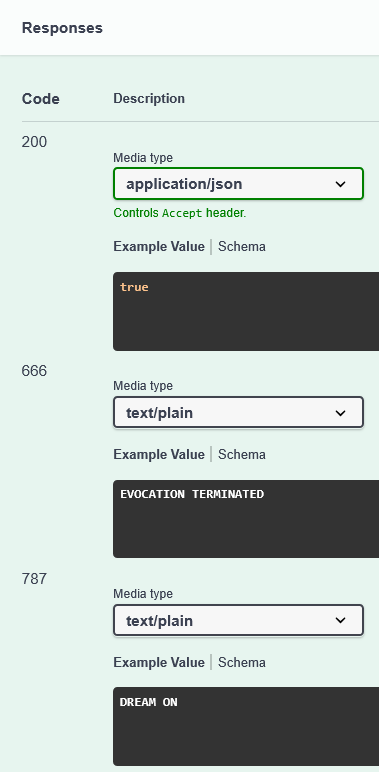
The list enriches the OpenAPI documentation with alternative return values. These return values supplement the regular response with HTTP status code 200.
IMPORTANT You must save changes in the OpenAPI error codes tab for them to appear in the OpenAPI documentation.
You create the entries manually via the user interface. Alternatively, click the Button Search profiles for thrown HTTP errors at the top of the tab. The platform then searches all profiles addressed in the action block for calls to the throwHttpException() function. If it finds status codes not yet in the list, it appends them.
NOTE If a list entry already exists for a status code, the search does not change the entry.
If you expect new content for an already listed status code after a profile change, remove the outdated entry manually. Then click Search profiles for thrown HTTP errors again.
Status codes no longer found during the search are not automatically removed by the platform. They are also not marked as orphaned.
IMPORTANT Assign values for HTTP status codes in the HTTP response codes column strictly uniquely. Otherwise, the OpenAPI documentation can be confusing.
By definition, HTTP response status codes are positive integers between
100and599.For client errors, the specification uses positive integers between
400and499.Via the user interface, you can also assign integers outside this range.
The
throwHttpException()function accepts strings for positive integers from0to999for the corresponding parameter.You can enter and save leading zeros for values below
100. However, the platform ignores these when transferring the value to thestatusCodeslist.
WARNING If the statusCodes list contains the HTTP status code 200, the corresponding definition overrides the OpenAPI representation for the return value. By default, this is derived from the type hint for the response variable in the action block.
NOTE In the following examples, the status codes are deliberately outside the official value range.
Endpoint configuration
Excerpt from the OpenAPI documentation for the endpoint