This topic describes the special client object input type (ASObject) for REST API endpoints. For an overview of the REST API configuration, see REST API.
Choosing client object as input type
When you select Client object (ASObject) as the input type, an Button Client object structure appears to the right of the Combobox element. This defines a Client object structure reference in the clientStructure field.
Clicking the button opens a Popover element. There, you select an existing private or public client object structure or create a new local one.
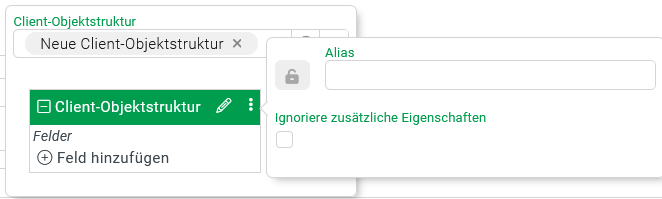
Creating a new client object structure
With the selection New client object structure, an element appears to define the new structure. Optionally, you specify an Alias for the header data in another Popover. The alias must meet the requirements for class names.
The Ignore additional properties option determines whether the data structure provided at runtime can contain fields that are not explicitly defined in the structure. For details, see Client Objekt-Struktur (Definition).
Example: client object structure "Aerodrome"
Via an API endpoint with the POST method, you import master data for landing sites into the Lobster Data Platform.
A landing site can optionally be identified via an ICAO code (4-letter identifier such as EGLL for London/Heathrow) and an IATA code (3-letter identifier such as LHR). Additionally or alternatively, the data object expected in JSON format contains further attributes: geo coordinates, w3w, plain text, and so on.
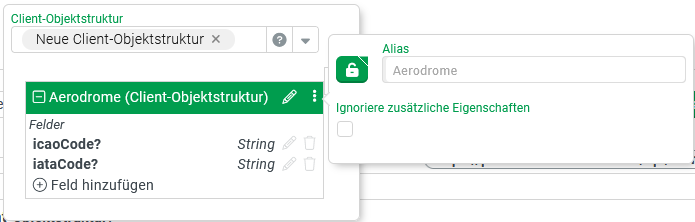
The local client object structure with the Alias Aerodrome defines the optional fields icaoCode and iataCode for this purpose. The Ignore additional properties option remains deactivated (default).
At runtime, the platform responds with HTTP error 404 Error: Not Found when the endpoint receives a data object with an unknown field name. The following structure would therefore not be accepted as an Aerodrome input value:
{"icaoCode":"VHHH","iataCode":"HKG","name":"Hong Kong Intl.","aka":"Chek Lap Kok"}
If you activate Ignore additional properties, the symbol * also appears in the fields list. It indicates that additional fields with arbitrary names are allowed.
Without "Ignore additional properties" | With "Ignore additional properties" |
|---|---|
|
|
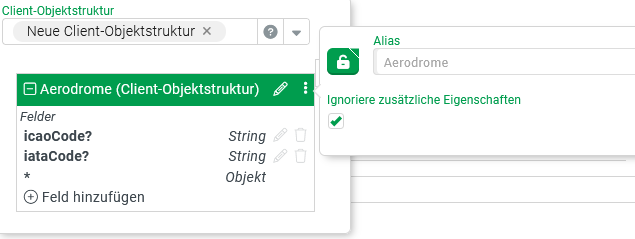
NOTE The associated OpenAPI example structure instead contains a field whose name follows the schema additionalProp<index>, for example additionalProp1.
The endpoint now also accepts a data object such as {"designation":"CVN-65", "name":"USS Enterprise"} as an Aerodrome input value. It contains fields that are not declared in the client object structure.
NOTE Ignore additional properties: This only affects acceptance of the data object as input type. The platform does not remove the additional fields from the data object. You can still access them in the action block.
For access via the Object property value resolver, specify a concrete field name (here designation) as free text. To try multiple field names, use chained Default value value resolvers.
Alternatively, treat the Client object type as a map. The All map keys value resolver enables systematic evaluation of all existing field names.
Client object input type for HTML form data
A request with the Content-Type header application/x-www-form-urlencoded delivers data from an HTML form. This data arrives as a concatenation of key-value pairs in a URL-encoded String.
You process this data with the Client object input type. The following table shows how the syntax is interpreted, with examples:
HTTP form data | Client object (JSON) |
|---|---|
|
|
|
|
|
|