This topic describes the configuration of the URI property (uri) of a REST API endpoint and the use of URI parameters. For an overview of the REST API configuration, see REST API.
URI: basic form
In the simplest case, the URI property identifies the endpoint via a static string. Optionally, this string can be a path separated by slashes (/).
You can also declare variable parts as URI parameters. URI parameters map sections of the runtime-addressed URI to variables that you use in the action block.
Example: An endpoint ./demo/deleteItem/{id} with the DELETE method deletes an entity. The URI parameter {id} identifies the entity to delete via its internal ID (id).
NOTE A URI parameter always delivers a text value (String). Explicit type conversions may be required in the action block.
The action block for the deleteItem endpoint expects a digit sequence at runtime. This must match the Long value of the ID property (id) of the entity to delete.
The Execute with event action defines the entity to delete via the object value resolver as a temporary reference object for the Delete later event action in the inner action block.
Using the String value from the URI parameter {id}, a two-stage value resolver chain (Chained resolver) accesses the entity to delete:
The Variable value resolver converts the
Stringto aLong. To do this, set the Type parameter for read access accordingly.The chained Input object (type safe) value resolver with the Type "Incident" (
Incident) returns theIncidententity whose ID (id) matches the providedLongvalue. If no matching entity exists, the value resolver returns$null. Without further measures, the caller receives no error message.
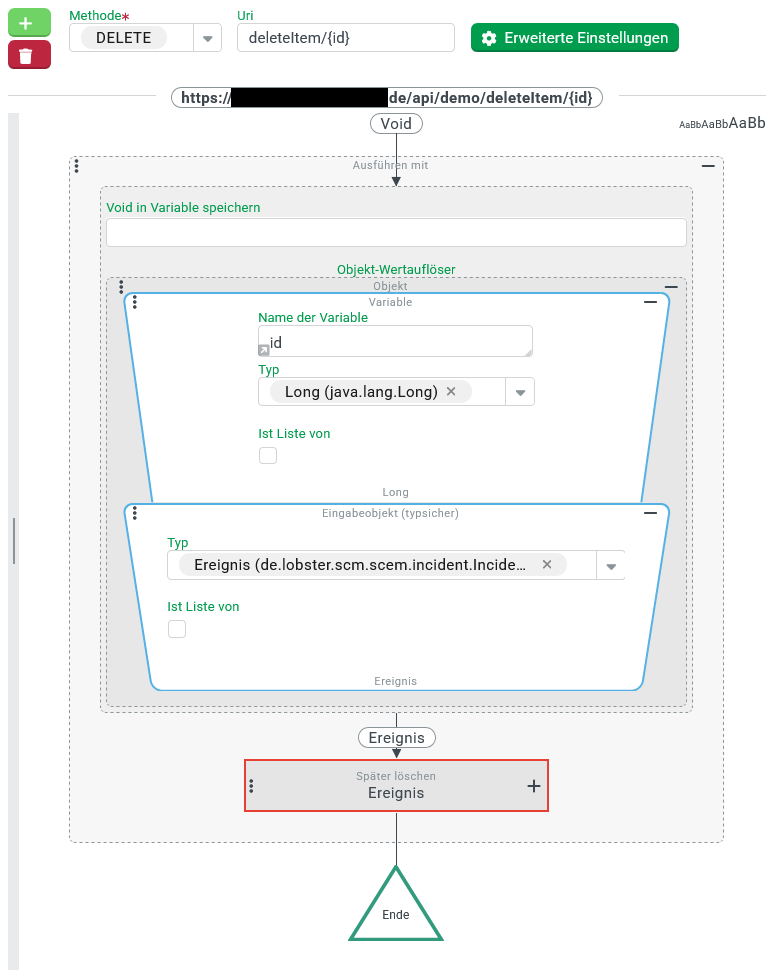
URI parameters: details
The text value of the URI property (uri) can contain URI parameters in the format {<variable>} in addition to plain text characters. At runtime, the platform maps the corresponding substrings from the call address as text values to variables (see Variable). You access these variables in the action block.
IMPORTANT Escape HTTP-relevant special characters in the runtime-provided string via URL encoding. Examples: %20 for space, %2F for a slash (/), %3F for the question mark (?).
The URI string can contain multiple URI parameters. Between two URI parameters, place a suitable separator. The separator must not appear unescaped in the strings provided at runtime.
IMPORTANT The platform treats all URI parameters as mandatory. An empty string ("") cannot be passed as %00. This restricts the use of Default value.
NOTE If you use an HTTP-relevant special character as a separator, you must also escape it. Example: %23 instead of #.
Example: URI parameters with separators
Base URI of the API definition (
baseUri):demo.The endpoint returns a text output via
GET. The text contains the system time with the time zone and format selectable via URI.String of the URI (
uri):getTime/{zone}|{format}Example call:
https://<platform-host>/api/demo/getTime/Europe%2FAthens|EEEE%20HH:mm%20zThe text between
getTime/and the pipe symbol (|) appears decoded asEurope/Athensin the variablezone.The text after the pipe symbol (
|) appears asEEEE HH:mm zin the variableformat.From these text parameters, the action block produces the desired output text, for example
Wednesday 19:40 Europe/Athens.
NOTE The date format contains parts requiring localization, here the full text for the day of the week (pattern EEEE). To make the output language optionally selectable, add a query parameter locale. The call then looks like: https://<platform-host>/api/demo/getTime/Europe%2FAthens|EEEE%20HH:mm%20z?locale=fr
In the action block, access the locale parameter via the system-populated queryParameters variable using the Map item value resolver with the key locale.
The output text for the "French" language (fr) then looks like: mercredi 19:40 Europe/Athens.
Dynamic paths via regular expressions
At the end of the URI string, specify a dynamic path via a URI parameter using the following schema: {<variable>: <regExp>}
If the corresponding section of the runtime-addressed URI matches the regular expression (
<regExp>) completely, the platform transfers it into the variable (<variable>).If the section does not match the regular expression, the call fails with error
404 - NOT FOUND.
Example: dynamic path
Base URI of the API definition (
baseUri):demo.The endpoint returns data on an artist in a media database via
GET.String of the URI (
uri):getArtist/{name: .+}The regular expression
.+accepts any characters as long as at least one character is present. Examples:U2,UB40,AC/DC,Van%20Halen,Primus,MEGADETH.With the regular expression
[A-Z]+[0-9]*, onlyU2,UB40, andMEGADETHfrom this list would be addressable.With the regular expression
([a-zA-Z/]|%20|%2F)+[0-9]*, all examples are compatible again. ForAC/DC, the preferred URL-encoded notation (AC%2FDC) then also works.