What is API Manager?
API Manager is an integrated module of the Lobster Data Platform. It lets you configure and run REST interfaces and MCP servers directly on the Lobster Data Platform server. No external middleware layer is required.
With API Manager you can:
Publish REST APIs: Define HTTP endpoints that external systems can call using standard HTTP methods.
Set up MCP servers: Provide tools for AI agents to call via the Model Context Protocol (MCP).
Control access: Use roles and permissions to define who can view, create, or edit API configurations.
Set priorities: Determine which API instance takes precedence when multiple instances define the same endpoint or tool.
Prerequisites
Access to 'API' entities is controlled by the permission node Administration / Configuration / (REST/MCP API) (administration/designer/restApiDefinition).
The menu item API Manager appears only if the Role of session is granted the Show (
show) permission.Owner restrictions apply only to 'API' entities where the Company of session is listed as owner or receives a corresponding Company authorizations.
Accessing the overview
The menu item API Manager is located in the Integration menu node. Clicking it opens the overview for entity type API (RestApiDefinition).
View name:
de.lobster.scm.api::RestApiDefinition|listSearchWindowMenu node name:
integrationModules/restApi
API instance and API definition
Every configuration in API Manager consists of two levels.
API instance (
RestApiDefinition): The outer shell. It holds general metadata such as name, description, and priority. The instance itself does not define any endpoints or tools.API definition: The actual interface content. It is embedded in the API (
api) field of the instance. The type of the API definition determines which endpoints or tools are provided.
The following types are available for the API definition:
REST API (
RestApi): Defines endpoints for HTTP methods and general REST requests.MCP Server (
McpRestApi): Defines tools for AI agent access via Model Context Protocol (MCP).
The input form is identical for both types. Its appearance varies depending on the selected API definition type. The form opens via view name de.lobster.scm.api::RestApiDefinition|detailsWindow.
NOTE Type-specific tab details are described in REST API and MCP Server respectively. The affected tabs are API and, where applicable, Meta information.
Creating a new API
Click the ribbon button New in the overview. A context menu appears. Select the API definition type from that menu.
IMPORTANT There is no interactive method to change the API definition type of an existing API instance. Choose the type carefully when creating it. This choice applies for the full life cycle of the API instance.
The ribbon button New appears only if the Role of session is granted the Create (
create) permission.The API definition type selected from the context menu determines the appearance of the input form.
Opening an existing API
Select an API instance in the overview. Open it by double-clicking or via the ribbon button Edit or Show details.
The ribbon button Edit appears only if the Role of session is granted the Update (
update) permission.If the role only has Show (
show) or Create (create) permission, the button Show details appears instead. The ribbon button Save is disabled in this mode. With the Create permission, you can still use the ribbon button Copy to create and save a new API instance from the current data.
Configuration
The following sections describe configuration properties of entity type API (RestApiDefinition). They apply regardless of the selected API definition type. Each section corresponds to a tab in the input form.
Basic settings
Property | Data field | Data type | Description |
|---|---|---|---|
Enabled |
|
| Enables ( NOTE : Changes to the enabled status take effect only when the API instance is saved. When multiple active APIs define overlapping endpoints or tools within the same base URI, the Priority field (see below) determines which instance handles the request. A disabled instance with a high priority value does not intercept incoming requests. |
Owner |
|
| The Company of session is automatically assigned as owner when an API instance is saved for the first time. Other assignments are available via a Combobox element in the input form. Owner restrictions and Company authorizations have no influence on runtime access to the API. They are relevant only for configuration management. |
Name |
|
| Each API instance requires a name. The name does not need to be unique. It provides orientation within configuration management and has no operational relevance. |
Description |
|
| Optional free-text field for multi-line descriptions. Typically used for configuration documentation and change notes. No operational relevance. NOTE : You can also assign Tags to an API instance for categorization. This is especially useful when transferring configurations between systems via Meta exchange. |
Priority |
|
| An integer value (positive or negative). It applies when multiple API instances define the same endpoint or tool within the same base URI. In a conflict, the definition from the instance with the highest priority value takes effect. NOTE : Disabled API instances do not participate in priority resolution. A disabled instance with a high priority value does not intercept any requests. |
Private structures
The Private structures tab lets you define custom data structures. These structures are referenceable within the API instance via their Alias (see Client object structure reference). They are called private because their use is limited exclusively to the context of this API instance.
You define a data structure by listing all fields a client object can or must include.
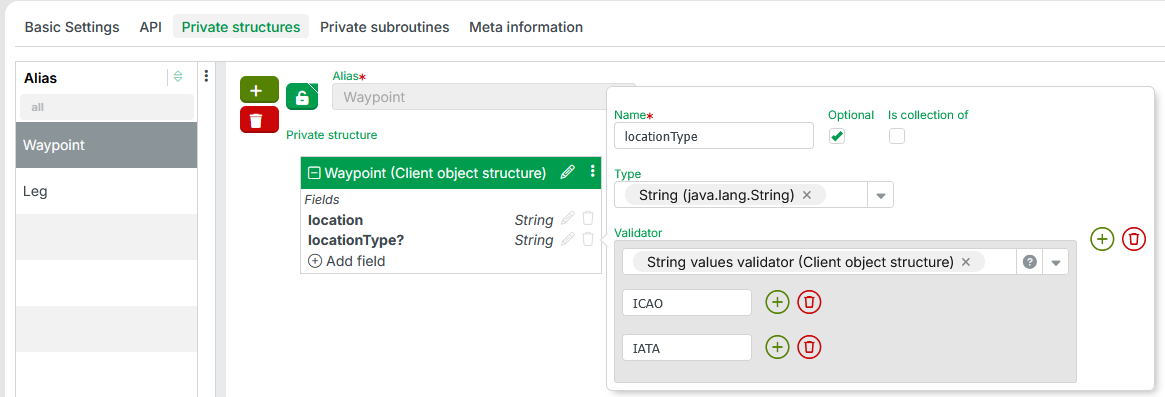
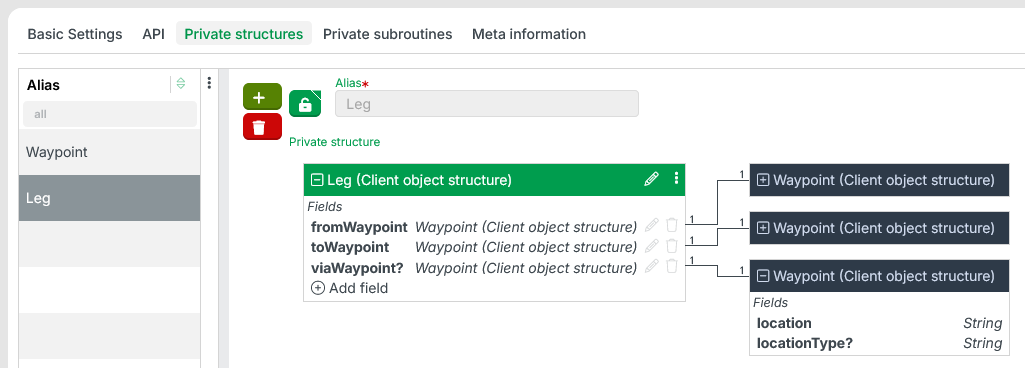
The following example shows two private structures (Waypoint and Leg) defined within the same API instance:
The private structure
Waypointdefines a waypoint along an air connection.The
locationfield expects aStringvalue identifying the waypoint.The optional
locationTypefield accepts anotherStringvalue. It indicates the context from which thelocationvalue is taken. Because the Check box Optional is set, the field list shows a ? suffix on the field name (locationType?). A String values validator (Client object structure) restricts accepted values toICAOandIATA.
The private structure
Legdemonstrates reuse: it referencesWaypointas the data type for its own fields.Legcombines two or threeWaypointinstances into an air connection:fromWaypoint,toWaypoint, and optionallyviaWaypoint.
In the workflow for an endpoint or tool, you can use the Check client object structure rule or the Check client object structure (Resolver) to validate input data against a private structure.
Alternatively, you can reference a private structure in the Create instance with values resolver. This makes it easier to assign values to client object fields for a return value (Variable response):
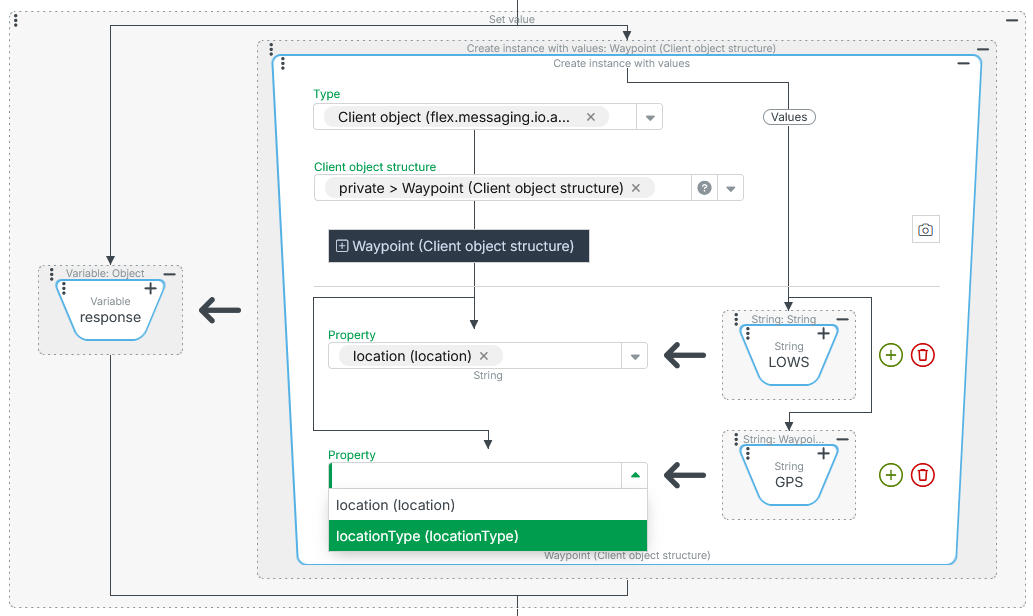
NOTE In this example, Waypoint is referenced only as a client object structure to populate the Property dropdown for value assignment. The String values validator (Client object structure) for locationType is not enforced here. A chained Check client object structure (Resolver) would handle that check.
Private subroutines
The Private subroutines tab lets you define Custom subroutines. These are called private because their use is limited exclusively to the context of this API instance.
Private subroutines can be Event actions, Resolvers, or Rule types. Their use is scoped to the context of this API instance.