Rule types – Abstract
Purpose: This is 'passed' if the Tracking state entry contained in the
trackingStatusEntryVariable refers to one of the Tracking state codes that the rule configuration specifies by a static multiple choice.Tooltip
Usage: Typically, the rule is created in the context of one of the Tracking state (Events) that provide the new Tracking state entry in the
trackingStatusEntryVariable. The rule checks whether the Tracking state code of the entry in this variable is included in the multiple selection defined by parameter. Whether the Tracking state entry in the variable is or was 'added' in this context is not relevant for the evaluation of the rule. The entry may also have been written to the variable from, for example, a tracking state attribute or the tracking state history of an entity.Parameter: Multiple selection for Tracking state, at least one of which must match the tracking state being added or to be added.
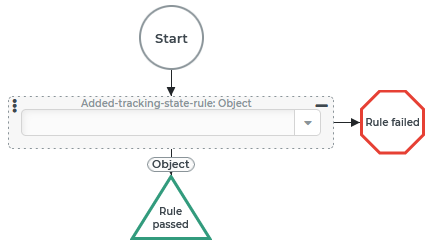
The Added-tracking-state-rule is considered 'passed' if the Tracking state entry contained in the trackingStatusEntry Variable refers to one of the Tracking state codes that the rule's configuration specifies through a static multiple selection.
The rule is typically used in connection with one of the events that are triggered when a Tracking state is added for a business object (Tracking state (Events)). In their context, the trackingStatusEntry Variable automatically refers to the added or to the Tracking state entry to be added.
If the trackingStatusEntry Variable is empty or does not refer to an entity of the 'tracking state entry' type, the rule is considered 'failed'.
NOTE The rule evaluates the trackingStatusEntry Variable regardless of whether the included tracking state was automatically assigned because it is being added. So it can be used to check the tracking state code of any tracking state entry against the positive list if it is assigned beforehand to this variable.
Configuration
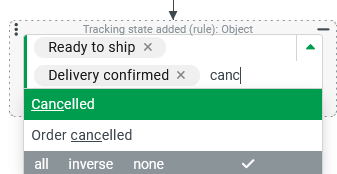
The Added-tracking-state-rule configuration provides for static multiple selection via a Multiselect combobox with a search function, which offers for selection all Tracking state codes for which there is at least read access in the context of the configuration. If no Tracking state are selected, the rule is always considered 'failed'. NOTE If there is no read access for an already selected Tracking state code, it will still appear in the selection. As long as such an entry is not specifically removed, it will remain in the list even if other entries are added or removed. Entries deselected by 'reversing' an existing selection, for which there is no access, do not reappear in the selection by 'reversing' them again. |
|
Example
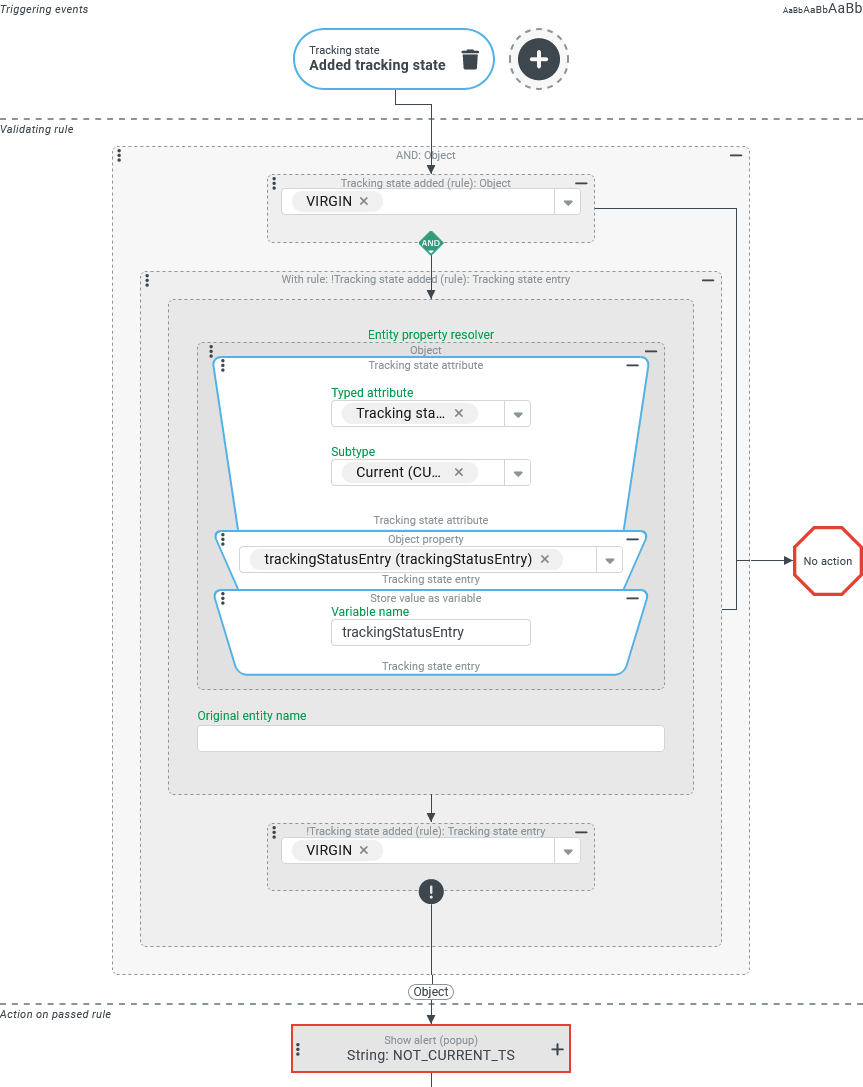
Whenever a specific Tracking state ('VIRGIN') has been successfully added to any reference object, it should be checked whether the current tracking state entry of this object refers to the same Tracking state code. If the 'current tracking state' differs from the currently assigned one according to the code, this should be reported to the user.
NOTE The requirement described may seem elaborate or complicated at first glance. However, when adding Tracking state, unlike Working state, it may be that the last entry added differs from the one considered 'current'. On one hand, the 'External creation time' is taken into account when adding tracking state entries, so that 'backdated' entries are also sorted chronologically. On the other hand, depending on the applicable Tracking state workflows, the added entry may be of a Tracking state type other than 'Current' (CURRENT). Then the value of the tracking state attribute for the 'Current' type refers unchanged to a tracking state entry other than the one just added. So the tracking state code of these entries may or may not be different. In the use case, the rule is considered 'passed' if the codes differ. Different entries that refer to the same code are not 'reported'.
Configuration:
An event handler that responds to the Added tracking state Triggering events is configured as shown on the right. IMPORTANT The triggering event refers to the recently added tracking status entry by the variable
|
|