See also: Server logging
Event action – Abstract
Purpose: The Log message event action generates an entry in a log file of the Lobster Data Platform/Orchestration server or the browser console, depending on the context, if the log level setting provides for this for the Level assigned when the Message was created.
Tooltip
Usage: A Message is sent to a logger addressed by Name, which can contain Localization Parameters. Whether a log entry is written depends on the comparison between the Level of the message and the log Level setting for the addressed logger (see manual for details). Depending on the Level, one of the following log files is written:
Lobster Data Platform / Orchestration/error.logfor the LevelFATALandERROR.
Lobster Data Platform / Orchestration/message.logfor all other Levels (exceptOFF).Parameter:
Name: Text value that names the logger to be used.
Message: Text body of the message, the placeholder for the Parameter (addressed by index
{0},{1}, etc.).Level: Single selection for the log level (static enumeration) of the Message (default value:
DEBUG).Parameter ({0},{1},...): Optional value configurations for text values that are inserted into placeholders in the Message.
NOTE
For each new Name, the server starts a custom logger with the log level
INFO, which can be customized via the Server logging menu item.If executed in the client context, the output only affects the browser console and related logging settings.
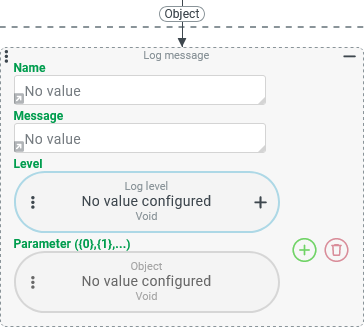
The Log message event action generates an entry in a log file of the Lobster Data Platform/Orchestration server in the server context (in Event handling), provided that the log level setting for the logger addressed by Name provides for this for the Level assigned when the Message was generated.
Messages with the Level
FATALorERRORare always entered in the log fileLobster Data Platform / Orchestration/error.log. In the following table, the relevant cells are shaded light blue.Messages with a different Level are always entered in the log file
Lobster Data Platform / Orchestration/message.log. In the following table, the relevant cells are shaded in light red.
The following logic applies to the comparison between the Level of a message and the log level set via the Server logging menu item:
Level → Server logging | Log Level settings for the logger addressed by 'Name' | |||||||
|---|---|---|---|---|---|---|---|---|
|
|
|
|
|
|
|
| |
| ||||||||
|
| |||||||
|
| |||||||
|
| |||||||
|
| |||||||
|
| |||||||
|
| |||||||
*) In this table, the default values for the log level are marked with an asterisk.
Background: Logger and log level
The Name configuration parameter can be used to refer to the name of a predefined logger or to 'name' a custom logger.
If a string that refers to a predefined logger is specified as the Name, a decision is made as to whether a log entry is written depending on the log level for this logger, which may have been adjusted by Server logging.
If no Name is specified, the Log message event action refers to the logger for its type (
de.lobster.scm.actionevent.actor.LogMessageActor).As soon as a Name that is still unknown on the server side is used for the first time when the Log message event action is executed, an additional entry appears in the 'Log information' tab the next time the Server logging view is opened. A log level other than the default (
INFO) can be set there for the custom logger.NOTE
If the first mention of the new logger is made via a Log message with a Level below the default value
INFO, no log entry is created. However, the logger will still appear in the 'Log information' list.As the log level
DEBUGis the default for the Level of a Log message event action, no message is generated if no Level is selected and the Name is still unknown on the server side.
In the client context (Client Workflow, Client workflows), the Log message event action only addresses the browser console, where a message may or may not appear depending on the settings selected for logging.
Configuration
Configuration example:
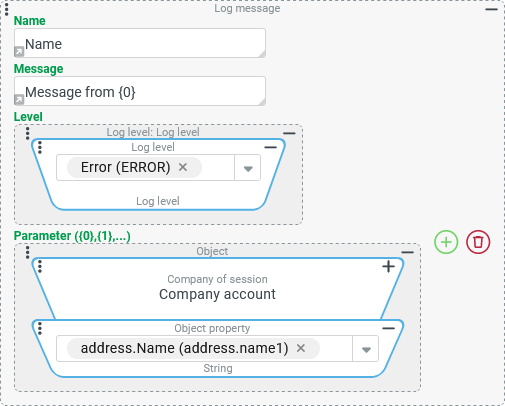
The following excerpt from an error.log of Lobster Data Platform/Orchestration illustrates the effect of the configuration parameters.

Configuration parameters | Element | Description |
|---|---|---|
Name Default value:
| Text field for direct input (Press the arrow in the bottom left-hand corner to switch!) Value configuration whose return value is converted into a | The Name designates the logger to be used. The Name appears in the log entry as a prefix in front of the Message, highlighted by square brackets: In the example (static text): |
Message Default value:
| The Message appears at the end of the log entry. It can contain placeholders for values ( In the example (static text): | |
Level Default value:
| Combobox for single selection from the static enumeration 'Log Level' ( | The selected Level determines whether a log entry is written and, if so, to which log file. In addition, the internal name of the enumeration value appears between square brackets in the automatically generated header of the log entry.
|
Parameter ({0},{1},...) Default value: | Repeatable element for value configurations whose return value is converted into a | Value configurations can optionally be provided for a Parameter, which can be addressed in the Message via its index (ascending from |
NOTE The following special cases must be taken into account when using parameters – similar to the handling for localization entries in Localization:
If the Message references a parameter with an index for which no entry exists under Parameter ({0},{1},...), then the reference including the curly brackets appears as plain text (e.g. '
Message from {0}').If the value configuration for a parameter referenced in the Message is either missing or returns 'No value' (
$null) at runtime, the plain text 'null' appears instead of the parameter (e.g. 'Message from null').
Examples
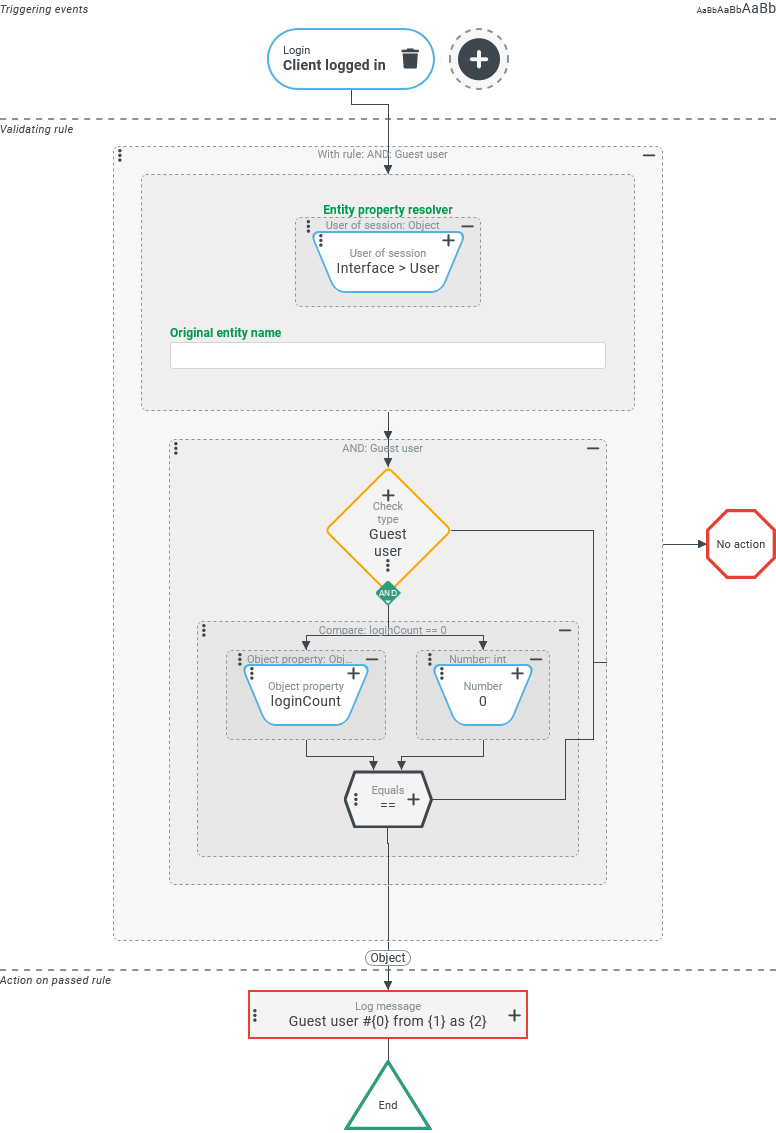
Simple use case: Logging the first login of a guest user account as INFO.
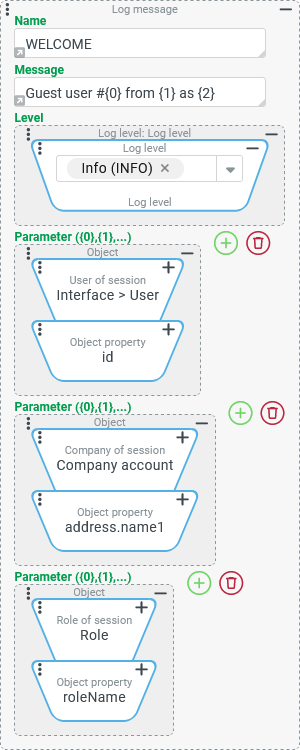
When Guest users log on to Lobster Data Platform/Orchestration for the first time, a log entry with the Level INFO should be created with a note stating the ID of the guest user, the Company of session and the Role of session.
The log entry should refer to the Name WELCOME so that a custom logger with this name is created.
Runtime example:
|
NOTE The 'ID' (id) of the guest user appears here as a negative integer (-8051), as it is taken directly from the return value of the User of session resolver, which differentiates between Guest users and Users via the sign.
Configuration:
The screenshot on the right shows an overview of the configuration for event handling with the Log message event action:
|
| |
NOTE For Guest users, unique selections are mandatory for the 'company' ( |
| |
More complex use case: Dynamically assign level for error.log entry
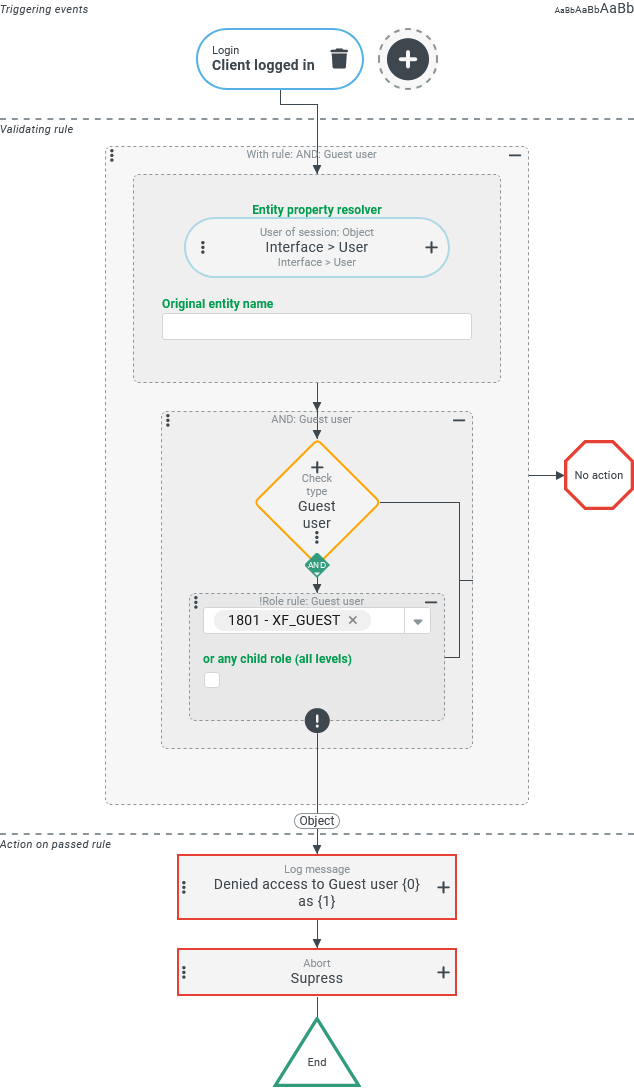
As with the previous example, when a guest user logs in with a role other than the designated role 'XF_GUEST', not only should the session be terminated, but a Log message should also be written to the error.log.
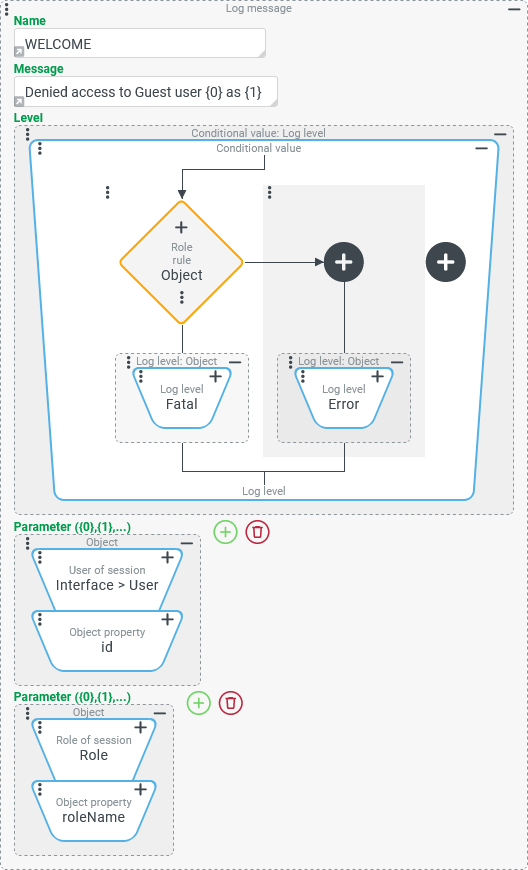
The Level FATAL ('Super user', 'Super user limited') or ERROR (other roles) should be assigned to the message depending on the role used.
Runtime example:
|
Configuration:
NOTE Since the logged out user will no longer see an error message triggered by an Abort anyway, the 'Suppress' mode is selected. |
|
The Log message event action is configured as shown on the right:
|
|