See also: Calculation field
The Behavior type Calculate executes a Calculation expression that can be used in many ways to evaluate data available in the context of a form or to extract new data from it.
The optional check expression influences whether the actions are executed on "true" or "false" by returning a value that can be interpreted as a truthy/falsy value. The input value
$inputis the output value of the expression above. However, the variable "orgInput" can also be used to access the original input value of the behavior ($var(orgInput)).
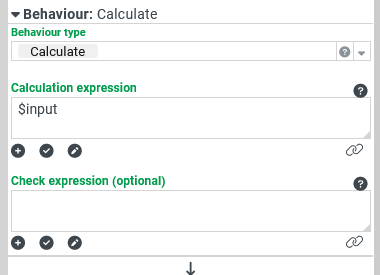
The Behavior type Calculate executes a Calculation expression that can be used in many ways to evaluate data available in the context of a form or to extract new data from it.
The return value of the "calculation" overwrites the original input data ($input) of the behavior. However, the Calculation expression can refer to input data (e.g. by $input) provided by a Events (Form designer) (e.g. Changed) or from a calling behavior (see Execute behavior). The rest of the procedure depends partly on whether an optional Check expression has been configured to determine a Boolean value by another Calculation expression for the selection of the actions (on "true"/"false") to execute.
Overall, the following cases must be differentiated:
If the Calculation expression contains syntactical errors (e.g. regarding the use of parentheses), the Actions on "false" will be executed. An error message is assigned as input data (
$input). Any Check expression that has been defined is then not evaluated. The original input value of the behavior can be accessed via the orgInput variable ($var(orgInput))If no Check expression is defined, then the return value from a syntactically correct Calculation expression (
$input) is passed to the Actions on "true". This is also the case if the return value is empty ($null), which happens, for example, with a "division by 0".If a Check expression is defined, it is evaluated as a Calculation expression whereby the return value from the already evaluated Calculation expression provides the input data (
$input).If the Check expression contains syntactical errors (e.g. regarding the use of parentheses), the Actions on "false" will be executed. An error message is assigned as input data (
$input).If the result of the Check expression is not considered false according to the following table, the input data (
$input) from the Calculation expression is passed to the Actions on "true".If the result of the Check expression is interpreted as false according to the following table, the input data (
$input) from the Calculation expression is passed to the Actions on "false".Data type
Values that are considered false ("falsy"):
(none)
null (
$null)Boolean value
falseNumber
0
Text
"", "0", "false", "no" (not case sensitive)
Example
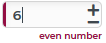
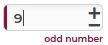
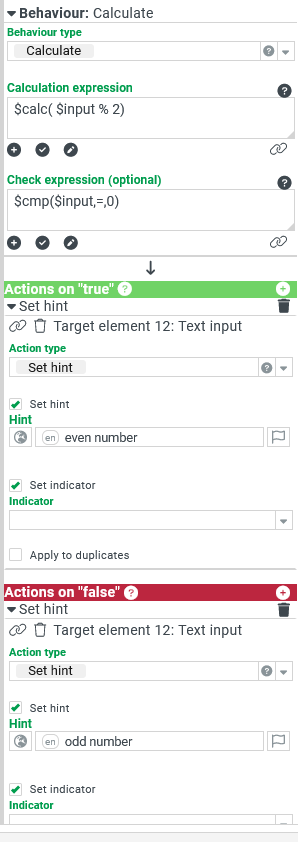
A numeric input field (for integers) should determine and display whether the assigned numeric value is even or odd, each time the value is changed.
|
|
Configuration:
|
|
NOTE
Since the number 0 in the Check expression is interpreted as "false" (see table above), it could be assumed that in this example the Check expression
$not($input)would give the same results as$cmp($input,=,0). But this is not the case, because for the function not (Logical negation), every value that is not matching "true" (case-insensitive) is considered "false". However, assigning$inputdirectly as a Check expression and swapping the two Set hint actions would yield appropriate results.