Go to Administration > Server logging > Log settings.
The settings for Server logging can be made via this dialog.
The adjustments are adopted during normal operations and also adjusted in the associated XML configuration so that they are applied again after a system restart.
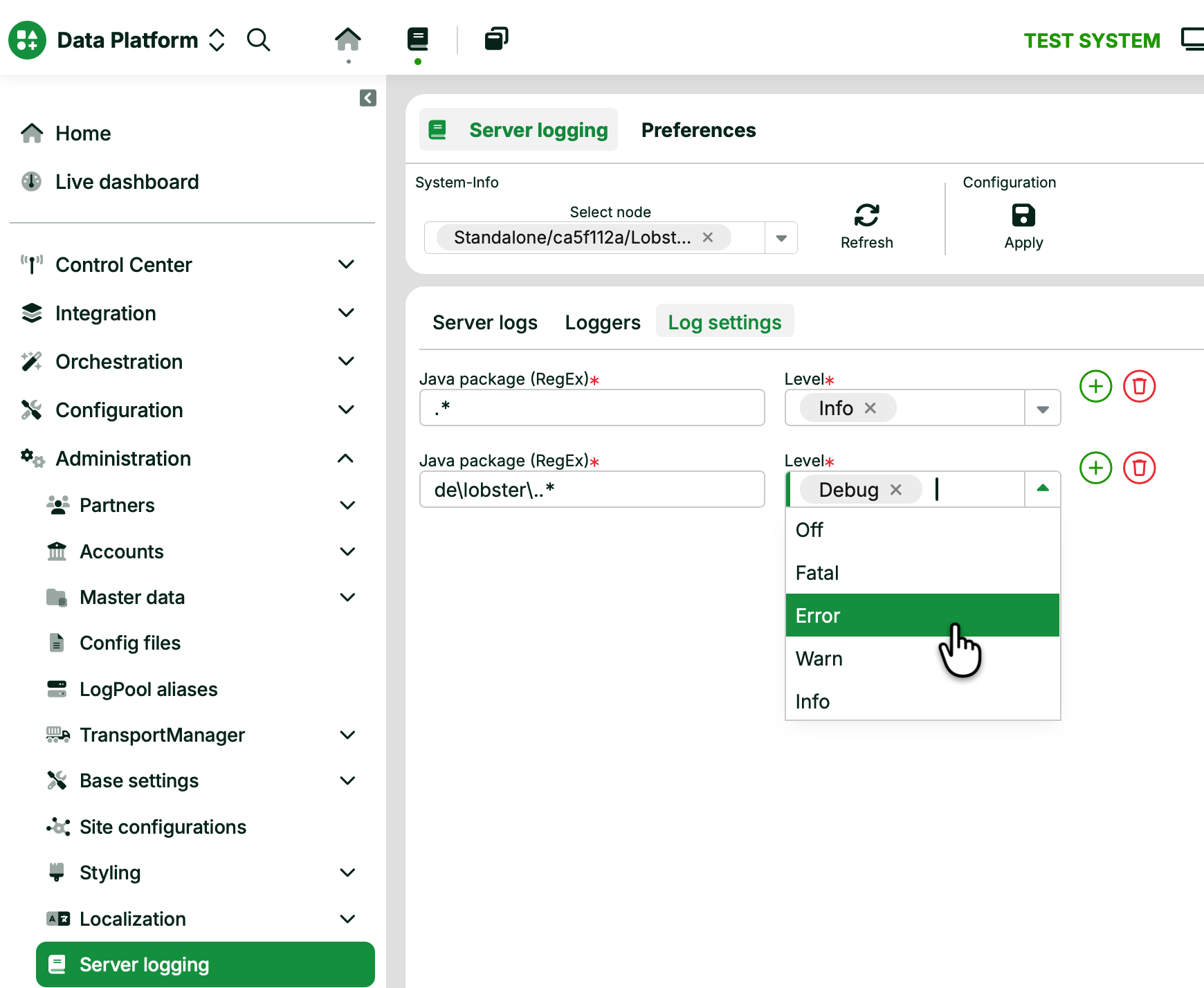
Name | Description |
|---|---|
Apply | Adapts the configuration of the Lobster Data Platform, if necessary, on all nodes of a cluster, and persists it in the associated XML configuration. |
Java package | This is a list of regular expressions for which the log output level can be defined. The list is handled in sequence. From the perspective of the log-generating Java package, the first applicable expression is used. If no expression applies, no log entry is output. It is therefore recommended to create a default entry with ".*" (= any character). Example: "de\.lobster\..*" applies to all Java classes whose package definition begins with "de.lobster". |
Level | Determines the level of granularity of the log output for the corresponding Java package. |
System info and configuration
The header area of the dialog controls which node the settings apply to. It also loads and persists the configuration.
Name | Description |
|---|---|
Select node | Selects the node the settings apply to. A standalone system shows a single node. In a cluster, you choose the target node. |
Refresh | Reloads the current log configuration from the selected node. |
Apply | Preserves the configuration. It adapts the running configuration, if necessary, on all nodes of a cluster. It then writes the configuration back to the XML configuration. A system restart doesn’t change the settings. |
Tabs
The dialog groups the logging functions into tabs.
Name | Description |
|---|---|
Server logs | Shows the current log output. |
Loggers | Lists the active loggers. |
Log settings | Defines the log output level per Java package. See the section below. |
Adding and removing rows
Each row in the Log settings tab pairs a Java package expression with a Level.
Click the green plus icon to add a row.
Click the red bin icon to remove a row.
Log levels
The Level sets a threshold. The system logs messages at the selected severity or higher. The levels appear in order of increasing verbosity.
Level | Logged output |
|---|---|
| No output for the matched package. |
| Fatal errors only. |
| Errors and higher. |
| Warnings and higher. |
| Informational messages and higher. |
| Debug messages and higher. |
| Trace messages and higher. |
| All messages. This is the most verbose level. |
NOTE
For the relationship between a message Level and the configured log level, and for the log file that receives the output, see Log message.