See also: All map keys, Variable value resolver
Value resolver – Abstract
Purpose: Addresses the Key of a map or the field of a "Client object" in the input value for read or write access .
Tooltip
Usage: The value resolver expects either a map or a "client object" as input value. It allows read or write access to a Key or a field with the name defined by a Key. Depending on the context (read/write access, client/server), functions for type checking, type conversion or entity or enumeration value lookup are used as in the Variable value resolver (see manual for details).
Parameter:
The Key parameter defines the key value in a map or the field name of an object. While a field name must be defined as a
String, any data type can be used as a key value.The optional Item type and Is collection of parameters declare the data type for the value to be read or assigned.
NOTE In contrast to the Object property value resolver, the Map item value resolver allows access to fields of a "client object" via field names determined dynamically only at runtime.
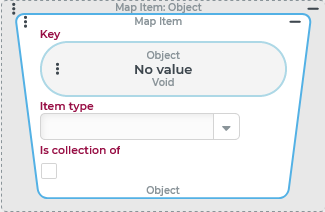
The Map item resolver addresses the Key of a map or the field of a "client object" in the input value for a read or write access.
IMPORTANT For a "client object" as input value only a Key of the
Stringtype is accepted.
For write access, the Map item resolver must be used in a similar way to the Variable or an Object property value resolver on the left side of a value assignment (e.g. per Set value or Set values).
Special cases:
If there is no data object of the map (
java.util.Map) or "client object" type as input value, the return value for read access is "no value" ($null). Write access has no effect.If there is no configuration for the Key parameter or this results in "no value" (
$null) as a "key" at runtime, the return value for read access is "no value" ($null). Write access has no effect.NOTE An empty string can be used as a Key in a map and as a field name in a "client object", but "no value" (
$null) cannot be used.If the parameterized Key in the input value is not used as key value or field name, the return value for read access is "no value" (
$null).Write access adds an entry to a map with the specified Key and the value determined by the assignment.
The field addressed via the Key is only added to a "client object" during write access if the Key is a string.
If the parameterized Key is already used as a key value or field name in the input value during write access, the assigned value overwrites the existing value.
Assigning "no value" (
$null) to an existing Key is possible.If the input value is a map, this does not delete the key set to
$nullfrom the map itself.On the other hand, if the input value is a "client object", the field set to
$nullis deleted from the "client object".
The Item type and Is collection of parameters define the data type expected for subsequent elements in the context of the configuration.
On the other hand, the two parameters are relevant for read and write accesses to map values depending on the context for the following functions similarly to the Input object (type safe) value resolver:
Function | With read access | With write access |
|---|---|---|
Type conversion for simple values ( |
|
|
Look up an enumeration value in the enumeration selected as Class, starting from a text key passed as value, which is compared with a key field defined for each enumeration (usually |
|
|
Look up an entity of the selected Class (specific entity type), starting from a numeric value for the ID ( |
|
|
Type check against the selected Class to check the class membership of a value or all values of a list (if Is collection of is selected):→ Return value if passed: checked value (list if applicable)→ Return value if failed: "no value" ( |
|
|
NOTE The Check type always takes place after the other functions that may be applicable. Therefore, if the look-up or type conversion is successful, the check is always passed. If an applicable function fails, the return value is "no value" ( | ||
.svg) automatic
automatic.svg) not supported in
not supported in IMPORTANT
If a write access uses the Map item resolver with the Class and/or Is collection of parameters on the target side of the assignment (e.g. left in a Set value event action), the failure of a type check, type conversion, or enumeration value look up will not result in the assignment of "no value" (
$null), but in a "silent" abort of the assignment. So the Key defined as the target keeps its previous value unchanged and the execution context continues without error message. The abort via the "Log" tab with anUnsupportedOperatonExceptionis only understandable in the context of Tests.
Configuration
The Map item resolver always expects a map (java.util.Map) or a "client object" as input value.
NOTE The input value may need to be created via the Create instance value resolver (with java.util.Map "type") so that read and write access can be made via the Map item resolver.
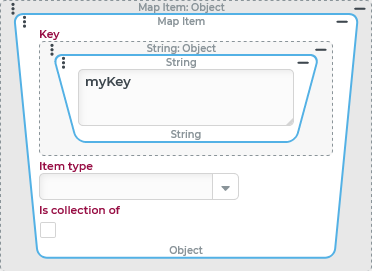
Key | In the Key parameter, value resolvers must be configured whose evaluation at runtime addresses a key (in a map) or field name (in a "client object"). In the example on the right, the value IMPORTANT While the field name of a "client object" must always be a NOTE When accessing existing keys in a map via the All map keys value resolver, the subset of keys for a given "key type" can be requested as the return value. To retrieve all field names in the context of a "client object", even the only supported |
|
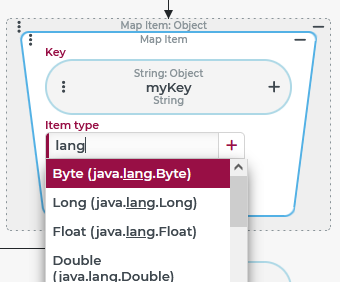
Class | The optional Item type parameter supports a static single selection for a class via a Combobox. Its search function (see image on the right) considers matches for the applicable localization as well as the internal name of the class. A selection for Item type value implies a Check type for the read or assigned value, and may – if automatic conversions are provided – also cause a type conversion or lookup of enumeration values or entities with respect to the return value. Example: For example, if the text value If the Item type However, the stored long value ( |
NOTE The |
Is collection of | The Is collection of option (unchecked by default) specifies that the read or written value should be a list. If the value is not a list, the Map item value resolver returns/writes "no value" ( If a Class is explicitly specified (see image on the right), selecting the option Is collection of implies a Check type of all existing entries against this Class, so that the return value is Example: The selection of the Item type NOTE As noted above, a write access is aborted on failure of a type check for the value on the target side of the assignment. If the configuration on the right defines the target of an assignment and a list is assigned at runtime that contains at least one value that is not a |
|
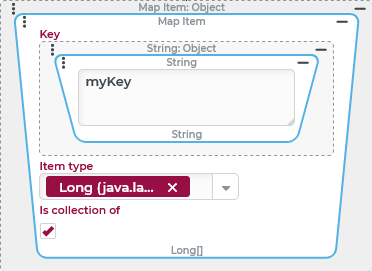
When accessing "lists" as values, the following aspects must also be taken into account:
If the option Is collection of is unchecked (default) and no Item type is selected then no Check type takes place. So there is no way to specify that only one return value that is not a list is "desired".
As long as the option Is collection of is unchecked, a list is returned or assigned directly like any other data object stored in a variable.
If the option Is collection of is unchecked when accessing a list, then the Item type parameter can be used for a type conversion for the list as a whole.Example: A Key
routecontains a normal "list" (java.util.List) ofStringvalues defined by IATA codes of flight destinations along a travel scheme:In JSON notation, the list in the value for the route Key for a "round trip" might look like this, for example:
[MUC,JFK,GIG,CDG,MUC]If theroutevariable is accessed by Item type "List" (java.util.List) or without specifying a type, the return value corresponds exactly to the stored value.However, if the Keyrouteis accessed by Item type "Set" (java.util.Set), then the "list" is converted to a "set", which can change the order and number of entries.In the specific example, the return value could look like this:[GIG,CDG,MUC,JFK]
Examples
Read access to a key of a map or a client object (as default value)
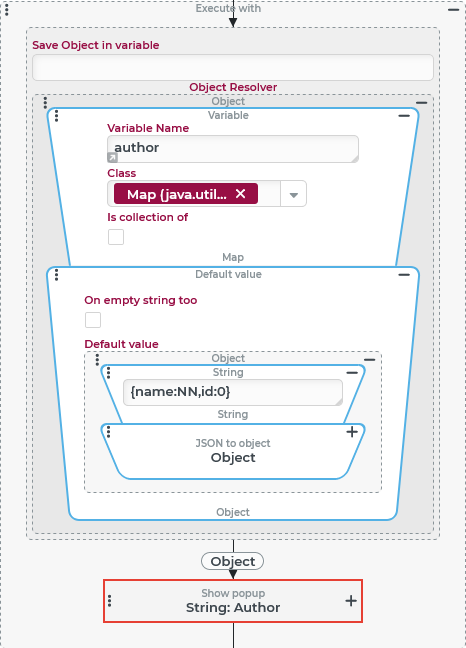
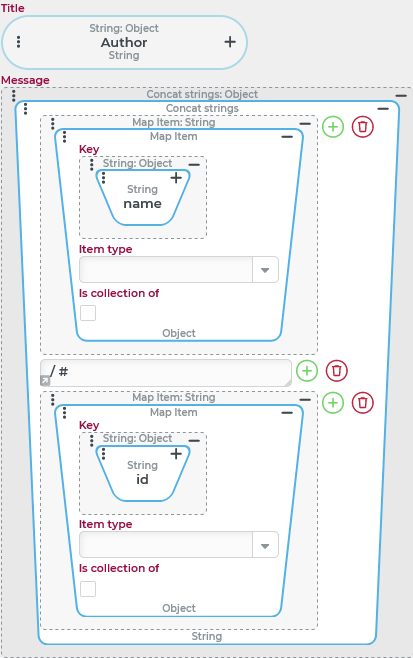
An event handler reproduces selected contents (here: name and id) from a map passed by an author variable in a notification.
If the author variable does not contain a map, field values are displayed from a "client object" generated for this purpose from statically stored JSON text.
Runtime example:
Notification with data from a provided map |
|
Notification with default values(without map) |
|


Configuration:
The notification can be configured within an event handling as shown on the right:
|
|
Within the Show alert (Popup) event action, the Message combines values from the reference object in a Concat strings value resolver with literal text characters:
NOTE We assume that the type of all "keys" relevant to the notification is in the map NOTE Creating a "client object" in the Default value resolver is more efficient than defining a separate Default value for each read access. However, the "default" only applies if the map is completely missing. If the map is available, but does not contain values for all relevant "keys", then the notification appears incomplete, if "individual default values" are waived as here. |
|
Collecting data in a map (write access)
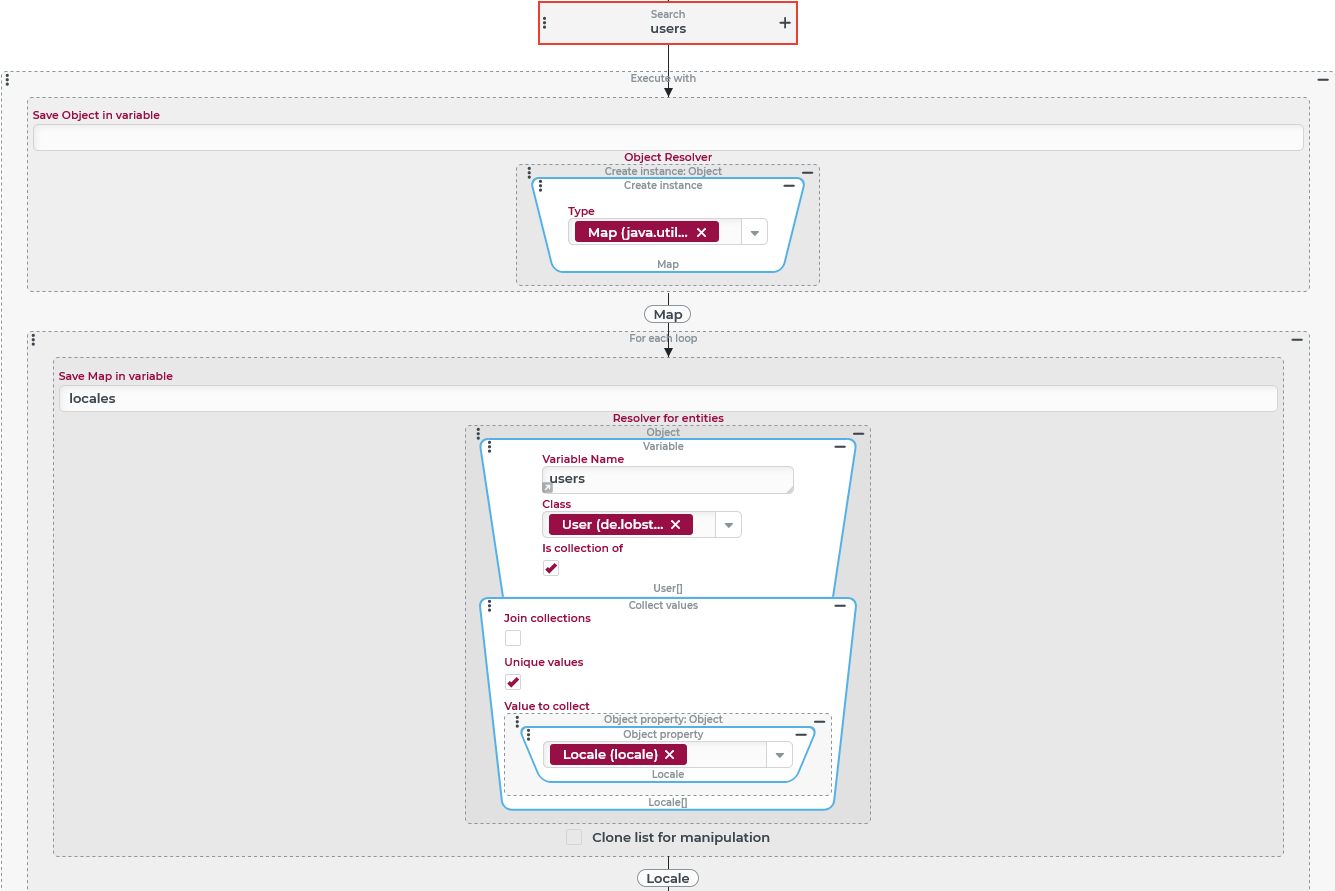
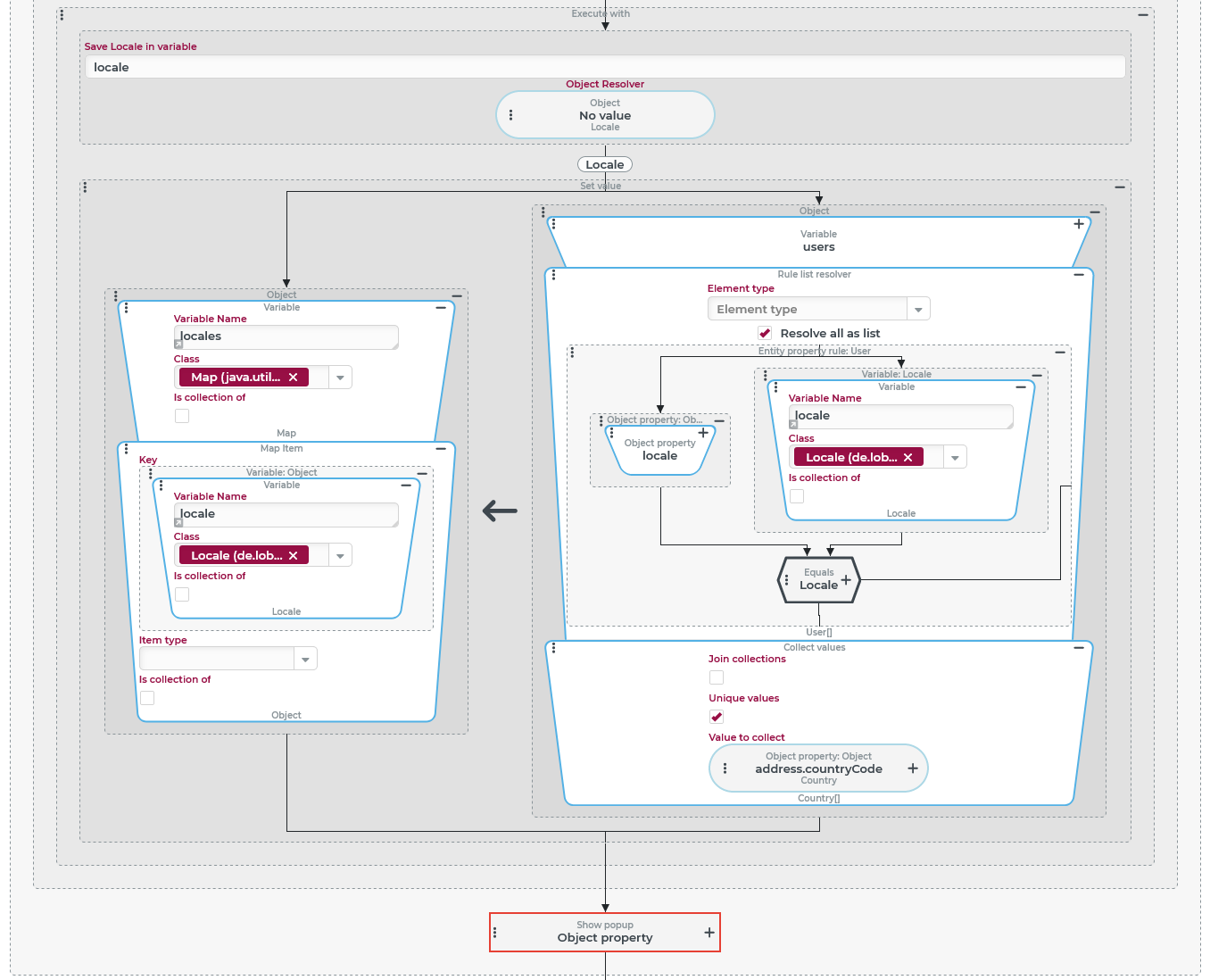
A Search (Event action) with the "search value" mode returns a list of user accounts (see Users) in a users variable, which is referred to here as a "user group".
The data of the "user group" is evaluated with regard to the combinatorial analysis for the "Locale" (locale) and "Country" (address.countryCode) fields. The evaluation result is provided as a map that uses all the locales used in the user group as unique "keys". A list of the "countries of origin" of users in whose account the respective language is selected is assigned to each key as a value.
NOTE An evaluation of the combinatorics is also conceivable within the Search (Event action) if corresponding criteria are used for a grouping. In the example, however, the evaluation of the combinatorics is explicitly decoupled from the retrieval of the detailed data for the user group and with a map as the result.
Configuration:
The configuration on the right shows how the evaluation of combinatorics can be solved within an event handling:
Runtime example: (String image of the map)
NOTE Values of the dynamic enumeration Locale serve as a Key in the map and not just the internal names of these values (as a For clarification, the server XML image of a map with the same data is also shown below |
|
Server XML of a map with country lists in locale keys
<?xml version="1.0" encoding="UTF-8"?>
<map xmlns:xsi="http://www.w3.org/2001/XMLSchema-instance" xmlns:core="CORESYSTEM">
   <entry>
      <key enumName="core:Locale" name="en" xsi:type="core:DynamicEnumValue"/>
      <value xsi:type="set">
         <entry enumName="core:Country" name="US" xsi:type="core:DynamicEnumValue"/>
         <entry enumName="core:Country" name="DE" xsi:type="core:DynamicEnumValue"/>
       </value>
   </entry>
   <entry>
      <key enumName="core:Locale" name="de" xsi:type="core:DynamicEnumValue"/>
      <value xsi:type="set">
         <entry enumName="core:Country" name="DE" xsi:type="core:DynamicEnumValue"/>
         <entry enumName="core:Country" name="IT" xsi:type="core:DynamicEnumValue"/>
         <entry enumName="core:Country" name="AT" xsi:type="core:DynamicEnumValue"/>
      </value>
   </entry>
   <entry>
      <key enumName="core:Locale" name="fr" xsi:type="core:DynamicEnumValue"/>
       <value xsi:type="set">
         <entry enumName="core:Country" name="MU" xsi:type="core:DynamicEnumValue"/>
      </value>
     </entry>
</map>
This evaluation of the combinatorics of Locale and Country in the evaluated "user group" results in plain text:
The locale "English" (
en) is selected for one or more users each from the USA (US) and Germany (DE)The locale "German" (
de) is selected for one or more users each from Germany (DE), Italy (IT) and Austria (AT).The locale "French" (
fr) is selected for one or more users from Mauritius (MU).
Dynamically determined field names in a client object (write access)
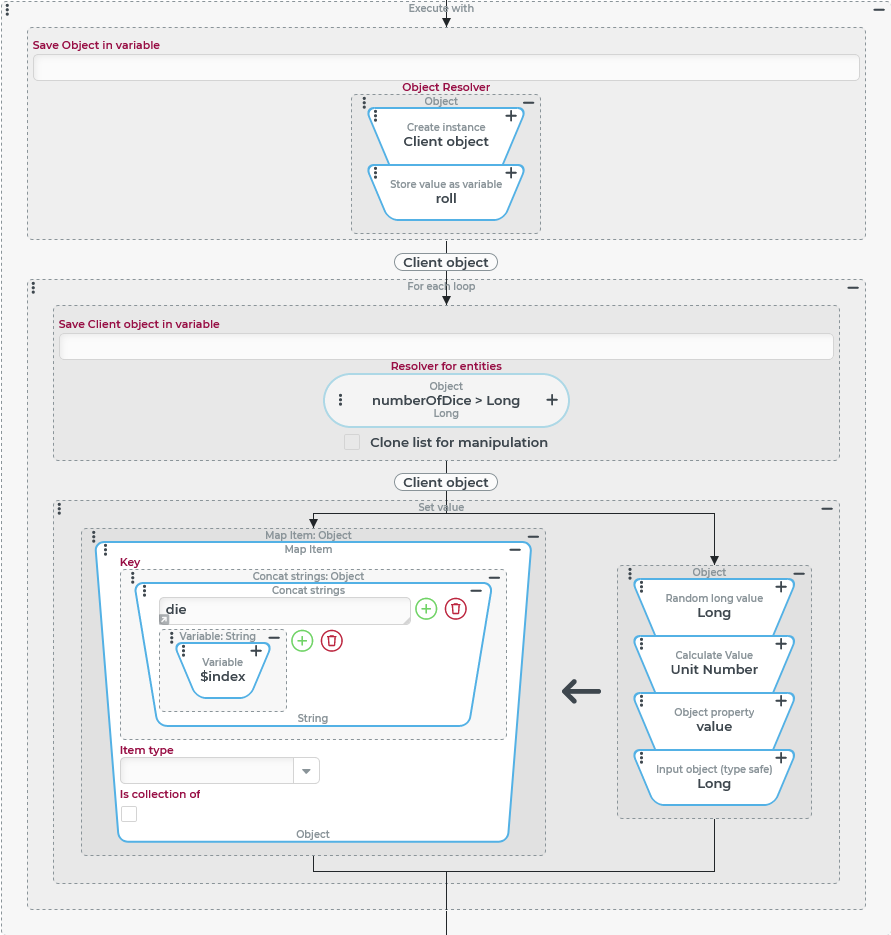
An event handling shall simulate a random "roll" with a parameterizable number of dice (numberOfDice variable) and return a "client object" reflecting the thrown number of points in systematically named fields (die0, die1, die2, ...).
Runtime example: "Roll with 3 dice" (numberOfDice=3)
Client object in JSON notation:
{
	"die2": {
		"class": "java.lang.Long",
		"value": "1"
	},
	"die1": {
		"class": "java.lang.Long",
		"value": "3"
	},
	"die0": {
		"class": "java.lang.Long",
		"value": "6"
	}
}
Configuration:
The sticking point for the configuration is that the Object property value resolver typically used for value assignments to fields of an object does not support dynamic assignment for the field name, but only static selection of a field in the configuration.
Therefore, the Map item value resolver must be used, whose dynamically definable Key is interpreted as a field name in the context of a client object.
In the event handling used to "roll the dice", the event actions shown on the right are configured:
|
|