See also: Check type, Variable
Value resolver – Abstract
Purpose: Checks if the input value is compatible with the given Type and if not returns "no value" (
$null). When successful, the return value varies depending on the input value type and the target type.Tooltip
Usage: Depending on the combination of input value type and the Type selected in the configuration, the value resolver fulfills one of the following purposes:
Type conversion: If the Type defines a simple value, it will try to convert the input value to this Type.
Look up enumeration value: If the Type defines a static or dynamic enumeration and the input value is a
String, then the input value is used as a key to look up an enumeration value by itsname.Look up entity: If the Type defines a specific entity type and the input value defines a
Longvalue, then the input value is used as a key to look up an entity via itsid.Check type: If none of the above cases apply, the input value is checked against the specified Type in a similar way to the Check type. If successful, the input value is returned.
If the check, type conversion or lookup fails,
$nullis returned.Parameter:
The Type parameter defines the class against which the input value is checked or the target type for a type conversion or retrieval of enumeration values or entities. Without any selection the return value is always
$null.The Is collection of option defines that the input value must be a list that does not contain any entries that do not correspond to the selected Type. A list without entries is considered to be "type neutral", i.e. it passes any check with the option Is collection of.
NOTE The lookup and type conversion functions only take effect for single values as input value and not for all entries of a list. If required, the Collect values value resolver helps.
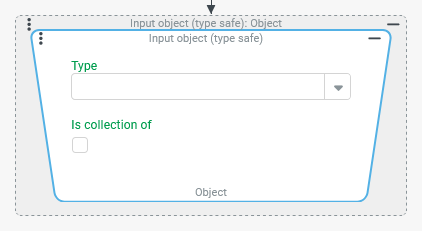
The Input object (type safe) value resolver attempts to map the input value to the specified Type and supports four different use cases:
Type conversion to simple values (
String,Long, etc.).Lookup of an enumeration value from a static or dynamic enumeration by text key.
Lookup of an entity by ID.
IMPORTANT Does NOT work in a Client Workflow!
Check type (checks the class affiliation of a data object).
The possible applications are manifold. The following diagram provides an overview of the variants. For specific configurations, see "Examples" (below).
NOTE If the input value is present in a variable, the Variable value resolver can often be used directly instead of the Input object (type safe) value resolver for the described purposes. This supports the same parameters and similar conversion logics. The most important difference is the value of a variable is processed and not the input value. However, an important difference is that the Input object (type safe) value resolver without specification for the Type always returns $null, whereas with the Variable value resolver the "type" selection can be omitted to get the value of the variable.
CAUTION The Input object (type safe) value resolver ignores any access restrictions when accessing entities by ID – as does the Variable value resolver. Unlike in the context of a Search, for example, access is explicitly granted without regard to role permissions (see Role) for the entity type and ownership rights or Company authorizations for the specific entity. Specifically, this allows, for example, unrestricted (read) access to any entity "known" by ID (e.g., a user account registered as creator in an entity"s data) without having to switch to a specific role or the appropriate company in the context of a Run as event action. Corresponding accesses are therefore also possible in execution contexts in which a company or role change is not technically possible (e.g. Association criteria, Custom overviews, Search API, etc.).
Type conversion to simple values | |||
Input value type | Target type | Condition | Return value |
Simple value or Data object | Simple value | Conversion of the input value to the target type possible. | Value converted to "target type" |
Conversion of the input value to the target type is not possible. | No value ( | ||
Example: Instead of a | |||
|
|
| (e.g.) |
| "Date with time" ( |
| No value ( |
Lookup of an enumeration value from a static or dynamic enumeration by text key | |||
Input value type | Target type | Condition | Return value |
Text value ( | Class for values of a static or dynamic enumeration. | Input value corresponds to a key value ( | Enumeration value |
Input value is not considered a key value for a value of the enumeration. | No value ( | ||
Example: A Substring is obtained from a field value as a "country indicator", for which the matching Country is determined from the dynamic enumeration. | |||
(e.g.) | Country ( |
| Country "Malta" |
(e.g.) |
| No value ( | |
Lookup of an entity by ID ◄ Does NOT work in a client workflow! | |||
Input value type | Target type | Condition | Return value |
| Entity type | The input value refers to the ID ( | Entity as "input object" (will be "fetched" by the server into the current context, if not already present there). |
Input value is not considered a key value for a value of the enumeration. | No value ( | ||
Example: Starting from the "Owner" field ( | |||
(e.g.) | "Company account" ( | A company account with | "Company account" with the |
(e.g.) | There is no company account with | No value ( | |
Check type: Checks the class affiliation of a data object | |||
Input value type | Target type | Condition | Return value |
Simple value or Data object | Class | Data object is compatible with the target type. | Data object (identical to the input value, i.e.not converted to the class specified as the target type). |
Data object not compatible with target type. | No value ( | ||
Example: The User of session value resolver should be checked to see if it returns a user or a guest user. NOTE The following scheme also shows the effect of a check against the parent class "Interface > User" ( | |||
Return value of | Users ( | A user is logged in. | The logged in user account. |
A guest user is logged in. | No value ( | ||
"Interface > User" ( | A user is logged in. | The logged in user account. | |
A guest user is logged in. | The logged in guest user account. | ||
Guest users ( | A guest user is logged in. | The logged in guest user account. | |
A user is logged in. | No value ( | ||
Configuration
The value resolver always expects an input value. Without an input value (or with the input value "no value", i.e.: $null) the return value is always $null.
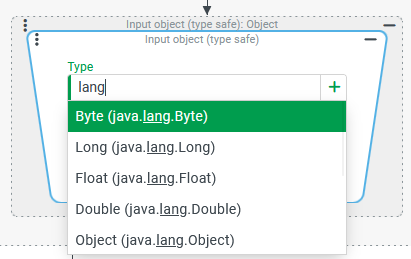
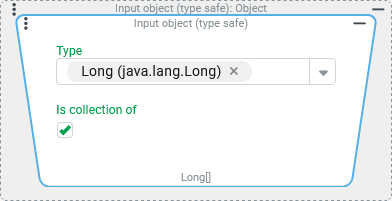
The Type parameter defines the class (or data type or entity type) that is the target of a type conversion, check type, or data retrieval, depending on the purpose. In the selection field for the Type, a search function (see image on the right) makes it easier to find the appropriate class for the respective purpose. This searches the localization texts of the classes as well as the internally used unique class names. IMPORTANT As the [+] symbol indicates, the selection field also allows free text entries, which are then interpreted as the internal class name. If a search term is entered very quickly and then the "Enter" key is pressed immediately to select the supposed match, the search term may be interpreted as an entry for an internal class name, as in the following example. Immediately after entering the search text long for the Type, the "Enter" key is pressed immediately. If the search function had not yet "found" the desired class "Long" ( If the desired result of the search function is already available when pressing the "Enter" key, the desired "Long" class ( |
| ||
FALSE:
| |||
CORRECT:
| |||
The option Is collection of (by default "unchecked") can be selected to specify, in conjunction with the Type, that the "target type" should be a list of elements corresponding to the class Type.
|
| ||
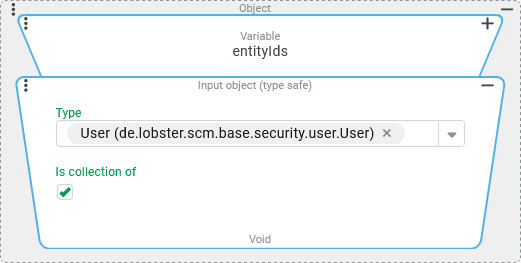
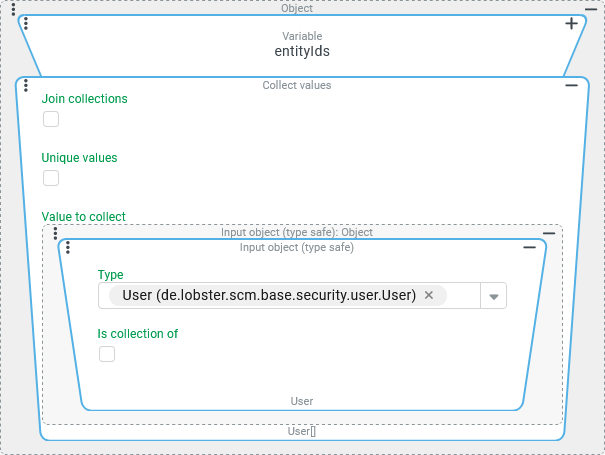
IMPORTANT The Is collection of option does not cause "type conversions" or "enumeration requests" to be executed for all elements of a list in the input value (see "FALSE" below). However, in conjunction with the Collect values value resolver, the Input object (type safe) value resolver can also be used for this purpose. The image on the right shows how a list of user account IDs can be used to obtain a list of the Users (accounts) in question. | FALSE:
This "misconfiguration" effectively checks whether the | ||
CORRECT:
|


Examples
Example: Type conversion to simple values
Using "Created" which is automatically registered for each entity in Lobster Data Platform/Orchestration in the created field, a simple statistic is created for a specific entity type (here: "ITEM"), which determines the number of all existing entities of the type and compares the duration of the time span in which they were created.
Runtime example:
A Show alert (Popup) event action informs (e.g. whenever an appropriately authorized user creates a new "ITEM") the current state of the statistics for that entity type. |
|

Configuration:
The "raw data" for the statistics can be obtained by a Tuple search, which analogously maps the following SQL statement:
SELECT COUNT(*) AS COUNT_items, MIN(created) as MIN_created, MAX(created) AS MAX_created FROM items [WHERE ...]The return value is a single "row" or, in a suitably parameterized Search (Event action), a client object with the COUNT_items (Long), MIN_created (Timestamp) and MAX_created (Timestamp) fields.
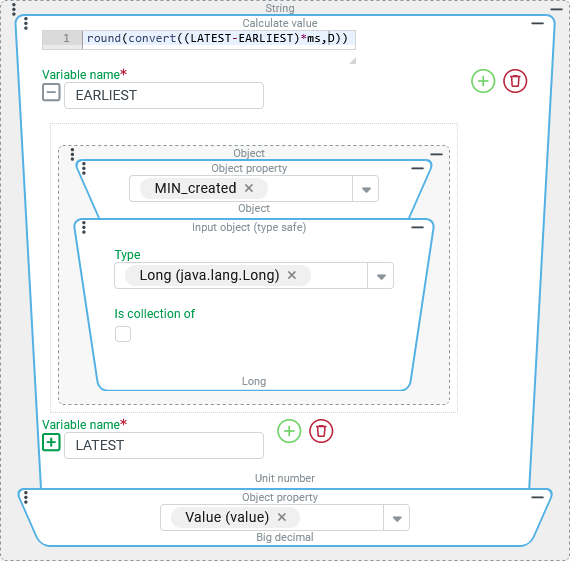
A simple difference calculation is required to specify the time span between the creation date of the oldest and the most recent ITEM entities that meet search criteria not specified here. The calculation is done based on the fields for the projections So that the data type can be calculated, it must first be converted into a numeric data type. The image shows how the The same procedure is used to assign the The |
|
Example: Looking up an enumeration value by text key
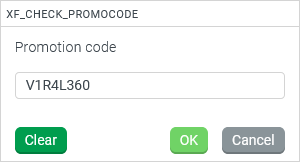
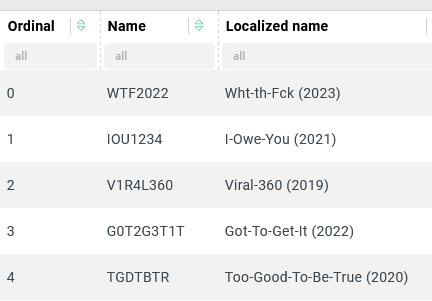
In an order form, users should be able to enter a "Promotion code" as free text to receive special conditions:
In Lobster Data Platform/Orchestration, a list of valid promotion codes is stored as dynamic enumeration "Promotion code" ( |
|
NOTE The workflow could be simplified by giving the user direct access to the Multiselect combobox for the "Order options". However, the user would then be offered all legitimate "Promotion codes" to choose from in the dropdown. However, these are naturally made known exclusively and selectively via dedicated marketing channels. | |

Configuration:
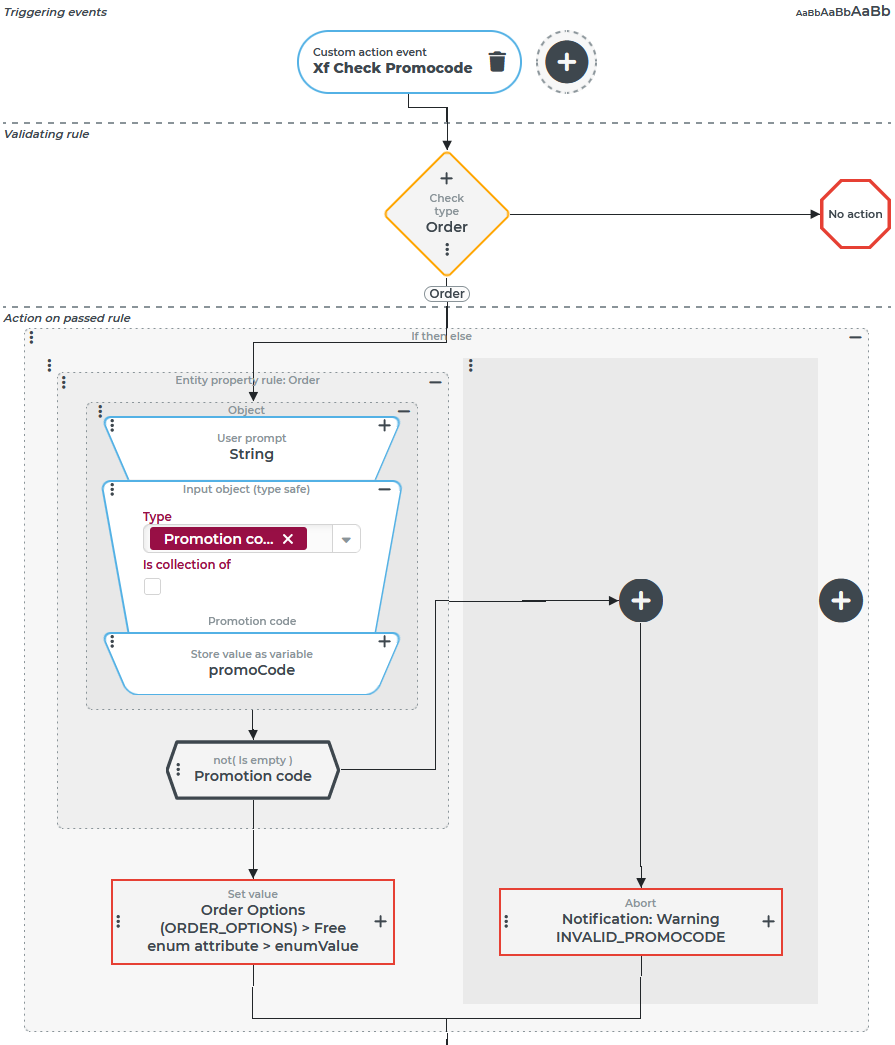
The "Promotion code" button triggers a Custom action event ( The event handling shown on the right reacts to this Triggering event. If the Check type in the Validating rule (not shown in the image) recognizes the input value as an "Order", the following actions are executed:
|
|
Look up an entity by ID
IMPORTANT
This functionality is not supported in a Client Workflow!
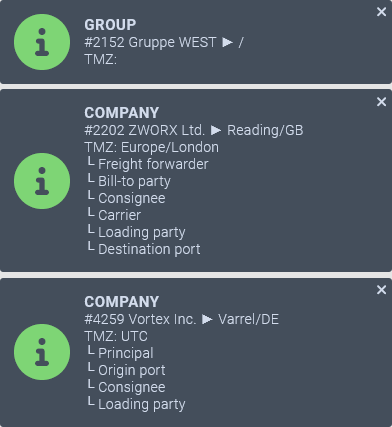
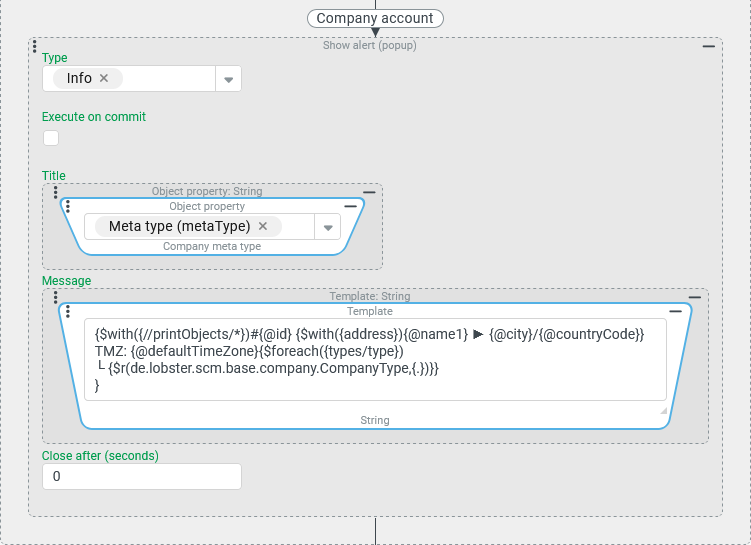
Event handling is intended to provide the logged-in user with information about all company accounts in the context of which they can log into Lobster Data Platform/Orchestration through a series of notifications.
The function is intended to make it easier for users whose role does not grant direct access to the "Company overview" (see Creating and managing company accounts) to run tests that concern the specific runtime behavior of Lobster Data Platform/Orchestration in the context of different companies.
The runtime example on the right shows how the output should look:
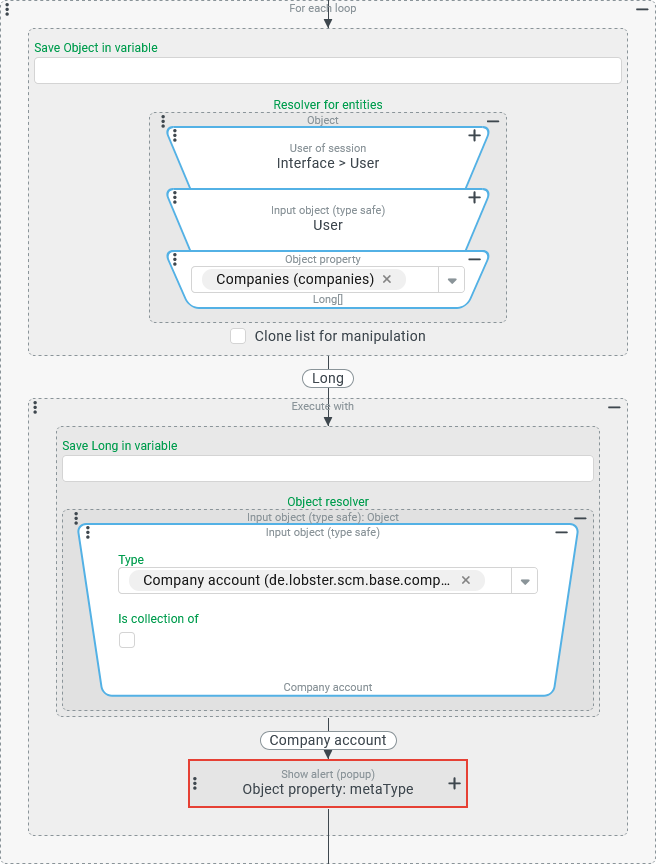
The particular challenge for obtaining this data is that the user account (User of session) used in a session refers to these company accounts in the "Companies" ( | Runtime example:
|
Configuration:
Event handling triggered by a Custom action event set up is configured as shown on the right:
|
|
| |
Check type: Checking the class membership of a data object
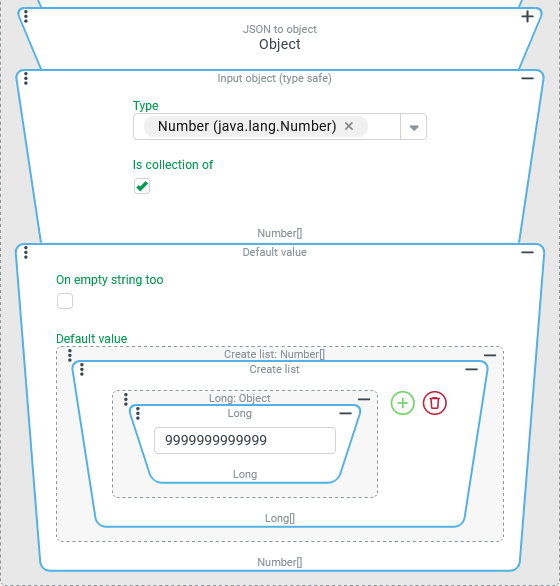
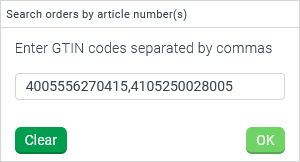
In an event handler, the user should be able to enter one or more numeric values (comma-separated, if necessary) to be used as a positive list for a Search (Event action). In a typical use case, for example, Orders are determined via article numbers of the Products referenced in the contained order items..
Even if Products in Lobster Data Platform/Orchestration could technically be identified by alphanumeric article numbers at any time, in the use case the Search (Event action) should explicitly be executed only if the user has entered numeric values.
Runtime example:
Configuration:
In the header of an Execute with event action, the User prompt value resolver is used to display a prompt to the user for a comma-separated list of EAN codes (as "article numbers"), which is processed as follows:
The prompt generated by the User prompt value resolver does not provide any input restrictions or validations for the entered text. In this respect, before the search is executed, it should be ensured that the object created via the JSON text meets the requirements:
The If then else event action in the action block uses an Entity property rule with the Is empty comparison type to ensure that the search action has an object that is a list of numeric values by type. NOTE In the "Else" branch, an error message or Abort could be configured via the |
|
 symbol to make it transparent to the user that no search is being performed.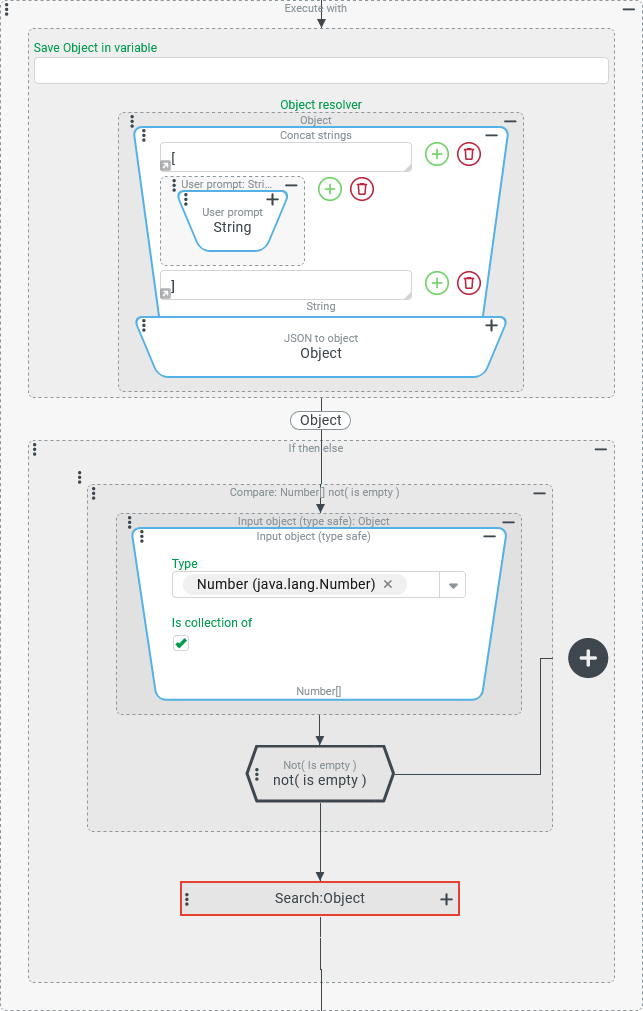
In the present configuration, a Check type with the parameters from the Input object (type safe) value resolver could be used instead of the Entity property rule in the action block:
Previous configuration:
| Alternative configuration:
|
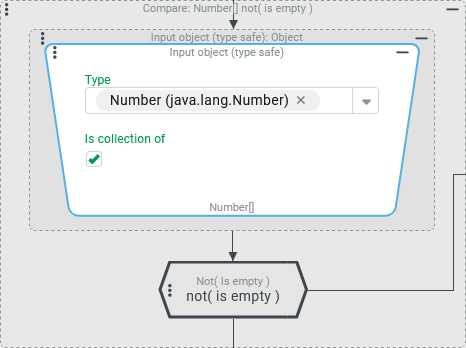
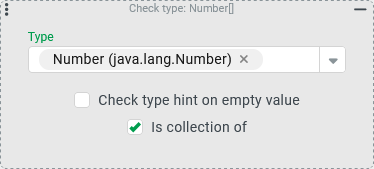
NOTE The Check type solves the task equivalently and even more elegantly. This should be true for most use cases of the Input object (type safe) value resolver when it is used to check the object class.
Since the Check type is a rule (see Rules and values) and not a value resolver, the Input object (type safe) value resolver offers advantages if the return value $null can be used in such a way that, by construction, no If then else event action is required for case discrimination in the given context.
This would be the case, for example, if a Custom action event is triggered with the return value, which executes the type check to be executed anyway.
Or the Input object (type safe) is concatenated with a Default value resolver to "catch" the case that no "matching" object is available.
In the present use case, for example, a list with a "dummy article number" (see below) could be passed to the Search (Event action) if the list from the prompt contains non-numeric values:
If the Search (Event action) is always executed in connection with the Default value value resolver, the case distinction per If then else event action can be omitted. The Input object (type safe) value resolver can then be used by concatenation directly in the header of the Execute with event action, as shown at right. If the Input object (type safe) value resolver detects that the object created via JSON notation does not exclusively contain number values, the concatenated Default value resolver generates a list containing exactly one value – here: the dummy number CAUTION If the input value for the Input object (type safe) value resolver is an empty list ( The Default value resolver does not intervene in this special case because the empty list ( |
|